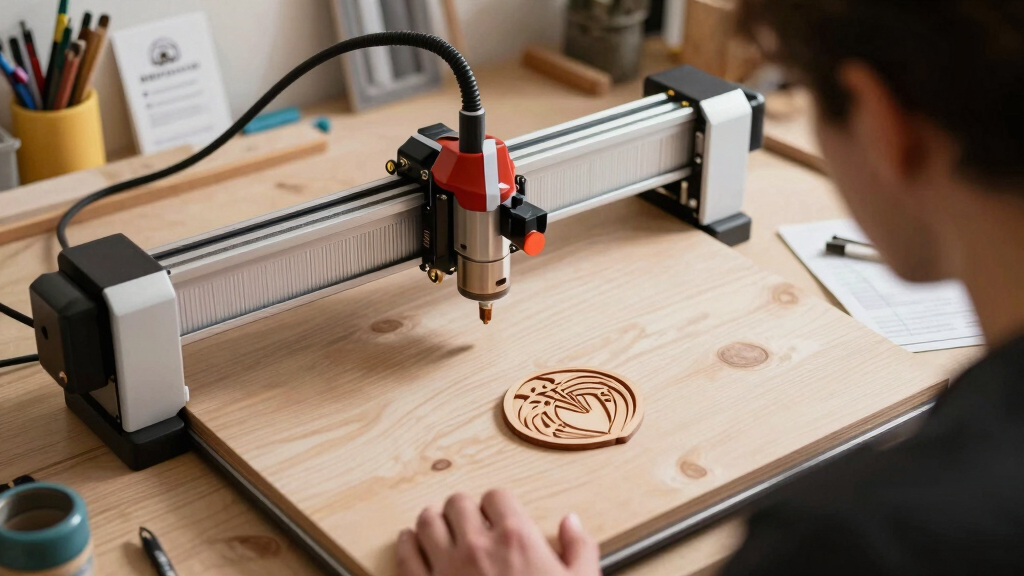

Choosing the best tabletop laser cutter for a small business involves balancing power, precision, size, and budget. The ACMER S1 6000mW stands out for its high engraving accuracy, making it ideal for detailed work. The ATOMSTACK 20W Laser Engraver offers a strong mix of power and versatility, perfect for various materials. Meanwhile, the CREALITY FALCON A1 provides an enclosed design with advanced features for metal and wood engraving. The main challenge in this category is finding a machine that offers enough power and precision without being too complex or expensive. Continue reading for a detailed breakdown of each option and how they compare.
Key Takeaways
- Power and precision vary widely; higher wattage machines typically handle thicker materials better but may come with increased cost and complexity.
- Enclosed models like the CREALITY FALCON A1 offer safer operation and better dust control, suitable for small workshops.
- Portability and ease of use are significant for small businesses with limited space or those new to laser cutting.
- Materials supported differ; some models excel at engraving wood and acrylic, while others can handle metal with the right configurations.
- Price points range from budget-friendly to premium; understanding your specific needs helps target the best investment.




More Details on Our Top Picks
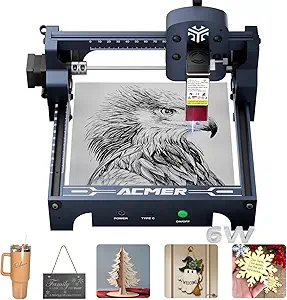
ACMER S1 6000mW Laser Engraver with 130x130mm Working Area and 0.04mm Precision
This high-precision engraver stands out for its superb 0.04mm laser spot, making it ideal for detailed work on wood, leather, and plastic. Compared with the ACMER S1 3500mW version, this model offers finer engraving accuracy, which is crucial for professional-looking results. Its preassembled design reduces setup time, and the support for LightBurn and LaserGRBL ensures flexible workflow options. However, being a Class 4 laser, it demands strict safety precautions, and its limited material support means metal cutting is off the table. This engraver suits small businesses focused on detailed custom products, but not those needing to cut metals or prioritize ease of safety for untrained staff.
Pros:- Exceptional 0.04mm laser spot for detailed engraving
- Supports multiple materials and software platforms
- Preassembled for quick start
- Includes free software and STEM application support
Cons:- Class 4 laser requires strict safety measures
- Limited to non-metal materials
- No built-in safety features
Best for: Small business owners requiring high-precision engraving on non-metallic materials, especially for jewelry, signage, or personalized gifts.
Not ideal for: Businesses that need to cut or engrave metals regularly or prefer a plug-and-play solution without safety concerns for untrained operators.
- Power Output:6000mW
- Working Area:130x130mm
- Laser Spot Size:0.04mm
- Materials Supported:Wood, plastic, leather, acrylic, MDF, paper, PCB, ceramic-coated
- Software Compatibility:AcmerTool, LightBurn, LaserGRBL
- Certifications:Class 4 laser, NRTL certified
Bottom line: Best for users who prioritize detailed, high-precision engraving on various non-metal materials but are prepared to handle safety protocols.
ATOMSTACK 20W Laser Engraver, A20 PRO V2 Laser Cutter, High Accuracy Laser Engraving Machine for Personalized Gifts, Business Cards, Wood, Metal, Acrylic, Leather
This model excels in high-energy cutting with its 20W laser, significantly reducing processing time compared to lower wattage options like the ACMER S1 6000mW. Its dot compression technology ensures precise engraving with 0.08 x 0.1mm dots, ideal for detailed logos and intricate designs on wood, acrylic, and even thin metal sheets. The quick assembly and durable aluminum frame make it suitable for busy small workshops, and the safety features like limit switches and a protective cover offer peace of mind. However, its size and power mean it’s less portable and requires proper ventilation and safety measures. This pick makes the most sense for small businesses needing fast, powerful engraving on a variety of materials, but less so for complete beginners or those prioritizing ultra-fine detail over larger-area cutting.
Pros:- High 20W laser power for fast cutting
- Advanced dot compression for detailed engraving
- Quick assembly with durable aluminum frame
- Built-in safety features and support for multiple software platforms
Cons:- Larger footprint reduces portability
- Requires adequate ventilation
- Higher cost compared to lower wattage models
Best for: Small business owners who need rapid, powerful engraving and cutting on multiple materials, especially for custom gifts or promotional items.
Not ideal for: Users with limited space or those who prefer a simple, beginner-friendly machine without the need for high power or speed.
- Laser Output Power:20,000mW
- Laser Class:4
- Engraving Speed:up to 400mm/s
- Materials Supported:Wood, acrylic, metal, leather
- Frame Material:Aluminum alloy
- Connectivity:Type-C, USB
Bottom line: Ideal for small businesses seeking a high-power, versatile laser engraver to speed up production on various materials.
AlgoLaser 3W Smart Laser Engraver Machine, Class 1 Portable Laser Engraving Machine with Built-in AlgoOS System, No PC Needed, Laser Engraving for Wood, Acrylic, Leather
This compact and portable laser engraver is perfect for craft booths and home use, thanks to its built-in AlgoOS system and 3W laser. Its 3.5-inch touchscreen makes operation straightforward, without needing a PC or complex setup—unlike the larger ATOMSTACK or Ortur models. The device supports WiFi control and LightBurn compatibility, offering flexibility for small projects. Its safety guard enhances user peace of mind, and its lightweight design makes it easy to carry to craft fairs or for personal use. The primary tradeoff is the lower power and smaller working area, which limits it to smaller, less complex projects. This machine is best for hobbyists or small-scale artisans, but not for high-volume production or detailed metal engraving.
Pros:- No PC needed, built-in touchscreen
- Portably lightweight for craft booths
- WiFi and LightBurn support
- Safe and intuitive operation
Cons:- Limited 3W laser power for detailed or deep engravings
- Small work surface
- Not suitable for metal or large projects
Best for: Beginners, hobbyists, and small-scale crafters needing a portable, easy-to-use laser engraver for light projects.
Not ideal for: Businesses requiring larger working areas, high power, or metal engraving capabilities.
- Laser Power:3W
- Built-in System:AlgoOS
- Display:3.5-inch touchscreen
- Supported Materials:Wood, acrylic, leather
- Connectivity:WiFi, SD card
- Dimensions:Compact, portable
Bottom line: Great for beginners and crafters who prioritize portability and simplicity over high power or large-area engraving.
ACMER S1 Laser Engraver, 6000mW Laser Engraver Machine Higher Accuracy Lazer Cutter and Engraving Machine with Working Area 130x130mm,0.04mm Laser Spot Engraving Machines & Tools
This version of the ACMER S1 offers similar high precision with a 0.04mm laser spot, making it comparable to the B0FY6KLH model but with a focus on broader compatibility. Its 6000mW diode laser and 130x130mm working area support detailed engraving and some light cutting on non-metallic materials. The machine’s compatibility with AcmerTool and other software, plus its preassembled design, make it a practical choice for small businesses starting up or expanding their product range. The downside is that, like other high-precision lasers, safety precautions are necessary, and the limited material support excludes metals. It’s a good balance for detailed work without the complexity of larger, more powerful units, but not suited for high-volume production or metal projects.
Pros:- High-precision 0.04mm laser spot
- Supports multiple software options
- Preassembled for quick deployment
- Versatile for engraving and light cutting
Cons:- Limited to non-metal materials
- Small working area
- Requires safety precautions due to laser class
Best for: Small business owners needing precise engraving on various materials with an easy setup and reliable software support.
Not ideal for: Operations focused on metal cutting or larger production runs requiring bigger working areas or higher power.
- Power Output:6000mW
- Working Area:130x130mm
- Laser Spot Size:0.04mm
- Materials Supported:Wood, plastic, leather, PCB, ceramics
- Software Compatibility:AcmerTool, LightBurn, LaserGRBL
- Certifications:Class 4
Bottom line: A solid choice for detailed, versatile engraving in small business environments, but not for metal or large-scale projects.
Ortur Laser Master 2 Pro S2 Laser Engraving Machine, 10000mW High Accuracy Laser Engraver, Laser Cutter, 15.7” x 15.7” Lazer Engraving Machine for Wood, Acrylic, Leather, Business Card, Class4
The Ortur Laser Master 2 Pro S2 offers a large 15.7″ x 15.7″ workspace and an incredibly high 10,000mW laser, making it ideal for bigger, more ambitious small business projects. Its advanced safety features like active position monitoring and automatic stop enhance safe operation, especially important given its power. The ultra-fine 0.05×0.1mm spot size delivers high detail, while the fast 15,000mm/min engraving speeds improve throughput. Its modular, quick-assembly design simplifies setup, and compatibility with popular software like LightBurn and LaserGRBL adds flexibility. The major tradeoff is its size and power requirements, which demand proper ventilation and safety precautions. This machine suits small businesses aiming for larger-scale production with detailed results, but it’s less suited for tight spaces or less experienced operators.
Pros:- Large engraving workspace
- 10,000mW high-power laser
- Fast engraving speeds
- Enhanced safety protections
Cons:- Size and weight require more space
- Requires proper ventilation
- Higher initial investment
Best for: Small businesses seeking a large-area, high-power laser capable of handling bigger projects efficiently.
Not ideal for: Crafters or hobbyists with limited space or those new to laser safety protocols who only need small-scale engraving.
- Laser Power:10,000mW
- Working Area:15.7” x 15.7”
- Laser Spot Size:0.05×0.1mm
- Speed:up to 15,000mm/min
- Safety Features:Active position monitoring, emergency stop
- Compatibility:LightBurn, LaserGRBL
Bottom line: Best for small businesses that need high-power, large-area engraving with safety in mind, but not for tight spaces or beginners.
CREALITY FALCON A1 10W Laser Engraver, 80W Enclosed Laser Cutter and Engraver Machine with Air Assist, Smart Camera Positioning, 600mm/s Speed, Smart Material Recognition, Ideal for Wood & Metal
The CREALITY FALCON A1 stands out for its comprehensive safety features, ease of use, and fast operation, making it a strong choice for small business owners new to laser cutting. Its enclosed design and Class 1 safety certification provide peace of mind, especially compared to open-frame models like the ACMER S1, which require more safety precautions. The built-in HD camera and smart material recognition simplify setup, reducing the time from unboxing to productive work. The impressive 600mm/s speed and dual motor system enable faster throughput, ideal for small batch production. However, the high power and enclosed setup limit the types of reflective or highly reflective materials you can work with, and the maximum work area of 381x305mm may constrain larger projects. This pick makes the most sense for entrepreneurs seeking a safe, reliable, and user-friendly machine that can handle wood and metal with minimal fuss.
Pros:- Enclosed design and Class 1 safety certification for secure operation
- Built-in HD camera and smart material recognition for quick setup
- Fast engraving and cutting speeds of up to 600mm/s
Cons:- Work area limited to 381x305mm, restricting larger projects
- Prohibited from engraving highly reflective metals and mirrored surfaces
Best for: Small business owners who prioritize safety, ease of use, and versatile material handling without extensive technical setup.
Not ideal for: Pro users needing large work areas or working extensively with reflective metals or larger sheets, as the workspace and material restrictions may be limiting.
- Laser Power:10W
- Working Area:381 × 305mm
- Speed:600mm/s
- Safety Class:Class 1
- Material Compatibility:Wood, metal (non-reflective)
- Camera:HD, pre-calibrated
Bottom line: This machine is ideal for small business owners seeking a safe, fast, and easy-to-operate laser engraver for wood and metal crafts.
ACMER S1 Laser Engraver, 3500mW with 130x130mm Working Area and 0.04mm Laser Spot
The ACMER S1 excels in delivering ultra-precise engraving with a 0.01mm repeat accuracy, making it perfect for detailed craftwork or jewelry-like small projects. When compared to the Carverall A1 Pro, which offers a larger 150x150mm work area, the ACMER S1 is better suited for delicate, high-precision tasks on smaller items. The preassembled design allows for quick setup, appealing to hobbyists and small businesses that need to start quickly. Its powerful 3500mW laser can cut fine details but requires careful handling due to its Class 4 classification, especially when working with reflective or thicker materials. The limited 130x130mm workspace constrains larger batch production. This model is an excellent choice for those focused on intricate engravings rather than larger-scale manufacturing.
Pros:- Exceptional 0.01mm repeat accuracy for detailed work
- Preassembled and easy to set up
- Dual-function for engraving and cutting on various materials
Cons:- Limited work area of 130x130mm, unsuitable for large projects
- Requires careful handling due to Class 4 laser power
Best for: Small business owners or hobbyists focused on high-detail engraving on small objects like jewelry, awards, or personalized gifts.
Not ideal for: Those needing larger work areas or higher cutting depths, as the small 130x130mm workspace and limited thickness capacity can be restrictive.
- Laser Power:3500mW
- Working Area:130x130mm
- Laser Spot Size:0.04mm
- Accuracy:0.01mm
- Supported Materials:Wood, leather, acrylic, PCB, ceramics
- Weight:2kg
Bottom line: This engraver is best suited for hobbyists and small businesses that prioritize precision and small-scale detailed work over larger production runs.
Carverall A1 Pro 5W Desktop Laser Engraver with Camera, WiFi & AI
The Carverall A1 Pro offers a user-friendly experience with AI-assisted features, WiFi connectivity, and a built-in HD camera, making it ideal for newcomers or small-scale artisans. Its 5W laser and 130x130mm work area are similar to the ACMER S1 but with added smart technology for effortless positioning. Compared with higher-powered models like the Algolaser 10W, the A1 Pro focuses on ease of use over raw cutting power, which suits hobbyists or small business owners just starting out. The AI software and WiFi integration streamline workflows, but the limited cutting depth (up to 4mm on acrylic) restricts larger or thicker materials. Its compact size and safety certifications make it perfect for home workshops or classrooms, though advanced users needing larger workspaces may find it limiting.
Pros:- Camera-assisted precise positioning
- WiFi and AI software for easy operation
- Compact, lightweight design
Cons:- Limited to 130x130mm work area
- Maximum cutting depth of 4mm limits thicker materials
Best for: Beginners, hobbyists, or small business owners who value ease of use, smart features, and safety for small projects.
Not ideal for: Experienced users requiring larger work areas, higher cutting depths, or heavy-duty production capabilities.
- Laser Power:5W
- Work Area:130x130mm
- Camera:HD, integrated
- Connectivity:WiFi, Type-C
- Supported Materials:Wood, leather, acrylic, up to 4mm
- Safety Certification:Class 1
Bottom line: This machine fits small business owners or hobbyists looking for an intuitive, connected laser engraver for small, detailed projects.
ACMER Laser Engraver Machine, K1 Desktop 3500mW Compact Laser Engraving Machine, 150×150mm Work Area, 0.08mm Fine Engraving Spot, Laser Cutter for Wood, Plywood, Acrylic, DIY Crafts & Small Business
The ACMER K1 combines a compact design, adjustable power, and multi-material support, making it adaptable for various small business applications. Its 150x150mm work area surpasses many competitors like the ACMER S1, enabling larger small projects or batch work. The 3500mW laser, with a fine 0.08mm spot size, delivers detailed engraving with accuracy suitable for wood, acrylic, and leather. The fully enclosed chamber with internal exhaust and safety features makes it practical for home or studio use, especially compared to open-frame models. However, the adjustable power levels mean users must calibrate carefully for different materials, and the maximum cutting capacity (up to 8mm on some woods) is modest compared to higher-powered lasers like the Algolaser 10W. This machine is ideal for small craft businesses that need versatility and safety in a compact footprint.
Pros:- Larger 150x150mm work area for small batch projects
- Adjustable power for different materials
- Enclosed design with internal exhaust for safety
Cons:- Limited maximum cutting depth of 8mm on some woods
- Requires calibration to optimize engraving quality
Best for: Small business owners seeking a flexible, safe, and capable laser engraver for a variety of materials and projects.
Not ideal for: Businesses requiring large work areas or cutting thicker materials regularly, as the 150x150mm space and 8mm max cut may be limiting.
- Laser Power:3500mW
- Work Area:150×150mm
- Laser Spot:0.08mm
- Material Compatibility:Wood, plywood, acrylic, leather
- Exhaust System:Internal fan
- Safety Class:Class 1
Bottom line: This engraver offers small business owners a versatile, safe, and reasonably large workspace for a range of craft and signage projects.
Algolaser 10W Laser Engraver Machine – Laser Engraver/Cutter with Rotary Roller & Laser Engraver Riser – Laser Engraving Machine with 3.5″ Smart Touchscreen & AlgoOS,Laser Engraver for Wood & Metal
The Algolaser 10W packs substantial power and advanced features, making it suitable for small businesses aiming for higher productivity and larger material handling. Its 3.5-inch touchscreen and AlgoOS system simplify operation, comparable to the Carverall A1 Pro’s smart controls but with a focus on power. The 10W laser allows for faster cutting and engraving on thicker materials like metal, wood, and acrylic, outperforming lower-powered models such as the ACMER K1 or Carverall A1 Pro in terms of raw capability. The inclusion of rotary rollers and riser expands project options, especially for cylindrical objects. The main tradeoff is its size and complexity, which may be overkill for hobbyists or those with space constraints. This machine is best for small business owners who need a reliable, high-power laser capable of handling various materials and larger projects.
Pros:- High-power 10W laser for faster, deeper cuts
- Smart touchscreen and user-friendly AlgoOS interface
- Includes rotary roller and riser for cylindrical work
Cons:- Larger and heavier, requiring more space and setup
- Higher price point compared to lower-powered compact models
Best for: Small business owners seeking a powerful, versatile laser cutter and engraver for larger or more demanding projects.
Not ideal for: Hobbyists or those with limited space, as the larger footprint and higher cost may not justify casual or small-scale use.
- Laser Power:10W
- Work Area:Variable, includes rotary roller
- Touchscreen:3.5 inches
- Supported Materials:Wood, metal, acrylic
- Max Material Thickness:Varies
- Control System:AlgoOS
Bottom line: This laser is best for small businesses that need a robust, high-capacity machine capable of handling diverse and larger materials efficiently.
AlgoLaser 10W Portable Laser Engraver Machine
The AlgoLaser 10W Portable Laser Engraver stands out for its user-friendly design, featuring a 3.5″ touchscreen and AlgoOS system that simplifies design input—much like the AlgoLaser 3W, but with a larger working area and higher power. Its portability, weighing just over 8 pounds, makes it ideal for small workshops or mobile setups, especially with wireless connectivity for remote control. However, compared to the Orturlaser Master 2 Pro S2, which offers higher precision and larger working space, the AlgoLaser’s portability comes with a tradeoff in overall engraving size and power. Safety features like auto-pause and Class 1 certification enhance user confidence, but it requires additional investments in ventilation and safety goggles. This pick is best for small businesses needing a compact, easy-to-operate laser for on-the-go projects or limited space, where total power and size are less critical.
Pros:- Intuitive touchscreen interface simplifies operation
- Built-in safety features including auto-pause door and Class 1 certification
- Lightweight and portable, easy to move between locations
Cons:- Relatively heavy for a portable device, at 8.51 pounds
- Requires separate purchase of ventilation and safety goggles
- Limited engraving area compared to larger models like the Ortur Laser Master 2 Pro S2
Best for: Small business owners who prioritize portability, ease of use, and safety features for on-site or mobile engraving tasks
Not ideal for: Businesses needing high-volume production or larger working areas, as this model’s limited size and power may hinder throughput
- Dimensions:10.5 x 8.5 x 7.7 inches
- Weight:8.51 pounds
- Model Number:Pixi-Black-10W
- Rating:4.1/5
- Laser Power:10W
- Connectivity:WiFi, USB-C
- Safety Certification:Class 1
- Touchscreen:3.5 inches
- Material Compatibility:Wood, metal, glass, leather
Bottom line: Ideal for small-scale, mobile, or hobbyist businesses seeking a straightforward, safe laser engraving solution.
How We Picked
To evaluate these laser cutters, I prioritized performance, usability, build quality, and value. Machines were assessed based on their cutting and engraving precision, material compatibility, safety features, and ease of setup. Cost was also a key factor, especially for small business owners balancing budget and capability. The ranking reflects a combination of power, versatility, user-friendliness, and overall value, ensuring each pick serves a distinct niche within small business needs.Factors to Consider When Choosing Best Tabletop Laser Cutter For Small Business
Selecting the best tabletop laser cutter for your small business requires understanding several critical factors. These machines vary significantly in power, size, and features, so aligning your choice with your specific projects and workspace constraints is essential. Beyond initial cost, consider ongoing maintenance, safety, and material compatibility. Making an informed decision helps prevent costly mistakes and ensures your investment supports your growth.Power and Material Compatibility
Power, measured in watts, determines a laser cutter’s ability to engrave or cut through different materials. For small business use, a balance between power and affordability is key. Higher wattage units can handle thicker materials like metal and hardwood, but they tend to be larger and more complex. Lower wattage models are suitable for light engraving on acrylic, leather, or thin wood, but may struggle with denser materials. Clarifying your primary material types helps narrow down the best power level for your needs.
Size and Workspace Fit
Tabletop laser cutters come in various sizes, from compact units to more spacious models. Small businesses must consider their available workspace and whether portability matters. Larger machines often offer bigger work areas, enabling more ambitious projects, but they require more room and may be harder to set up. Conversely, compact models save space but may limit project size. Carefully measure your workspace and project scope to choose a machine that fits comfortably without sacrificing functionality.
Safety Features and Ease of Use
Safety is paramount, especially for small businesses operating in enclosed spaces. Features like fully enclosed housings, emergency stop buttons, and air assist systems can significantly reduce health risks and material fumes. Ease of use includes intuitive controls, software compatibility, and straightforward setup. Machines with user-friendly interfaces and clear instructions minimize learning curves, enabling quicker adoption and reducing operational errors. Prioritize safety and usability to ensure smooth, worry-free operation.
Budget and Long-Term Value
Price varies widely in this category, from budget models to premium units with advanced features. While it might be tempting to choose the cheapest option, investing in a slightly higher-priced machine often yields better durability, support, and performance. Consider total cost of ownership, including maintenance, replacement parts, and consumables. A well-chosen laser cutter can serve your business reliably for years, making it worth spending extra upfront for quality and features that match your project demands.
Material Support and Expansion Options
Not all laser cutters handle the same range of materials, and some are more adaptable through software upgrades or accessories. For instance, some models can engrave metals with additional modules, while others excel at crafting on wood, acrylic, or leather. Think about your future growth plans; selecting a machine with expandable capabilities or flexible software options can save money and hassle as your business evolves. Clarify your primary and potential future projects before making a decision.
Frequently Asked Questions
Can I cut metal with a tabletop laser cutter for small business?
Most standard tabletop laser cutters are designed for non-metal materials like wood, acrylic, and leather. However, some models, such as the CREALITY FALCON A1, are capable of engraving and cutting certain metals when equipped with appropriate modules or settings. For consistent metal cutting, especially thicker or ferrous metals, a larger, industrial-grade laser cutter may be needed. For small business use, evaluating whether metal cutting is a core requirement will help you choose the right machine or plan for future upgrades.
How important is software compatibility for my laser cutter?
Software compatibility plays a significant role in workflow efficiency and project complexity. A machine that works seamlessly with popular design programs like AutoCAD, Illustrator, or CorelDRAW can save time and reduce frustration. Some models come with proprietary software that may limit flexibility or require learning new interfaces. Choosing a laser cutter with widely supported, user-friendly software ensures easier operation, especially for beginners or those planning to scale their business activities.
What maintenance should I expect with a laser cutter for small business?
Regular maintenance includes cleaning the laser lens, checking belt tensions, and ensuring the cooling system functions properly. Dust and debris buildup can impair performance, so routine cleaning of the work area and fans is necessary. Some models feature automatic cleaning or air assist systems to reduce manual upkeep. Investing in a machine with accessible parts and clear maintenance instructions can extend its lifespan and keep it running smoothly, saving money in the long run.
Is it better to buy a more powerful laser cutter or one with moderate power for my small business?
Choosing a more powerful laser cutter depends on your projected workload and material types. Higher wattage units can handle thicker or denser materials and reduce processing time, which benefits larger or more frequent projects. However, they are often more expensive and require more space and safety measures. For many small businesses, a moderate power machine offers a good balance of versatility, cost, and ease of use, especially if most work involves thin materials or detailed engraving.
Should I prioritize safety features over cutting power?
Safety features are non-negotiable when operating laser cutters, especially in small workshops or shared spaces. Enclosed designs, emergency stops, and air filtration systems protect operators and reduce health risks. While cutting power determines what materials can be processed, safety features ensure the machine can be used confidently and sustainably. Ideally, a good machine balances both, providing sufficient power for your projects without compromising safety. Investing in safety saves potential costs related to accidents or health issues.
Conclusion
The best overall choice for small business owners who need reliable, versatile performance is the CREALITY FALCON A1, thanks to its enclosed design and metal-capable features. For those prioritizing budget without sacrificing quality, the ACMER S1 6000mW offers impressive precision at an affordable price. Beginners or hobbyists should consider models like the Carverall A1 Pro for its simplicity and WiFi support. If your projects demand the highest power and expansion capabilities, investing in a premium option like the Orturlaser Master 2 Pro S2 will pay off. Tailor your choice to your specific project scope, workspace, and future growth plans to maximize your investment.