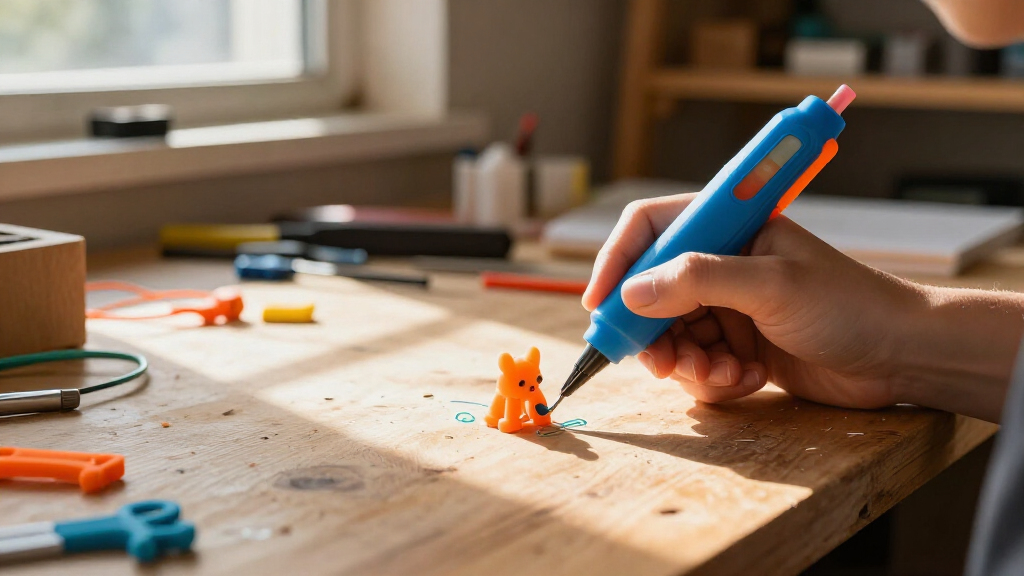

The best 3D printing pens balance steady filament control, comfortable handling, and features that fit the maker’s skill level. I’d put the MYNT3D Professional in the overall lead for its OLED display and adjustable controls, while the SCRIB3D P1 stands out as a straightforward value pick and the 3Doodler Start+ is tailored to younger users. The main tradeoffs are between precise temperature and speed adjustments, beginner-friendly operation, and bundled supplies such as filament and stencils. Filament compatibility also matters because a pen designed for one material may not handle another. Read on for the full comparison, buying advice, and answers to common questions.

Get business pricing on tools and workshop supplies
- Business-only prices and quantity discounts
- Tax-exempt purchasing
- Multiple users, one account, clear invoices
Complete the kit


Key Takeaways
- Adjustable controls separate the most versatile pens: The MYNT3D Professional’s OLED display gives temperature feedback, while simpler picks such as the SCRIB3D P1 emphasize accessible operation.
- Starter bundles vary more by accessories than by the basic task: SCRIB3D P1 kits pair the pen with different combinations of mats, stencils, displays, or filament colors, so match the bundle to what you will use.
- Filament compatibility should guide the purchase: The MYNT3D Super explicitly supports 1.75 mm ABS and PLA, while material and diameter support can differ across models.
- Age and heat handling change the right choice: The 3Doodler Start+ is designed for children ages six and up, whereas adult-oriented pens with hot nozzles need more careful handling.
- More included filament does not automatically mean a better fit: Color variety helps with projects that use many hues, but a display, design surface, or comfortable controls may matter more for regular drawing.
| SCRIB3D Advanced 3D Printing Pen Bundle with PLA Filament |  | Best for a Ready-to-Create Color Assortment | Filament type: PLA | Filament diameter: 1.75 mm | Filament length: 348 feet total | VIEW LATEST PRICE | See Our Full Breakdown |
| SCRIB3D Advanced 3D Printing Pen Kit with PLA Filament, Stencil Book, and Project Guide |  | Best for Comfortable, Guided Practice | Model number: SCRIB_PEN_ADV | Dimensions: 4.06 × 7.8 × 2.48 inches | Weight: 11.7 ounces | VIEW LATEST PRICE | See Our Full Breakdown |
| MYNT3D Professional 3D Printing Pen with OLED Display | 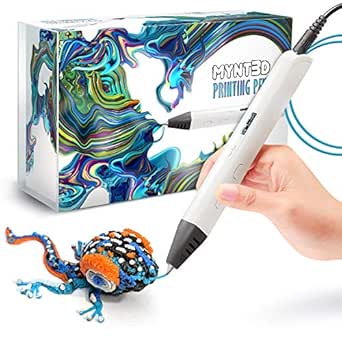 | Best for Fine Temperature Adjustments | Temperature range: Listed as both 130–240 °C and 140–230 °C | Temperature adjustment: 1 °C increments | Display: OLED | VIEW LATEST PRICE | See Our Full Breakdown |
| MYNT3D Pro 3D Pen Kit with 10-Color PLA Filament and DesignPad |  | Best for Tracing and Work Surface Support | Filament material: PLA | Filament diameter: 1.75 mm | Filament colors: 10 | VIEW LATEST PRICE | See Our Full Breakdown |
| SCRIB3D P1 3D Printing Pen Bundle with Silicone Mat, PLA Filament, and Stencil Book |  | Best Starter Bundle for Guided Tracing | Brand: SCRIB3D | Model: P1 | Included items: 3D pen, silicone mat, PLA filament, stencil book, project guide, and power adapter | VIEW LATEST PRICE | See Our Full Breakdown |
| SCRIB3D P1 3D Printing Pen Kit with Display |  | Best for Adjustable Control | Model: P1 (SCRIB_P1_INTL) | Filament compatibility: PLA and ABS | PLA temperature range: 160–210°C (320–410°F) | VIEW LATEST PRICE | See Our Full Breakdown |
| SCRIB3D P1 3D Printing Pen Bundle with 23 PLA Filament Colors |  | Best for a Large Color Selection | Model: SCRIB3D P1 | Filament type: PLA | Total included filament: 358 feet | VIEW LATEST PRICE | See Our Full Breakdown |
| SCRIB3D P1 3D Printing Pen Bundle with Silicone Mat and 20-Color PLA Filament Refills |  | Best Complete Starter Bundle | Model: SCRIB3D P1 | Filament type: PLA | Filament diameter: 1.75 mm | VIEW LATEST PRICE | See Our Full Breakdown |
| Juku 3Doodler Create+ 3D Printing Pen, Steel Blue |  | Best for Multiple Plastic Types | Model number: 9CPSODUS1E | Compatible materials: PLA, ABS, FLEXY plastics | Nozzle size: 3 mm | VIEW LATEST PRICE | See Our Full Breakdown |
| SCRIB3D PRO 3D Printing Pen Set |  | Best for Specialty Filaments | Recommended age: 14+ | Filament diameter: 1.75 mm | Supported materials: PLA, PHA, wood, bronze/copper, steel, Vibers, CF (Carbon Fiber) 10 | VIEW LATEST PRICE | See Our Full Breakdown |
| 3Doodler Flow 3D Printing Pen with Filaments, Stencil Book, and Guide |  | Best for Filament Variety | Compatible filament: 1.75 mm PLA, ABS, and wood | Display: Integrated LCD temperature monitor | Included filament: 8 colors, 80 feet total | VIEW LATEST PRICE | See Our Full Breakdown |
| 3Doodler Start+ Essentials 3D Pen Set for Kids, Ages 6+ |  | Best for Young Beginners | Age range: 6 years and up | Filament type: PCL | Charging: USB-C rechargeable | VIEW LATEST PRICE | See Our Full Breakdown |
| MYNT3D Super 3D Printing Pen, 1.75 mm ABS and PLA Compatible |  | Best for Flow Control | Compatible filament: 1.75 mm ABS and PLA | Dimensions: 3.98 × 8.31 × 2.32 inches | Weight: 7.7 ounces | VIEW LATEST PRICE | See Our Full Breakdown |
More Details on Our Top Picks
SCRIB3D Advanced 3D Printing Pen Bundle with PLA Filament
I’d put this bundle first for buyers who want plenty of material and guidance in one purchase. Its 348 feet of PLA across 20 assorted colors gives it a much broader palette than the five-color SCRIB3D Advanced Kit, so larger projects are less likely to run out of a favorite shade. The variable speed control and LCD help users adjust extrusion as they draw, while the ceramic nozzle is designed for controlled lines. A stencil book and project guide also give beginners a starting point. The tradeoff is that the product details omit the temperature range and power requirements, leaving less to judge about material flexibility and setup than the MYNT3D Professional pen. I’d choose it for color variety and bundled practice materials, not for clearly documented temperature control.
Pros:- Includes 348 feet of PLA filament in 20 assorted colors plus two starter colors.
- Variable speed control lets users adjust material flow while drawing.
- LCD screen provides a view of settings during use.
- Stencil book and project guide support guided practice.
Cons:- The product details do not state an operating temperature range.
- Power and connectivity requirements are not specified.
Best for: Beginners and hobbyists who want a large range of PLA colors plus stencils and project guidance in one kit.
Not ideal for: Buyers who need published temperature settings or power details before choosing a pen.
- Filament type:PLA
- Filament diameter:1.75 mm
- Filament length:348 feet total
- Filament colors:20 assorted colors plus 2 starter colors
- Controls:Variable speed
- Display:LCD screen
- Nozzle:Ceramic
- Included accessories:Stencil book and project guide
Our verdict“Choose this bundle if color range and guided projects matter more to you than fully specified temperature and power details.”
SCRIB3D Advanced 3D Printing Pen Kit with PLA Filament, Stencil Book, and Project Guide
This is the more focused choice for someone who wants an approachable pen and a small starter supply rather than a large filament stockpile. The soft-touch ergonomic surface is aimed at comfortable handling, and eight speed options give users a clear set of flow settings to work through. Its LCD shows heat and settings, making adjustments easier to follow than on a kit whose controls are less clearly described. Compared with the 20-color SCRIB3D Advanced Bundle, this kit includes only about 50 feet across five colors, so it suits short projects and learning the basics better than extended, color-heavy work. The tradeoffs are its 2–3 minute warm-up and corded operation, which make spontaneous use less convenient. The one-year warranty adds a concrete support detail.
Pros:- Soft-touch ergonomic surface is designed for comfortable handling.
- LCD displays temperature and speed settings.
- Eight speed options provide defined control over material flow.
- Includes five PLA colors, stencils, guides, and a one-year warranty.
Cons:- The stated 2–3 minute warm-up delays getting started.
- Corded operation limits where the pen can be used.
- About 50 feet of filament is a smaller supply than the 348-foot SCRIB3D Advanced Bundle.
Best for: New users who want an ergonomic corded pen, a modest PLA starter supply, and clear guides for learning speed and temperature settings.
Not ideal for: Frequent makers who want many colors or long drawing sessions without stopping to replenish filament.
- Model number:SCRIB_PEN_ADV
- Dimensions:4.06 × 7.8 × 2.48 inches
- Weight:11.7 ounces
- Filament type:PLA
- Filament quantity:5 colors, approximately 50 feet total
- Speed options:8
- Display:LCD
- Warranty:1 year
Our verdict“Pick this kit for guided, comfortable practice when a small starter supply is enough.”
MYNT3D Professional 3D Printing Pen with OLED Display
For users who want more direct control over heat, this MYNT3D pen stands apart from the SCRIB3D Advanced Kit: its temperature adjustment is specified in 1 °C increments, and the OLED displays material temperature. That detail can help experienced makers tune extrusion for different drawing conditions, while adjustable speed offers another way to manage line flow. Its ergonomic design and light 12-ounce listed weight suit handheld work. The tradeoff is a smaller included filament assortment—three colors—than either SCRIB3D kit in this batch. The supplied product data also conflict: one temperature range is given as 130–240 °C and another as 140–230 °C, and filament is described as both PLA and ABS. I’d favor it for granular controls, while checking compatibility details before buying.
Pros:- Temperature adjustment is specified in 1 °C increments.
- OLED display shows material temperature.
- Adjustable extrusion speed supports control over material flow.
- Ergonomic pen design with a listed weight of 12 ounces.
Cons:- The supplied temperature ranges conflict: 130–240 °C and 140–230 °C.
- The included filament is inconsistently described as PLA and ABS.
- Includes only three filament colors, fewer than the SCRIB3D kits in this batch.
Best for: Experienced hobbyists who want fine temperature adjustments and a live material-temperature display.
Not ideal for: Buyers who need unambiguous filament compatibility or a broad color supply included in the box.
- Temperature range:Listed as both 130–240 °C and 140–230 °C
- Temperature adjustment:1 °C increments
- Display:OLED
- Power output:10 W
- Input:5 V DC, 2 A
- Included filament:Three colors; material is inconsistently listed as PLA and ABS
- Dimensions:7.99 × 5.2 × 2.6 inches
- Warranty:1-year limited
Our verdict“Choose this pen for fine temperature control if you are comfortable resolving the conflicting material and range details.”
MYNT3D Pro 3D Pen Kit with 10-Color PLA Filament and DesignPad
I’d choose this kit when the drawing surface matters as much as the pen. Its double-sided silicone DesignPad and transparent FreePad provide two ways to shape or trace designs, giving it a more structured setup than the MYNT3D Professional pen, which includes only three filament colors and no listed design surfaces. Ten PLA colors and stepless speed control make it easier to move from simple outlines to varied projects, while adjustable temperature gives the user another control point. The replaceable sealed nozzle is a practical repair feature that the SCRIB3D bundles do not list. Its main limitation is material compatibility: the supplied details specify 1.75 mm PLA, so buyers seeking broader filament options should look elsewhere. I’d rank it for guided, surface-based making rather than material versatility.
Pros:- Includes PLA filament in 10 colors.
- Stepless speed control and adjustable temperature provide adjustable extrusion.
- Replaceable sealed nozzle supports nozzle replacement.
- Silicone DesignPad and transparent FreePad support shaping and tracing.
Cons:- The supplied compatibility details specify 1.75 mm PLA only.
- The kit is less suitable for buyers who want to use other filament types.
Best for: Makers who like tracing templates or shaping designs on reusable surfaces and want several PLA colors included.
Not ideal for: Users who need a pen documented for filament materials beyond 1.75 mm PLA.
- Filament material:PLA
- Filament diameter:1.75 mm
- Filament colors:10
- Pen controls:Stepless speed control and adjustable temperature
- Nozzle:Replaceable sealed design
- Design surfaces:Double-sided silicone DesignPad and transparent FreePad
- Warranty:1-year limited
- Number of items:14
Our verdict“Pick this MYNT3D kit if reusable drawing surfaces and tracing support are central to your projects.”
SCRIB3D P1 3D Printing Pen Bundle with Silicone Mat, PLA Filament, and Stencil Book
This P1 bundle is aimed at a first project session: the pen comes with starter PLA, a two-sided heat-resistant silicone mat, built-in shapes, a stencil book, and a project guide. That gives a beginner a more organized place to trace and practice than the SCRIB3D Advanced Kit, which includes stencils and a guide but does not list a mat. The pen’s display adds visibility while working. This is a convenience-focused package rather than the better pick for color range or documented fine controls: the details do not state filament quantity, speed options, or temperature range. The mat’s stated compatibility centers on SCRIB3D P1, Advanced, and PRO pens, so owners of other brands may not get the same fit. I’d choose it for an easy start with reusable tracing support.
Pros:- Bundle includes pen, starter PLA filament, power adapter, stencil book, and project guide.
- Two-sided heat-resistant silicone mat is reusable and easy to clean.
- Built-in shapes and patterns help with tracing and repeatable forms.
- Display provides visibility while adjusting the pen.
Cons:- Mat compatibility is listed for SCRIB3D P1, Advanced, and PRO pens, limiting its usefulness with other brands.
- Filament quantity, speed options, and temperature range are not specified.
- Bundle contents are fixed, with no stated option to customize accessories.
Best for: First-time users and families who want a ready-to-use SCRIB3D setup with a reusable mat and guided tracing materials.
Not ideal for: Owners of non-SCRIB3D pens or buyers who need stated filament quantities and detailed pen-control specifications.
- Brand:SCRIB3D
- Model:P1
- Included items:3D pen, silicone mat, PLA filament, stencil book, project guide, and power adapter
- Mat material:Silicone
- Mat features:Two-sided, heat-resistant, with built-in shapes
- Mat compatibility:SCRIB3D P1, Advanced, and PRO pens
- Pen display:Display included
Our verdict“Choose this P1 bundle if guided tracing and an included reusable mat matter more than detailed control specifications.”
SCRIB3D P1 3D Printing Pen Kit with Display
The SCRIB3D P1 pairs a temperature-adjustable pen with a stepless speed slider, so I’d pick it for makers who want to move between fine lines and filling larger shapes without switching tools. Its PLA and ABS settings give it more material flexibility than the PLA-only SCRIB3D P1 20-color mat bundle, though that bundle supplies more filament and a work surface. Here, the included three PLA colors total just 30 feet, so frequent projects will call for refills. The stencil guide and project manual help new users get started, while the ceramic nozzle and two-minute auto-sleep add practical touches. The tradeoff is a 2–3 minute warm-up and a starter supply that suits sampling more than extended sessions.
Pros:- Stepless speed control accommodates detailed drawing and faster filling
- Adjustable temperature supports both PLA and ABS
- Stencil guide and project manual help beginners start
- Two-minute auto-sleep and ceramic nozzle are useful practical features
Cons:- Only 30 feet of PLA filament is included
- Warm-up takes about 2–3 minutes
Best for: First-time makers who want adjustable speed and temperature for both PLA and ABS projects
Not ideal for: High-volume crafters who want a large filament supply or a mat included in the kit
- Model:P1 (SCRIB_P1_INTL)
- Filament compatibility:PLA and ABS
- PLA temperature range:160–210°C (320–410°F)
- ABS temperature range:210–235°C (410–455°F)
- Speed control:Stepless speed slider
- Included PLA filament:3 colors, 30 feet total
- Auto-sleep:After 2 minutes of inactivity
- Weight:12.9 ounces
Our verdict“Choose this P1 kit if adjustable control and PLA/ABS compatibility matter more than a large refill supply.”
SCRIB3D P1 3D Printing Pen Bundle with 23 PLA Filament Colors
If changing colors often is part of the project, this SCRIB3D P1 bundle gives me a substantial supply from the start: 23 PLA colors and 358 feet in total. It uses the familiar P1 controls, including a stepless speed slider, and adds an anti-clogging design. Compared with the SCRIB3D P1 kit with display, this bundle devotes its value to more colors and filament rather than PLA/ABS temperature options or a stencil guide. That makes it a better fit for long craft sessions and multicolor work, but less suited to makers who want to experiment with ABS. The pen still needs to heat before use, and the listed filament supply is finite; heavy use will eventually mean sourcing compatible PLA refills.
Pros:- Includes 23 PLA colors across 358 feet of filament
- Stepless speed slider supports different drawing and filling tasks
- Intuitive controls are approachable for new users
- Ceramic nozzle and anti-clogging design support routine crafting
Cons:- Limited to PLA in the listed bundle
- Requires heating before use
- The included filament is a finite supply that heavy users will use up
Best for: Crafters planning multicolor decorations, gifts, or repeated PLA projects who want refills ready
Not ideal for: Makers who need ABS compatibility, detailed project guidance, or a silicone work mat
- Model:SCRIB3D P1
- Filament type:PLA
- Total included filament:358 feet
- Filament colors:23
- Starter filament:3 colors, 30 feet
- Assorted refill filament:20 colors, 328 feet
- Nozzle:Ceramic
- Speed control:Stepless speed slider
Our verdict“Pick this bundle for a ready supply of colors for PLA crafts, and choose another P1 kit if material flexibility or a work mat matters more.”
SCRIB3D P1 3D Printing Pen Bundle with Silicone Mat and 20-Color PLA Filament Refills
This bundle is the most ready-to-work setup among the SCRIB3D P1 options here: it combines a display pen, 320 feet of 20-color PLA, a stencil book, and a two-sided heat-resistant silicone mat with guided patterns. The mat gives beginners a defined surface for shaping and tracing, while the project materials offer a starting point when they need ideas. Compared with the 23-color SCRIB3D P1 bundle, it includes a work surface and guides but fewer colors and 38 fewer feet of filament. Its stated compatibility is 1.75 mm PLA, so it is a narrower choice than the P1 kit that lists both PLA and ABS. The extra accessories make this appealing for a first setup, but unnecessary bulk for someone who already has a mat and patterns.
Pros:- Includes 320 feet of PLA in 20 colors
- Two-sided heat-resistant silicone mat has guided patterns
- Display pen provides temperature and speed feedback
- Stencil book and project guide help users start creating
Cons:- Listed filament compatibility is limited to 1.75 mm PLA
- Includes fewer colors and less filament than the 23-color P1 bundle
- The mat and guides add little value for makers who already own them
Best for: Beginners and families setting up a dedicated PLA craft station with patterns and a work surface
Not ideal for: Experienced makers who already own a mat and guides or need ABS compatibility
- Model:SCRIB3D P1
- Filament type:PLA
- Filament diameter:1.75 mm
- Included filament:320 feet
- Filament colors:20
- Mat material:Silicone
- Mat features:Two-sided, heat-resistant, guided patterns
- Included accessories:Stencil book, project guide, power adapter
Our verdict“Choose this set for a guided PLA start with a mat included, especially if you do not already have a work surface.”
Juku 3Doodler Create+ 3D Printing Pen, Steel Blue
The Juku 3Doodler Create+ stands apart from the SCRIB3D P1 kits by supporting PLA, ABS, and FLEXY plastics, giving experienced makers more material options for models, jewelry, and small repairs. Its dual-drive system and fast and slow modes are designed to adapt extrusion to the job: faster for broad surfaces, slower for detail. The included 15 colors, tools, and guide make it a broader starter package than the basic P1 kit, which supplies only three PLA colors. That flexibility comes with a different filament ecosystem: buyers need compatible plastics, and the heated tip calls for supervision around younger users. At 1.3 pounds, it is also heavier than the listed SCRIB3D P1, a consideration for long drawing sessions.
Pros:- Supports PLA, ABS, and FLEXY plastics
- Dual-drive technology offers fast and slow modes
- Includes 15 colors of ABS and PLA refills
- Starter kit includes tools and an instructional guide
Cons:- Requires compatible plastic refills rather than any assumed universal filament
- Heated tip needs supervision around younger users
- At 1.3 pounds, it is heavier than the SCRIB3D P1
Best for: Makers who want to work with PLA, ABS, and flexible plastic for varied models and repair projects
Not ideal for: Young children without adult supervision or buyers seeking a lightweight pen and standard filament convenience
- Model number:9CPSODUS1E
- Compatible materials:PLA, ABS, FLEXY plastics
- Nozzle size:3 mm
- Weight:1.3 pounds
- Dimensions:10.8 x 4.55 x 3.13 inches
- Included refills:2 packs of ABS and PLA refills
- Included colors:15
- Included accessories:Power adapter, tools, Ultimate Guide to Doodling
Our verdict“Choose the Create+ if you value multiple plastic types and mode control more than a lighter, simpler P1 setup.”
SCRIB3D PRO 3D Printing Pen Set
For artists and technical makers who want to experiment beyond standard PLA and ABS, the SCRIB3D PRO lists a wide range of materials, including wood, bronze, steel, and carbon-fiber filament. Its adjustable temperature and speed, on-pen display, and interchangeable nozzles give users more control over material and detail than the simpler SCRIB3D P1 kits. The set also includes a DoodlePad and a variety of specialty plastics, so the extra controls have practical room to shine. The tradeoff is a more demanding setup: unfamiliar materials can require careful temperature selection, and the hot nozzle needs attention. It is recommended for ages 14 and up, which makes the Juku Create+ or a kids-focused pen a better direction for younger users.
Pros:- Supports a broad selection of specialty materials, including wood and carbon-fiber filament
- Adjustable temperature and speed allow material-specific control
- On-pen display gives real-time setting feedback
- Interchangeable nozzles and DoodlePad expand the included toolkit
Cons:- Hot nozzle requires care during use
- Recommended age is 14+, limiting its fit for younger users
- Specialty materials and multiple settings may be unnecessary for basic PLA crafts
Best for: Artists and makers aged 14+ who want to explore specialty 1.75 mm filaments and tune pen settings
Not ideal for: Young beginners or casual users who want a lightweight, straightforward pen for basic PLA projects
- Recommended age:14+
- Filament diameter:1.75 mm
- Supported materials:PLA, PHA, wood, bronze/copper, steel, Vibers, CF (Carbon Fiber) 10
- Included colors:Red, black, clear, bronze, wood, dual-color blue and yellow, metallic gold, metallic silver, pure white
- Item weight:2.24 pounds
- Package dimensions:10.43 x 8.27 x 2.72 inches
- Controls:Adjustable temperature and speed with on-pen display
- Included accessories:Interchangeable nozzles, DoodlePad
Our verdict“Choose the SCRIB3D PRO if specialty materials and adjustable settings justify a more advanced setup.”
3Doodler Flow 3D Printing Pen with Filaments, Stencil Book, and Guide
The 3Doodler Flow suits makers who want to switch materials as well as draw with them: it accepts 1.75 mm PLA, ABS, and wood filament, while its LCD shows the operating temperature. That flexibility sets it apart from the 3Doodler Start+, which is designed for children and uses PCL filament. The Flow also comes with eight colors totaling 80 feet, plus a stencil book and activity guide, so projects can start without sourcing supplies first. Its tradeoff is a more hands-on setup: it extrudes heated plastic, and buyers need compatible 1.75 mm filament for refills. I’d choose it for older hobbyists who want material options and temperature feedback, but the Start+ is a better fit for young children.
Pros:- Works with 1.75 mm PLA, ABS, and wood filament
- LCD shows operating temperature during use
- Supports both freehand drawing and stencil projects
- Includes eight filament colors totaling 80 feet, a stencil book, and an activity guide
Cons:- Extrudes heated plastic, so it is less suited to young children than the 3Doodler Start+
- Refills must be compatible 1.75 mm filament
Best for: Older teens and adult hobbyists who want to experiment with PLA, ABS, and wood filament and use guided stencil projects
Not ideal for: Families seeking a child-focused pen without exposed hot parts, or buyers who want a pen that uses a different filament format
- Compatible filament:1.75 mm PLA, ABS, and wood
- Display:Integrated LCD temperature monitor
- Included filament:8 colors, 80 feet total
- Included accessories:Stencil book and activity guide
- Dimensions:3.1 × 10.74 × 4.44 inches
- Weight:15.8 ounces
- Model number:3DFLOW-US
- Color:Black
Our verdict“Choose the Flow if material flexibility and temperature feedback matter more than a child-focused, no-external-hot-parts design.”
3Doodler Start+ Essentials 3D Pen Set for Kids, Ages 6+
For a first 3D pen aimed at children, the 3Doodler Start+ puts ease of handling ahead of material choice: it is designed for ages six and up and has no external hot parts. The rechargeable pen comes with PCL strands, a DoodlePad, and an activity guide, giving young creators a more approachable starting point than the 3Doodler Flow, which handles PLA, ABS, and wood but uses heated, extruded plastic. The Start+ still heats its filament during use, so adult supervision remains sensible, and its PCL format limits refill choices compared with the Flow’s broader compatibility. The listing also gives conflicting warranty terms—one year in product information and two years in the description—which makes coverage less clear. I’d pick it for supervised early projects, not for adults seeking material experimentation.
Pros:- Designed for children ages six and up
- No external hot parts
- USB-C rechargeable
- Includes mixed-color PCL strands, a DoodlePad, and an activity guide
Cons:- Filament is heated during use, so supervision is still appropriate
- Uses PCL rather than the PLA, ABS, and wood options supported by the 3Doodler Flow
- Warranty duration is inconsistent across the listing
Best for: Parents and educators introducing children ages six and up to hands-on drawing and guided STEAM projects
Not ideal for: Adult hobbyists who want to use standard PLA or ABS filament, or families who need consistent warranty terms before buying
- Age range:6 years and up
- Filament type:PCL
- Charging:USB-C rechargeable
- Included components:3D pen, 2 packs of plastic strands, DoodlePad, USB charger cable, instruction manual, and activity guide
- Material:Plastic
- Dimensions:9.06 × 6.02 × 2.56 inches
- Weight:10.72 ounces
- Warranty:Listing states both 1 year against manufacturer defects and 2 years from date of purchase
Our verdict“Choose the Start+ for a child’s supervised first projects when its PCL filament system fits your needs.”
MYNT3D Super 3D Printing Pen, 1.75 mm ABS and PLA Compatible
The MYNT3D Super is the control-focused pick here: its stepless speed adjustment lets users fine-tune filament flow, while adjustable temperature supports ABS or PLA. That gives it a practical edge for shaping line thickness and pace over the 3Doodler Flow, whose listed standout is a temperature display and broader filament compatibility that includes wood. The MYNT3D is also relatively light at 7.7 ounces, which may make longer drawing sessions easier to manage. Its kit is spare by comparison, with only three filament colors listed, and the product information conflicts over whether the included filament is PLA or ABS. I’d favor it for experienced users who value adjustable flow and already know which material they want; beginners seeking a larger guided-project bundle may prefer the Flow.
Pros:- Stepless speed control adjusts filament flow
- Adjustable temperature supports ABS and PLA
- Lightweight 7.7-ounce ergonomic stylus design
- Includes a power adapter and three colors of filament
Cons:- The listing conflicts on whether the included filament is PLA or ABS
- Includes fewer filament colors than the 3Doodler Flow’s eight-color, 80-foot set
Best for: Hobbyists who want to adjust extrusion speed and temperature while working with ABS or PLA
Not ideal for: Beginners who want a larger color selection and guided project materials, or buyers who need the included filament type stated consistently
- Compatible filament:1.75 mm ABS and PLA
- Dimensions:3.98 × 8.31 × 2.32 inches
- Weight:7.7 ounces
- Power output:10 watts
- Input:5 V DC, 2 A
- Adapter:100–240 V AC, 50/60 Hz
- Certifications:FCC, CE, RoHS
- Warranty:1-year limited
Our verdict“Choose the MYNT3D Super if adjustable flow and a lightweight pen matter more than a larger starter bundle.”
How We Picked
I compared the 13 pens on the factors that change day-to-day use: control over feed and temperature, ease of loading, display feedback, material compatibility, included project aids, and suitability for the intended age group. A bundle earned credit when its accessories addressed a clear need, such as providing a protected work surface or helping a new user practice shapes. I treated filament quantity and color range as useful extras rather than substitutes for control or fit.
The ranking favors pens that offer a practical balance of control, usability, and flexibility for a broad range of makers. Models with more specialized strengths follow when their audience is narrower, such as children or buyers who mainly want a large color assortment. Similar SCRIB3D P1 bundles are distinguished by their included accessories, while the MYNT3D and 3Doodler options are ranked by the different priorities they serve. Each pick also has tradeoffs, so the best choice depends on the user and project.
Factors to Consider When Choosing Best 3D Printing Pens
Before choosing a pen, I’d start with the materials and projects you expect to use, then check how much control and setup help the user needs. These broader factors can prevent a bundle from looking more capable simply because it contains more accessories.
Match Filament Type and Diameter to Your Projects
Check both the filament material and its diameter in the pen’s specifications before buying refills. PLA is commonly chosen for accessible indoor crafting, while ABS can suit users who specifically need that material and can work with its handling requirements. A pen that accepts only a particular size may limit which refill spools you can use. Don’t assume that two pens with similar names or appearances share the same filament standard. If the intended user is new, sticking with one supported material at first can simplify setup and reduce failed feeds. Buyers who already own filament should verify compatibility before choosing a bundle.
Choose Controls That Fit the User’s Skill
Speed control affects how quickly material leaves the nozzle, which can make corners and small details easier to manage. Temperature adjustment matters when a pen supports multiple materials or when the user wants to tune how smoothly filament extrudes. A display can make settings easier to see, but it also adds information that a young beginner may not need. For a first pen, consider whether simple buttons and clear loading steps will be more useful than extensive adjustments. Experienced makers may prefer feedback and control because they can refine line thickness and handling. The common mistake is paying attention to a display while overlooking whether the controls are comfortable to use.
Treat Bundled Accessories as Project Tools
A stencil book can help a new user learn to draw flat shapes before joining them into three-dimensional forms. A silicone mat offers a more protected surface for practice, while a design pad can provide a defined workspace. Extra filament colors help when projects depend on color variety, but they do little for someone who mainly wants to practice basic construction. Think about which accessories will be used in the first few sessions, rather than counting every included item equally. Refill costs and availability matter too, especially if the bundle’s colors run out quickly. A smaller kit with the right guide or surface can be more useful than a larger assortment of supplies.
Prioritize Age-Appropriate Heat and Handling
3D pens heat filament at the nozzle, so the intended age range and supervision needs should shape the choice. A child-focused model such as the 3Doodler Start+ is designed for younger users, while adult-oriented hot-nozzle pens call for more careful handling. Read the manufacturer’s age guidance and operating instructions before handing a pen to a child. A comfortable grip and straightforward loading process can also reduce frustration during early projects. For shared family use, decide whether an adult will manage setup and material changes. Buying a more adjustable pen for a young user can add controls without making the activity easier.
Pay More for Capabilities You Will Use
Extra control is worthwhile when the user plans detailed work, switches materials, or expects to adjust flow and temperature often. For occasional crafts, a simpler pen may cover the core task without requiring the user to learn additional settings. A bundle can also be a better use of the budget when its mat, guide, or filament replaces items you would otherwise buy separately. Avoid treating the largest filament count as proof of better performance. Compare the features that affect your projects against the tradeoffs in setup, learning, and refill choice. The right spend follows the user’s habits, not the length of the included-accessory list.
Consider Where and How Long You Will Draw
Long sessions make grip comfort, button placement, and manageable filament loading more noticeable than they are during a short craft. A pen that feels easy to start and stop can help a beginner focus on the drawing rather than operating the tool. If projects require fine joins, steady feed control may matter more than portability. For classroom or family settings, storage for the pen, refills, and patterns can keep supplies together between sessions. Check whether the bundle includes a work surface or guides that suit the space where the pen will be used. A good fit is the one that supports the actual routine, from setup through cleanup.
Frequently Asked Questions
Should I choose PLA or ABS filament for a first 3D pen?
I’d begin with the material the pen’s maker recommends and the user can handle comfortably. PLA is a common starting choice for craft projects, but the pen must explicitly support the filament type and diameter you buy. ABS can be useful for people who need that material, though its handling and working conditions may call for more care. Avoid buying a large refill assortment until you have confirmed which material feeds reliably in the selected pen. The MYNT3D Super explicitly lists both ABS and PLA compatibility, which may suit buyers who want that choice.
Is a temperature display worth choosing over a simpler pen?
A display is most useful when you plan to adjust settings or want feedback while using compatible materials. It can help an experienced maker tune the pen, but it does not by itself guarantee smoother drawing or easier results. Beginners may benefit more from clear loading instructions, a stencil guide, or a protected surface. Compare the control layout with the person’s likely projects before treating the display as a deciding feature. The MYNT3D Professional is the clearest fit here for buyers who value visible temperature information.
Can a child use an adult 3D printing pen?
Follow the manufacturer’s stated age guidance and supervision instructions for the specific model. Adult-oriented pens can have hot nozzles and controls that require careful operation, so they may not suit a younger child working independently. The 3Doodler Start+ is specifically labeled for ages six and up, making it the age-focused choice in this group. Even with a child-oriented set, an adult should review the instructions and decide what level of supervision is appropriate. Don’t choose a pen based only on its included colors or project book.
Do I need to buy a bundle with a mat and stencil book?
A mat and stencil book are useful when the user is learning to control lines or needs a surface for repeated practice. They are less valuable if you already have a suitable workspace and patterns, or if the user prefers freehand drawing. Stencils can teach flat shapes that later become parts of a 3D construction, while a mat helps keep work organized. Compare the SCRIB3D P1 bundles by the accessories you expect to use rather than their shared pen name. If you are uncertain, a guide or mat may help more at the start than extra filament colors.
How can I tell whether refills will fit my pen?
Look up the supported filament diameter and material in the pen’s product specifications, then compare those details with the refill listing. A familiar brand name or similar bundle does not prove that two models accept the same supplies. The MYNT3D Super specifies 1.75 mm ABS and PLA compatibility, while other models may have different requirements. Keep the pen’s instructions when ordering refills so you can check the approved materials later. If the specifications are unclear, contact the manufacturer before buying a large supply.
Conclusion
For the best overall balance of control and feedback, I’d choose the MYNT3D Professional, especially for makers who expect to adjust settings. The SCRIB3D P1 is my value-minded pick for straightforward crafting, with bundle versions suited to buyers who want a mat, stencils, or a wider color assortment. Beginners can start with a guided SCRIB3D kit, while younger children should look first at the age-focused 3Doodler Start+. For a more specialized material choice, the MYNT3D Super lists compatibility with 1.75 mm ABS and PLA. Choose the pen whose controls, safety fit, and supplies match the person who will use it most.
Black Friday Picks

Vitamix 5200 Blender with 64 oz Container, Black
As an affiliate, we earn on qualifying purchases.