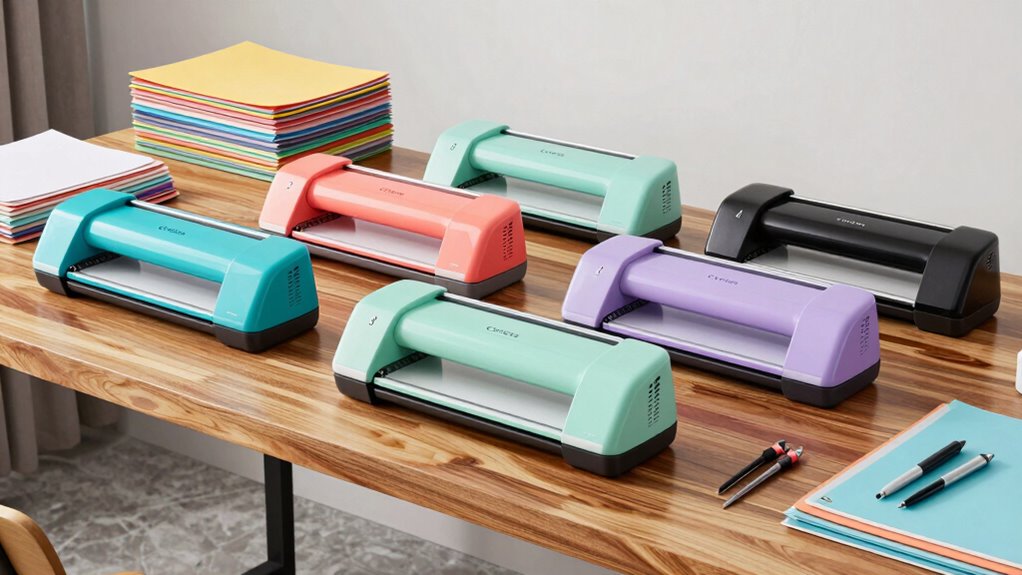
Starting a small business with a Cricut machine offers endless creative possibilities, but choosing the right model can be challenging. The Cricut Maker 4 stands out for its versatility and professional-grade cuts, making it ideal for serious entrepreneurs. The Cricut Explore 5 offers a balance of power and affordability, perfect for those just scaling up. Meanwhile, the Cricut Joy Xtra excels in compact design and quick projects, suited for small setups with limited space. Each option involves tradeoffs around price, features, and ease of use. Continue reading for a detailed breakdown of the best Cricut machines for small business owners in 2026.

Get business pricing on tools and workshop supplies
- Business-only prices and quantity discounts
- Tax-exempt purchasing
- Multiple users, one account, clear invoices
Complete the kit



Key Takeaways
- The Cricut Maker 4 offers the highest versatility, capable of handling a wide range of materials for professional results.
- Budget-conscious buyers should consider the Cricut Explore 5, which balances features and affordability without sacrificing performance.
- Compact models like the Cricut Joy Xtra are ideal for small spaces but may lack some advanced features needed for large-scale production.
- Bundles that include tools like EasyPress or digital libraries add significant value for small business owners looking to expand their product offerings.
- Increased investment generally correlates with better durability, faster cutting speeds, and expanded material compatibility.
| Cricut Joy Xtra Cutting Machine Ultimate Sticker Making Bundle |  | Best for Print-Then-Cut Sticker Projects | Includes: Cricut Joy Xtra machine, printable sticker paper, Smart Vinyl, transfer tape, tools, design guides | Features: Print then cut, portable, beginner-friendly | Uses: Custom stickers, labels, decals, planner accessories | VIEW ON AMAZON | See Our Full Breakdown |
| Cricut Explore 5 Essential Bundle with Multicolor Sampler and EasyPress 9×9 |  | Best for Versatile Small Business Projects | Material Compatibility: Vinyl, HTV, cardstock, printable vinyl | Max Temperature: 400°F (205°C) | Connectivity: Bluetooth | VIEW ON AMAZON | See Our Full Breakdown |
| Cricut Maker 4 + EasyPress SE Heat Press Bundle – Cutting Machine with Infusible Ink, Vinyl & Tools for Professional Shirts & Custom Apparel |  | Best for Professional-Quality Apparel and Custom Products | Product Type: Cutting machine and heat press bundle | Includes: Cricut Maker 4, EasyPress SE, tools, Infusible Ink, heat transfer vinyl, digital guides | Suitable For: Professional and advanced crafting projects | VIEW ON AMAZON | See Our Full Breakdown |
| Cricut Joy Xtra – Smart Cutting Machine with Digital Content Bundle | 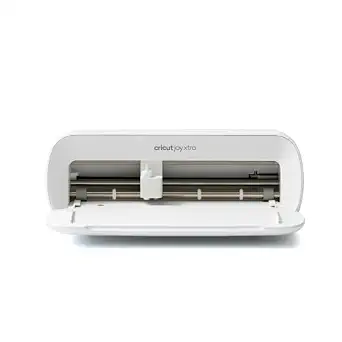 | Best for Versatile Personalization and Small Projects | Includes: Cricut Joy Xtra, Fine-Point Blade, Fine Point Pen, mini Weeder, welcome card, USB cable, power adapter, practice materials, free Cricut Access trial, 30 bonus images | Material Compatibility: Vinyl, iron-on HTV, cardstock, stickers, more | Features: Cuts, draws, foils, print-then-cut, compatible with inkjet printers | VIEW ON AMAZON | See Our Full Breakdown |
| Cricut Joy 2 Deluxe Bundle, Coral |  | Best for Quick, Small-Scale Projects | Cutting Width: 4.5 inches (11.4 cm) | Weight: Just over 2 lbs (0.91 kg) | Compatibility: 75+ materials including vinyl, iron-on, printable materials, and cardstock | VIEW ON AMAZON | See Our Full Breakdown |
| Cricut Joy Machine & Digital Content Library Bundle |  | Best for Portability and On-the-Go Small Business Creators | Weight: 3.9 lbs | Materials Compatible: Cardstock, vinyl decal, iron-on, and more | Connectivity: Wireless Bluetooth | VIEW ON AMAZON | See Our Full Breakdown |
| Cricut Explore 5 Essential Bundle + Digital Content, Taupe | 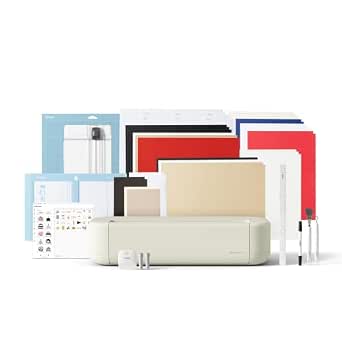 | Best for Versatile Small Business Projects with Wide Material Compatibility | Cutting Size: 12 inches | Color: Taupe | Compatibility: Vinyl, iron-on, cardstock, printable materials | VIEW ON AMAZON | See Our Full Breakdown |
| Cricut Maker 4 – Smart Cutting Machine (Seashell) with Digital Content Bundle |  | Best for High-Volume and Multi-Function Small Business Projects | Includes: Cricut Maker 4, Fine-Point Blade, Materials Sampler, 30 bonus images, tools | Material Compatibility: Leather, wood, vinyl, iron-on, cardstock, stickers, and more | Features: Cuts, draws, foils, scores, engraves, debosses, perforates | VIEW ON AMAZON | See Our Full Breakdown |
| Cricut Joy 2 Essential Bundle + Digital Content, Blue |  | Best for Small-Scale Personalization and Quick Turnaround Projects | Cutting Width: 4.5 inches | Weight: Just over 2 lbs | Materials Compatibility: 75+ including vinyl, iron-on, printable, and cardstock | VIEW ON AMAZON | See Our Full Breakdown |
| Cricut Joy 2 Essential Bundle + Rainbow Sampler |  | Best for Colorful, Quick Personalization and Small Batch Production | Weight: 2 lbs | Cutting Width: 4.5 inches | Materials Compatibility: 75+ including vinyl, iron-on, printable, and cardstock | VIEW ON AMAZON | See Our Full Breakdown |
| Cricut Maker 4 – Smart Cutting Machine (Seashell) with Engagement Plus Bundle |  | Best Overall for Versatility and Speed | Model: Cricut Maker 4 | Color: Seashell | Included Accessories: Fine-Point Blade, Light Grip Machine Mat, 2 Fine Point Pens, Tools, Materials, Cricut EasyPress 2 (SE), Pressing Mat, Tote Bag, Smart Iron-On, Smart Vinyl, Cardstock, Transfer Tape, Digital Images | VIEW ON AMAZON | See Our Full Breakdown |
| Cricut Maker 4 Cutting Machine Ultimate Beginner Sticker Making Bundle |  | Best for Beginners and Small-Scale Sticker Production | Model: Cricut Maker 4 | Color: Seashell | Functionality: Print then Cut | VIEW ON AMAZON | See Our Full Breakdown |
| Cricut Joy 2 Deluxe Bundle, Blue |  | Best Compact, Portable Machine for Quick Projects | Cutting Width: 4.5 inches (11.4 cm) | Weight: 2 lbs (0.91 kg) | Compatibility: 75+ materials including vinyl, iron-on, printable materials | VIEW ON AMAZON | See Our Full Breakdown |
| Cricut Maker 4 T-Shirt Making Bundle – Cutting Machine with EasyPress SE Heat Press, Vinyl & Iron-On Kit for Custom Apparel, Tote Bags & DIY Projects |  | Best for Custom Apparel and Small Business T-Shirt Production | Brand Name: Cricut | Unit Count: 1 Count | Warranty: 1 Year | VIEW ON AMAZON | See Our Full Breakdown |
| Cricut Explore 5 + Deluxe Bundle + Digital Content, Taupe |  | Best for Versatile Crafting and Balanced Features | Cutting Width: 12 in (30.5 cm) | Compatibility: Vinyl, iron-on, cardstock, printable materials | Tools: 6 including optional Deep Cutting Tool | VIEW ON AMAZON | See Our Full Breakdown |
More Details on Our Top Picks
Cricut Joy Xtra Cutting Machine Ultimate Sticker Making Bundle
The Cricut Joy Xtra excels as a portable solution for creating detailed stickers, labels, and decals, especially with its support for print then cut workflows. Compared to the Cricut Joy 2, it offers enhanced capabilities for printable projects, making it ideal for small businesses focused on custom stickers. However, it requires an inkjet printer and is limited mainly to sticker and label crafts, which could be a constraint for those seeking broader cutting versatility. This model is particularly suited to small business owners prioritizing high-quality, detailed sticker production without needing large-scale cutting features.
Pros:- Supports detailed print then cut workflow for high-quality stickers
- Includes comprehensive bundle with tools, materials, and guides
- Portable and beginner-friendly for quick setup and use
Cons:- Requires an inkjet printer for printing designs, adding extra cost
- Limited to sticker, label, and decal projects, lacking larger cutting capacity
Best for: Small business owners concentrating on custom sticker and label production with print then cut workflows
Not ideal for: Businesses needing to cut thicker materials or larger projects, as the Joy Xtra is limited to stickers and decals
- Includes:Cricut Joy Xtra machine, printable sticker paper, Smart Vinyl, transfer tape, tools, design guides
- Features:Print then cut, portable, beginner-friendly
- Uses:Custom stickers, labels, decals, planner accessories
Our verdict“This pick makes the most sense for small businesses focused on sticker and label printing with portable convenience.”
Cricut Explore 5 Essential Bundle with Multicolor Sampler and EasyPress 9×9
The Cricut Explore 5 Essential Bundle stands out for its all-in-one approach, combining a smart cutting machine with a heat press and various materials, making it well-suited for small businesses creating a broad range of personalized items like shirts, decals, and crafts. Compared to the Cricut Joy Xtra, it offers greater material compatibility and the ability to produce apparel and larger projects. Still, the setup involves some learning curve, especially for users new to crafting software, and the overall cost can be high for hobbyists. This bundle is ideal for entrepreneurs who want a comprehensive system for different types of small-scale production.
Pros:- All-in-one bundle with cutting machine, heat press, and materials
- Bluetooth connectivity with guided setup for ease of use
- Supports a wide variety of materials including vinyl, HTV, and printable media
Cons:- Requires some familiarity with crafting software
- Projects are limited to compatible included materials, which may restrict creativity
- Higher price point may be a barrier for casual crafters
Best for: Small business owners wanting versatile tools for apparel, decals, and crafts with guided setup
Not ideal for: Casual hobbyists or those with limited space, due to higher price and setup complexity
- Material Compatibility:Vinyl, HTV, cardstock, printable vinyl
- Max Temperature:400°F (205°C)
- Connectivity:Bluetooth
- Included Materials:Smart Vinyl, Smart Iron-On, cardstock, printable vinyl, pens
- Machine Size:30% more compact than previous models
Our verdict“This bundle suits small business owners seeking a versatile, beginner-friendly setup for apparel and craft projects.”
Cricut Maker 4 + EasyPress SE Heat Press Bundle – Cutting Machine with Infusible Ink, Vinyl & Tools for Professional Shirts & Custom Apparel
The Cricut Maker 4 paired with the EasyPress SE offers a professional-grade system for creating durable, fade-resistant apparel and accessories, making it ideal for small businesses that want to produce high-quality, long-lasting designs. Compared to the Cricut Explore 5, the Maker 4 supports more intricate cuts and uses advanced materials like Infusible Ink, which provides a more polished look. The main tradeoff is a steeper learning curve and higher initial investment, especially for users unfamiliar with design software. This bundle makes the most sense for small businesses targeting professional-level apparel or custom gift items.
Pros:- Complete system for professional-quality apparel creation
- Supports fade-resistant, durable Infusible Ink and vinyl
- Includes digital guides and tutorials for advanced techniques
Cons:- Requires familiarity with design software
- Higher cost and complexity may be intimidating for newcomers
Best for: Small business owners focusing on professional custom apparel with advanced materials
Not ideal for: Beginners or hobbyists without prior experience in digital design or heat transfer techniques
- Product Type:Cutting machine and heat press bundle
- Includes:Cricut Maker 4, EasyPress SE, tools, Infusible Ink, heat transfer vinyl, digital guides
- Suitable For:Professional and advanced crafting projects
Our verdict“This is best suited for small businesses needing high-end, durable apparel and accessories with a professional finish.”
Cricut Joy Xtra – Smart Cutting Machine with Digital Content Bundle
The Cricut Joy Xtra with its digital content bundle shines as a versatile tool capable of cutting over 50 materials, from vinyl to cardstock, and supports drawing and foiling for diverse projects. Unlike the Cricut Explore 5, which emphasizes larger-scale projects, the Joy Xtra excels in smaller, detailed work such as stickers, labels, and personalized decor. Its ability to print then cut with inkjet printers adds to its appeal. However, beginners may face a learning curve in mastering Design Space, and the need for an optional Cricut Access subscription for full content could add ongoing costs. It’s perfect for small business owners who prioritize variety and detailed customization.
Pros:- Supports over 50 materials including printable options
- Includes comprehensive bundle with essential tools and free images
- Enables full-color Print-Then-Cut designs with inkjet printers
Cons:- Requires optional Cricut Access subscription for full content library
- Learning curve for new users unfamiliar with digital design software
- Limited information on machine dimensions and power specifics
Best for: Small business owners seeking versatile, multi-material cutting with digital design library access
Not ideal for: Businesses requiring large-scale cuts or those with limited space, as it is designed for smaller projects
- Includes:Cricut Joy Xtra, Fine-Point Blade, Fine Point Pen, mini Weeder, welcome card, USB cable, power adapter, practice materials, free Cricut Access trial, 30 bonus images
- Material Compatibility:Vinyl, iron-on HTV, cardstock, stickers, more
- Features:Cuts, draws, foils, print-then-cut, compatible with inkjet printers
- Design Software:Design Space with 3,000+ images and 100+ fonts
Our verdict“This option makes the most sense for small business owners wanting versatile, detailed projects with digital design flexibility.”
Cricut Joy 2 Deluxe Bundle, Coral
The Cricut Joy 2 Deluxe Bundle offers a compact, lightweight option for small projects like cards, decals, and labels, with the added benefit of full-color sticker creation when paired with a home inkjet printer. Its 4.5-inch cutting width limits larger projects, but this makes it ideal for quick, everyday tasks. Compared to larger models like the Cricut Explore 5, it’s more portable and easier to store. Still, users should note that creating full-color stickers requires a printer and extra content may involve additional subscriptions or purchases. This machine makes the most sense for casual crafters or small business owners doing frequent, small-scale work.
Pros:- Compact and portable for easy storage and transport
- Supports a wide range of materials including printable media
- Includes a comprehensive bundle with tools and project ideas
Cons:- Limited to 4.5-inch cutting width, restricting project size
- Requires a home inkjet printer for full-color sticker capability
- Additional content or features may require subscriptions
Best for: Small business owners needing a portable, easy-to-use machine for quick projects and full-color stickers
Not ideal for: Businesses requiring larger cuts or extensive material versatility beyond small projects
- Cutting Width:4.5 inches (11.4 cm)
- Weight:Just over 2 lbs (0.91 kg)
- Compatibility:75+ materials including vinyl, iron-on, printable materials, and cardstock
- Connectivity:Bluetooth
Our verdict“This is best for small business owners who need a portable device for quick, colorful projects on a small scale.”
Cricut Joy Machine & Digital Content Library Bundle
The Cricut Joy Bundle excels in portability, making it ideal for small business owners who need to craft at markets, pop-up shops, or in limited spaces. Compared with larger models like the Cricut Explore 5, the Joy’s compact size (just 3.9 pounds) allows for easy transportation and quick setup. However, its material compatibility is somewhat limited to around 50 types, which might restrict more diverse projects. The Bluetooth connectivity and app-based design make it straightforward to operate without bulky equipment, but the digital content library may require internet access for updates, potentially delaying workflows. This pick is perfect for entrepreneurs prioritizing mobility over extensive material versatility or high-volume production.
Pros:- Extremely portable and lightweight, ideal for mobile crafting
- Compatible with a wide array of materials including vinyl and iron-on
- Wireless Bluetooth connection facilitates easy setup without cords
Cons:- Limited to about 50 materials, restricting more complex projects
- Requires a smartphone or computer to operate, which may not suit all workflows
- Digital library updates depend on internet access, possibly delaying use
Best for: Small business owners who need a lightweight, portable machine for personalized, small-scale projects on the go.
Not ideal for: Businesses requiring high-volume production or working with more than 50 material types, as the Joy’s capabilities are more limited in scale and range.
- Weight:3.9 lbs
- Materials Compatible:Cardstock, vinyl decal, iron-on, and more
- Connectivity:Wireless Bluetooth
- Included Content:Digital library of 30 images
Our verdict“This device suits small business owners who prioritize portability and simplicity for personalizing small projects on the move.”
Cricut Explore 5 Essential Bundle + Digital Content, Taupe
The Cricut Explore 5 offers a significant step up in versatility, supporting over 100 materials, making it suitable for diverse small business needs—from decals to apparel. Unlike the Cricut Joy, it has a larger cutting width of 12 inches, enabling bigger designs and more complex projects. Its stylish taupe design and user-friendly interface make it appealing for entrepreneurs who want a sleek, reliable machine. However, the Deep Cutting Tool is sold separately, which could be a drawback for those needing heavy-duty cuts immediately. Also, it relies on Bluetooth and the Design Space app, which can be limiting if technical issues arise. This model is ideal for small businesses that need a balance of ease of use, material diversity, and larger design capacity.
Pros:- Supports over 100 materials, allowing for diverse projects
- Compact and visually appealing design with a straightforward interface
- Includes a comprehensive bundle of tools and materials for immediate use
Cons:- Deep Cutting Tool sold separately, increasing initial costs
- Limited to 12-inch wide cuts, which might restrict larger designs
- Requires Bluetooth and the Design Space app, which may pose connectivity challenges
Best for: Small business owners seeking a versatile, stylish machine capable of handling a broad range of materials and projects.
Not ideal for: Entrepreneurs who need a budget-friendly, ultra-compact solution or do not want to purchase additional tools separately.
- Cutting Size:12 inches
- Color:Taupe
- Compatibility:Vinyl, iron-on, cardstock, printable materials
- Tools:Includes 6 tools, optional Deep Cutting Tool sold separately
Our verdict“This machine is well-suited for small business owners who need versatility, style, and a larger cutting area for a broad range of projects.”
Cricut Maker 4 – Smart Cutting Machine (Seashell) with Digital Content Bundle
The Cricut Maker 4 stands out for its ability to cut over 300 materials and perform functions like drawing, foiling, engraving, and debossing, making it the most versatile option in this lineup. Compared to the Explore 5, it offers expanded capabilities for entrepreneurs who want to diversify their product range without investing in multiple machines. The extensive digital content, including 3,000+ images and fonts, plus the included tools, make it easy to start complex projects immediately. Nonetheless, the price point is higher, and the machine’s multifunctionality might be overwhelming for beginners. Its advanced features are best suited for businesses with a steady workflow and a need for professional-quality finishes, rather than casual crafters.
Pros:- Supports over 300 materials, enabling broad creative options
- Includes extensive digital content and multifunctional tools
- Capable of drawing, foiling, scoring, engraving, and debossing
Cons:- Higher initial cost may be prohibitive for some small businesses
- Complex features could overwhelm beginners
- Full content library may require a subscription for access
Best for: Established small businesses that need a multifunctional machine capable of handling high-volume, intricate projects with diverse materials.
Not ideal for: Small startups or hobbyists who work on a limited scale and prefer simpler, less costly machines.
- Includes:Cricut Maker 4, Fine-Point Blade, Materials Sampler, 30 bonus images, tools
- Material Compatibility:Leather, wood, vinyl, iron-on, cardstock, stickers, and more
- Features:Cuts, draws, foils, scores, engraves, debosses, perforates
- Print-Then-Cut:Yes
Our verdict“Ideal for established small business owners who need a professional-grade, multifunctional machine for a wide array of custom projects.”
Cricut Joy 2 Essential Bundle + Digital Content, Blue
The Cricut Joy 2 offers a compact and affordable option for small business owners focused on quick, small projects like labels, cards, and decals. Its 4.5-inch cutting width is more restrictive than larger models like the Explore 5 or Maker 4 but is sufficient for many personalized items. The bundle includes essential tools and materials, enabling up to 35 projects without additional purchases. Its ability to create full-color stickers with home inkjet printers adds a unique benefit for businesses that need colorful branding or product labels. However, the limited size means it isn’t suitable for larger designs or bulk production. This machine is perfect for entrepreneurs who prioritize simplicity, portability, and rapid turnaround on small items.
Pros:- Compact and lightweight, perfect for small spaces or mobile use
- Supports full-color sticker printing via home inkjet printers
- Includes a variety of tools and materials for multiple small projects
Cons:- Limited to 4.5-inch wide cuts, restricting larger designs
- Requires Bluetooth and app use, which may cause connectivity issues
- Additional content or accessories might be necessary for expanded options
Best for: Small business owners producing personalized items or labels in small batches within limited space.
Not ideal for: Businesses needing larger designs or high-volume production, as the 4.5-inch width can limit scale and complexity.
- Cutting Width:4.5 inches
- Weight:Just over 2 lbs
- Materials Compatibility:75+ including vinyl, iron-on, printable, and cardstock
- Included Content:Smart Vinyl, Smart Iron-On, cardstock, printable vinyl, 25 images, 1 font
Our verdict“Best suited for small business owners focusing on personalized, small-scale projects with quick turnaround times.”
Cricut Joy 2 Essential Bundle + Rainbow Sampler
The Cricut Joy 2 with the Rainbow Sampler is tailored for small businesses that want vibrant, colorful designs with minimal setup. Its 4.5-inch width limits large projects but excels in creating decals, labels, and cards quickly. The bundle’s inclusion of the Rainbow Sampler provides a variety of colorful materials, ideal for adding visual punch to small runs. Like the other Joy models, it supports full-color stickers via home inkjet printers, which can be a major advantage for branding. Its portability and user-friendly design make it suitable for entrepreneurs who need a straightforward solution for quick, colorful customizations. Nonetheless, the size limitation constrains its use for larger or more complex items.
Pros:- Portable, lightweight, and easy to store
- Supports full-color stickers and decals with home inkjet printers
- Includes the Rainbow Sampler for a variety of colorful materials
Cons:- Limited to 4.5-inch width, restricting larger projects
- Needs Bluetooth and app integration, which may cause technical hiccups
- Additional content or subscriptions may be necessary for expanded designs
Best for: Small business owners focused on colorful, small-scale branding, labels, or quick gift items that require vivid designs.
Not ideal for: Businesses needing larger designs or bulk production, as the device’s size and capacity are limited for big runs.
- Weight:2 lbs
- Cutting Width:4.5 inches
- Materials Compatibility:75+ including vinyl, iron-on, printable, and cardstock
- Included Content:Smart Vinyl, Smart Iron-On, value cardstock, printable vinyl, 25 premium images, 1 font
Our verdict“This model is ideal for small business owners who want vibrant, quick projects with minimal space and setup requirements.”
Cricut Maker 4 – Smart Cutting Machine (Seashell) with Engagement Plus Bundle
The Cricut Maker 4 stands out for its ability to handle over 300 materials, making it ideal for small business owners who need flexibility across a variety of products. Compared to the Cricut Explore 5, it offers faster cutting speeds—up to 2X—plus more advanced functions like foiling and engraving, which justify its higher price. However, its setup can be overwhelming for newcomers, and the premium bundle might be a stretch for casual hobbyists. This machine makes the most sense for entrepreneurs who want a comprehensive, all-in-one tool capable of scaling with their business needs, despite the steeper investment and learning curve.
Pros:- Handles over 300 materials for diverse product creation
- Includes a comprehensive bundle with tools, materials, and accessories
- Supports multiple functions: cutting, drawing, foiling, scoring, and engraving
- Faster and more precise than previous models
Cons:- Setup process can be overwhelming for new users
- Premium bundle price might be prohibitive for casual buyers
Best for: Small business owners seeking a versatile, high-speed cutter that can produce a wide range of products.
Not ideal for: Beginners with limited space or budget, as the complex setup and higher price may be barriers.
- Model:Cricut Maker 4
- Color:Seashell
- Included Accessories:Fine-Point Blade, Light Grip Machine Mat, 2 Fine Point Pens, Tools, Materials, Cricut EasyPress 2 (SE), Pressing Mat, Tote Bag, Smart Iron-On, Smart Vinyl, Cardstock, Transfer Tape, Digital Images
- Material Compatibility:Leather, wood, vinyl, iron-on HTV, cardstock, stickers, and more
- Cutting Speed:Up to 2X faster than previous model
Our verdict“This pick is best for small businesses that need a versatile, fast machine capable of handling complex projects and a variety of materials.”
Cricut Maker 4 Cutting Machine Ultimate Beginner Sticker Making Bundle
This Cricut Maker 4 bundle is tailored for those starting small, focusing on creating custom stickers, labels, and decals with professional-quality print-then-cut features. Unlike the more advanced Maker 4, this setup emphasizes ease of use for beginners interested in small batch sticker production, making it ideal for hobbyists or micro-businesses. It requires an inkjet printer, which adds an extra step, and the learning curve isn’t trivial for new users. This bundle suits entrepreneurs who want a straightforward way to produce durable, water-resistant stickers without needing extensive equipment or technical expertise.
Pros:- Perfect for creating custom stickers and decals
- Print-then-cut functionality yields professional results
- Includes all essential tools and materials to start right away
- Produces durable, water-resistant stickers
Cons:- Requires a compatible inkjet printer, adding cost and setup steps
- Learning curve for beginners may slow initial productivity
- Limited to small-scale projects
Best for: Small business owners or hobbyists focusing on sticker, label, or decal creation with minimal setup complexity.
Not ideal for: Large-scale or high-volume manufacturing, since its small project scope and learning curve may limit productivity.
- Model:Cricut Maker 4
- Color:Seashell
- Functionality:Print then Cut
- Included Materials:Printable sticker paper, adhesive vinyl
- Intended Use:Custom stickers, labels, decals
Our verdict“This bundle is ideal for small-scale sticker entrepreneurs seeking easy, high-quality production without extensive equipment.”
Cricut Joy 2 Deluxe Bundle, Blue
The Cricut Joy 2 excels in portability and speed, making it perfect for small business owners who need to craft on the go or handle quick turnaround projects like labels, decals, or cards. Its compact size, at just 2 pounds, contrasts sharply with larger machines like the Maker 4, but this limits cutting width to 4.5 inches—less suitable for bigger projects. The extensive content library and compatibility with over 75 materials add value, though operation requires a mobile device or computer, and additional content may cost extra. This model suits small business owners with limited space who prioritize convenience over large-scale capacity.
Pros:- Extremely portable and lightweight design
- Compatible with a wide range of materials
- Includes extensive digital content and accessories
- Ideal for quick, small projects
Cons:- Limited to 4.5-inch cutting width, restricting project size
- Requires a mobile or desktop device for operation
- Additional content may incur extra costs
Best for: Small businesses or entrepreneurs who need a portable, easy-to-use machine for quick, small projects.
Not ideal for: High-volume production or large designs, as the limited 4.5-inch cut width hampers bigger projects and the need for a device adds complexity.
- Cutting Width:4.5 inches (11.4 cm)
- Weight:2 lbs (0.91 kg)
- Compatibility:75+ materials including vinyl, iron-on, printable materials
- Connectivity:Bluetooth
- Included Content:3,000+ images, 100+ fonts, 1,000+ projects
Our verdict“This machine is best for small business owners who prioritize portability and fast turnaround on smaller projects.”
Cricut Maker 4 T-Shirt Making Bundle – Cutting Machine with EasyPress SE Heat Press, Vinyl & Iron-On Kit for Custom Apparel, Tote Bags & DIY Projects
The Cricut Maker 4 T-Shirt Making Bundle combines a versatile cutter with a professional heat press, making it an excellent choice for small businesses focused on apparel customization. It simplifies creating durable, high-quality transfers for t-shirts, tote bags, and other fabric items. Its ease of use and consistent heat transfer make it suitable for hobbyists and entrepreneurs stepping into custom clothing. Still, the bundle can be costly for casual users and requires some learning to perfect heat application. Compared with standalone cutters, this kit offers a complete solution for apparel, but its focus on fabric limits its use for other materials.
Pros:- Complete kit for easy, professional-quality apparel transfers
- Includes EasyPress SE for consistent, high-quality heat application
- Designed for small-scale apparel and accessory projects
- Durable, water-resistant transfers
Cons:- Expensive compared to basic cutters alone
- Requires some learning curve for perfect heat application
- Limited to compatible materials and accessories
Best for: Small business owners specializing in custom apparel, especially t-shirts and fabric accessories.
Not ideal for: Those not primarily interested in fabric projects, or with limited budgets, as the full bundle is a significant investment.
- Brand Name:Cricut
- Unit Count:1 Count
- Warranty:1 Year
- Included Components:Cricut Maker 4, Heat Press Machine, HTV and Vinyl
Our verdict“This bundle is best for small businesses that want a streamlined, professional solution for custom apparel and fabric projects.”
Cricut Explore 5 + Deluxe Bundle + Digital Content, Taupe
The Cricut Explore 5 paired with the Deluxe Bundle offers a solid balance of size, capability, and ease of use, making it a strong choice for small business owners who need versatility without the bulk of a Maker 4. Its 12-inch cutting width allows for a broad range of projects, including decals, stickers, and small apparel designs. While it lacks some of the advanced features of the Maker 4, such as engraving, it supports full-color printing and a comprehensive bundle that suits entrepreneurs aiming to diversify their product catalog. The need for Bluetooth setup and the optional Deep Cutting Tool (sold separately) are minor inconveniences, but overall, it’s a well-rounded choice for small-scale production.
Pros:- Compact and stylish with user-friendly interface
- Supports a wide variety of materials and tools
- Includes a comprehensive bundle for multiple project types
- Enables full-color printing and precise cutting
Cons:- Requires Bluetooth connection and app setup
- Deep Cutting Tool sold separately, adding extra cost
- Limited to 12-inch cutting width
Best for: Small business owners needing a versatile, space-efficient cutter that can handle a variety of craft projects with full-color printing.
Not ideal for: Producers requiring high-volume or industrial-grade cutting, as the 12-inch width and limited power may slow larger runs.
- Cutting Width:12 in (30.5 cm)
- Compatibility:Vinyl, iron-on, cardstock, printable materials
- Tools:6 including optional Deep Cutting Tool
- Color:Taupe
- Bundle Includes:Smart Vinyl, Smart Iron-On, Cardstock, Printable Vinyl, 25 images, 1 font
Our verdict“This model makes the most sense for small business owners who want versatility in a compact form factor with reliable performance across multiple craft types.”

How We Picked
Each Cricut machine was evaluated based on performance, usability, build quality, versatility, and value for small business needs. We prioritized models that support a variety of materials and offer reliable, precise cuts suitable for commercial projects. Ease of use, digital content support, and bundle options also influenced rankings, as these factors directly impact productivity and startup costs. Our goal was to identify options suitable for different business sizes and budgets, from beginners to more established entrepreneurs. The final list reflects a balance between cost-effectiveness and professional-grade features, ensuring every type of buyer finds a fitting choice.Factors to Consider When Choosing Cricut Machine For Small Business
Choosing the right Cricut machine for a small business involves considering several key factors beyond basic features. The decision impacts your workflow, product quality, and overall profitability. Here are some important considerations to help clarify what to look for:Material Compatibility and Cutting Power
Assess what materials you’ll primarily work with—vinyl, fabric, leather, or thicker substrates. Higher-end models like the Cricut Maker 4 can handle a broader range of materials, including thicker or more complex ones, making them more versatile for diverse product offerings. Cheaper models may struggle with heavier or textured materials, limiting your creative options. Choosing a machine with adequate cutting force ensures you won’t be restricted as your business grows, saving you from needing an upgrade too soon.
Ease of Use and Digital Content
Ease of operation is essential, especially if you’re new to Cricut or small business manufacturing. Machines with intuitive interfaces and strong app support reduce learning curves and increase productivity. Digital content libraries, bundled designs, and compatibility with design software can accelerate product creation. However, premium models often include more extensive content and advanced features, which may be unnecessary for simple projects but valuable for scaling up your offerings.
Speed and Production Capacity
If your business demands higher output, consider machines with faster cutting speeds and larger cutting beds. While entry-level models may suffice for small batches, they might slow your workflow during peak periods. Investing in a higher-capacity machine can boost efficiency but typically comes with a higher price tag. Balance your immediate needs against future growth to avoid over-investing in features you won’t utilize initially.
Budget and Bundle Options
Cost is often a deciding factor; however, the cheapest model may lack essential features for a professional setting. Bundles that include tools, accessories, and digital content tend to offer better value, especially when starting out. Consider the long-term savings of investing in a more complete package versus purchasing add-ons separately later. Remember, a higher upfront investment can lead to better durability and more consistent results.
Size and Space Considerations
Small business setups vary; some owners operate from home or small studios, making compact models like the Cricut Joy Xtra attractive. Larger machines such as the Cricut Maker 4 require more space but provide greater capabilities for bulk production. Measure your workspace carefully to ensure your chosen machine fits comfortably. A compact machine might limit your production volume but is easier to store and move around.
Frequently Asked Questions
Can I use a Cricut machine for commercial purposes?
Yes, many Cricut machines are suitable for small business use, especially higher-end models like the Cricut Maker 4 or Explore 5. However, it’s important to verify the warranty and licensing terms, as some machines or digital content may have restrictions. For consistent, professional results, investing in a machine with higher durability and material handling capability can be worthwhile, but always consider the volume of work and specific needs of your business.
What’s the difference between the Cricut Maker 4 and Cricut Explore 5?
The Cricut Maker 4 offers more robust features, including greater material compatibility, faster cutting speeds, and a larger cutting area, making it better suited for professional or high-volume use. The Explore 5 is more affordable, supports many materials, and still provides good performance for smaller batches or hobbyist-level production. Your choice depends on your expected workload, material diversity, and budget constraints.
Are bundles with digital content worth the extra cost?
Bundles that include digital content and accessories often provide immediate design options and tools that accelerate your workflow, adding significant value—particularly for small businesses looking to diversify their product lines. While they might cost more initially, the time saved and additional creative options can justify the expense. Evaluate how much digital content aligns with your product ideas before purchasing.
Is a compact Cricut machine capable of professional-quality work?
Compact models like the Cricut Joy Xtra are excellent for small-scale projects and quick turnaround tasks but might lack the precision, speed, or material versatility needed for larger or more complex production runs. They are ideal for startups or those with limited space. For truly professional-quality work at scale, larger models like the Cricut Maker 4 generally deliver better results and efficiency.
How important is digital content support for small business use?
Digital content support can significantly streamline the creative process, offering ready-to-use designs, fonts, and images that save time and inspire product variety. For small business owners, access to a broad digital library can reduce initial setup costs for design software and help produce professional-looking products quickly. However, some users prefer creating custom designs, so consider your workflow preferences when choosing a machine with or without extensive digital content.
Conclusion
For small business owners just starting out or operating from limited space, the Cricut Joy Xtra offers a compact, affordable solution for simple projects. The Cricut Explore 5 strikes a balance between cost and capability, making it suitable for growing ventures. The Cricut Maker 4 remains the best choice for entrepreneurs aiming for professional-grade results and larger production runs, justifying its higher price through versatility and durability. Budget-conscious buyers should prioritize bundles and models that provide extra digital content, while those expanding into apparel or larger items should consider the more advanced, larger machines. Ultimately, selecting the right Cricut depends on your current needs and future growth plans—choose accordingly to maximize your small business success.
Halloween Picks
halloween
As an affiliate, we earn on qualifying purchases.