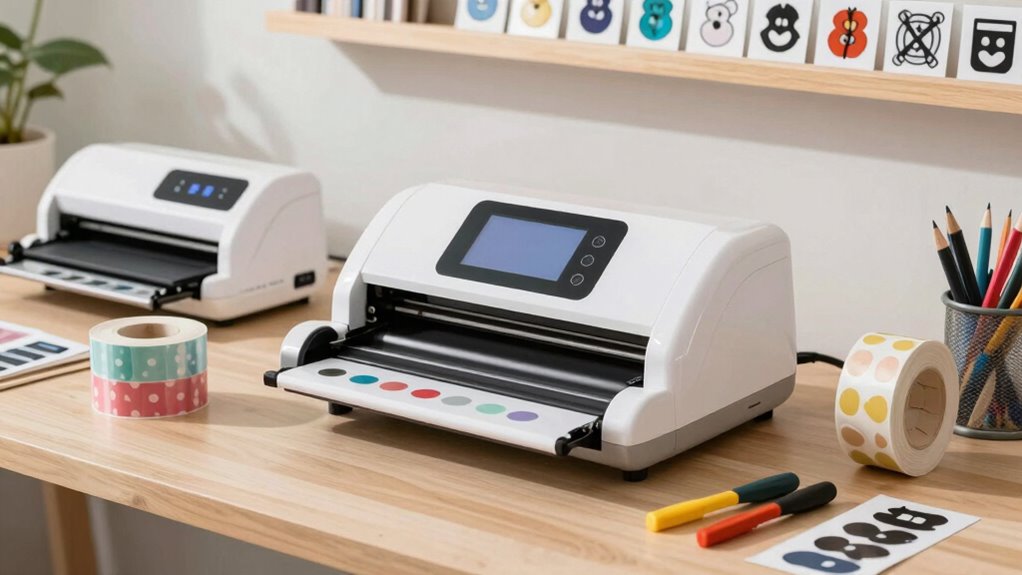
Choosing the right sticker cutting machine for a small business involves balancing features like ease of use, versatility, and professional quality. Among the top contenders are the Liene PixCut S1 Inspire Kit, an all-in-one dye-sublimation printer and cutter, the A3+ Autofeed Self-Adhesive Paper Sticker Die Cutting Machine for high-volume, precise cuts, the Cricut Maker 4 Bundle designed for DIY and small-scale production, and the Liene PixCut S1 Color Sticker Printer & Cutter, which combines high-res printing with AI-guided cutting. Each offers distinct advantages, but also involves specific tradeoffs like setup complexity, ongoing costs, or space requirements.

Get business pricing on tools and workshop supplies
- Business-only prices and quantity discounts
- Tax-exempt purchasing
- Multiple users, one account, clear invoices
Complete the kit



Key Takeaways
- All-in-one devices like the Liene PixCut S1 Inspire Kit excel for space-saving, professional-looking stickers, but depend heavily on app compatibility.
- High-volume, precise production benefits from dedicated die cutters like the A3+ Autofeed, though they may be bulky and require technical setup.
- Beginner-friendly options like the Cricut Maker 4 bundle provide easy-to-use tools but might limit scalability for larger orders.
- AI-powered, color-rich printing options such as the Liene PixCut S1 Color Sticker Printer offer vibrant results but come with higher device dependency.
- Tradeoffs often involve size, complexity, or ongoing costs, so matching a machine’s strengths to your specific business needs is key.
| Liene PixCut S1 Inspire Kit – All-in-One Color Sticker Printer & Cutting Machine |  | Best for professional-quality, space-saving printing and cutting | Printing Technology: Thermal dye-sublimation | Resolution: 300 DPI | Color Capabilities: 16.7 million colors | VIEW ON AMAZON | See Our Full Breakdown |
| A3+ Autofeed Self-Adhesive Paper Sticker Die Cutting Machine Vinyl Label Cutter Plotter for Art Projects |  | Best for high-volume, precise cuts of various materials | Max feeding width: 340mm | Max cutting width: 340mm | Max cutting speed: 800mm/s | VIEW ON AMAZON | See Our Full Breakdown |
| Cricut Maker 4 Cutting Machine Ultimate Beginner Sticker Making Bundle |  | Best for beginners and small-scale sticker projects | Model: Cricut Maker 4 | Functionality: Print then Cut | Includes: Waterproof sticker paper, vinyl, tools | VIEW ON AMAZON | See Our Full Breakdown |
| Liene PixCut S1 Color Sticker Printer & Cutting Machine |  | Best for high-quality, AI-guided sticker production | Technology: Thermal dye-sublimation | Resolution: 300 DPI | Color Range: 16.7 million colors | VIEW ON AMAZON | See Our Full Breakdown |
| sticker cutting machine for small business | Resolution | Connectivity |
|---|---|---|
| Liene PixCut S1 Inspire Kit | 300 DPI | Bluetooth |
| A3+ Autofeed Self-Adhesive Pap | — | — |
| Cricut Maker 4 Cutting Machine | — | — |
| Liene PixCut S1 Color Sticker | 300 DPI | Bluetooth |
More Details on Our Top Picks
Liene PixCut S1 Inspire Kit – All-in-One Color Sticker Printer & Cutting Machine
The Liene PixCut S1 Inspire Kit stands out for integrating high-resolution dye-sublimation printing with AI-powered cutting in a single device. This all-in-one approach makes it ideal for small businesses that need vibrant, waterproof stickers without managing multiple machines. Compared with dedicated cutters, it offers a seamless workflow, especially for personalized labels and photo stickers. However, it relies on a smartphone app, which could slow down productivity for some users, and dye-sublimation might require more maintenance than other printing methods. The large paper bundle is a plus for volume projects, but the device’s dependence on mobile connectivity and limited to dye-sublimation can be restrictions for some operations.
Pros:- All-in-one device saves space and simplifies workflow
- Vibrant, waterproof, scratch-resistant prints
- AI-powered image recognition for precise cuts
- Large paper supply for continuous projects
Cons:- Requires a smartphone or tablet for operation
- Limited to dye-sublimation printing, which may need maintenance
- No detailed price info available
Best for: Small business owners prioritizing space-saving, high-quality custom stickers with vibrant color and waterproof durability
Not ideal for: Businesses needing high-volume production of simple stickers or those preferring standalone cutters without printing capabilities
- Printing Technology:Thermal dye-sublimation
- Resolution:300 DPI
- Color Capabilities:16.7 million colors
- Included Paper:36 photo sheets, 144 sticker sheets
- Connectivity:Bluetooth
- AI Features:Image extraction and precision cutting
Our verdict“Ideal for small businesses that want a compact, professional-quality, all-in-one sticker creation solution with vibrant results.”
A3+ Autofeed Self-Adhesive Paper Sticker Die Cutting Machine Vinyl Label Cutter Plotter for Art Projects
This A3+ Autofeed Die Cutting Machine excels in handling large batches of stickers with minimal manual intervention. Its auto feed simplifies workflow, especially when producing multiple sheets of adhesive paper, vinyl, or cardboard. The high-precision cutter supports materials up to 340mm wide and 1mm thick, making it suitable for detailed, large-scale projects. But, its setup can be complex, and its weight and size might be a challenge for small spaces. The machine’s maximum material thickness of 1mm limits some specialty materials, but for standard sticker and label production, it’s a reliable, high-speed choice.
Pros:- Auto feeding up to 100 sheets speeds up production
- High-precision cutting for detailed designs
- Supports large materials up to 340mm wide
- Compatible with CDR files and Windows software
Cons:- Complex setup requiring some technical knowledge
- Heavy and less portable
- Limited to 1mm material thickness
Best for: Small businesses focusing on batch production of custom stickers, labels, or decals with high precision
Not ideal for: Solo entrepreneurs or those with limited space needing a compact, lightweight device
- Max feeding width:340mm
- Max cutting width:340mm
- Max cutting speed:800mm/s
- Max cutting thickness:1mm
- Material capacity:up to 100 sheets
- Power supply:AC90-240V
Our verdict“Best suited for small-scale businesses that need fast, accurate, high-volume sticker production with a larger footprint.”
Cricut Maker 4 Cutting Machine Ultimate Beginner Sticker Making Bundle
The Cricut Maker 4 Bundle is a favorite among small businesses and DIYers for its user-friendly interface and print-then-cut functionality. It includes all essential tools and materials, making it straightforward to produce durable, waterproof stickers at home or in small batches. While it’s ideal for creative projects and small runs, it’s less suited for high-volume production due to its slower speed and limited material capacity. The need for a compatible inkjet printer adds an extra step and cost, and beginners may face a learning curve in mastering the software.
Pros:- Complete bundle with tools and materials
- Print-then-cut functionality for professional results
- Water-resistant, durable stickers
- Great for beginners and small batches
Cons:- Requires a compatible inkjet printer
- Limited scalability for large orders
- Learning curve for new users
Best for: New small business owners or hobbyists starting with sticker production and needing an easy-to-use machine
Not ideal for: Businesses requiring rapid, high-volume sticker manufacturing or complex multi-material projects
- Model:Cricut Maker 4
- Functionality:Print then Cut
- Includes:Waterproof sticker paper, vinyl, tools
- Suitable for:Small business, DIY projects
- Color:Seashell
Our verdict“Perfect for small startups or hobbyists stepping into sticker making without a steep learning curve.”
Liene PixCut S1 Color Sticker Printer & Cutting Machine
The Liene PixCut S1 Color Sticker Printer & Cutting Machine combines high-res printing with AI-powered cutting to produce professional, vibrant stickers. Its all-in-one design makes it convenient for small businesses looking for a quick, reliable way to create custom labels, stickers, and gifts. Compared with the PixCut Inspire Kit, this model emphasizes AI-guided precision and an extensive library of templates, fonts, and images. However, it still depends on a smartphone or computer, and its focus on sticker and label projects might limit versatility for other crafts. The device’s color richness and waterproof durability make it appealing, but ongoing app or subscription fees are not specified.
Pros:- All-in-one device for printing and cutting
- Vivid, 300 DPI color output
- AI-guided, high-precision cutting
- Extensive templates and resources
Cons:- Requires a smartphone or device for operation
- Limited to sticker and label projects
- No clear info on ongoing costs
Best for: Small business owners seeking vibrant, high-precision sticker production with AI-assisted features
Not ideal for: Businesses needing a standalone cutter or those not comfortable with smartphone apps
- Technology:Thermal dye-sublimation
- Resolution:300 DPI
- Color Range:16.7 million colors
- Connectivity:Bluetooth
- Cutting Precision:AI-guided
- Templates & Resources:40,000+ images, fonts, elements
Our verdict“Best for businesses prioritizing high-quality, colorful stickers with intelligent cutting assistance.”

How We Picked
Our selection process focused on machines tailored for small business needs, emphasizing ease of use, versatility, print quality, and cutting precision. We compared all-in-one systems against dedicated cutters, evaluating setup complexity, material support, and scalability. Each product was assessed for its suitability to small-scale commercial use, considering real-world tradeoffs like size, learning curve, and ongoing expenses. Our goal was to identify options that balance professional results with practical operation for small business owners.
Factors to Consider When Choosing Sticker Cutting Machine For Small Business
Selecting a sticker cutting machine for small business involves weighing the need for versatility, print quality, and operational simplicity. Consider whether you prefer all-in-one solutions that save space but may limit scalability, or dedicated cutters that excel in high-volume precision but require more setup. Your choice depends on your current production volume, space constraints, and whether you want to handle printing and cutting in a single device or separately. Understanding these tradeoffs helps ensure you pick a machine aligned with your business goals.All-in-One vs. Dedicated Cutters
All-in-one devices like the PixCut S1 Inspire Kit or PixCut S1 Color offer the convenience of printing and cutting in one unit, making them perfect for small spaces and quick workflows. However, they often come with higher upfront costs and limited material versatility. Dedicated cutters such as the A3+ Autofeed excel at high-volume, precise cuts but require more space and technical setup. For small businesses starting out or with limited space, all-in-one options tend to be more practical, while dedicated cutters suit those focusing on larger batches.
Ease of Use and Learning Curve
Beginners benefit from user-friendly interfaces like the Cricut Maker 4, which comes with preloaded tools and intuitive software. These machines typically have lower learning curves, making it quicker to start producing stickers. More complex machines like the A3+ Autofeed or the PixCut Inspire Kit may involve a steeper learning curve due to setup or software requirements, but they offer higher precision and volume capabilities once mastered.
Print Quality and Material Support
If vibrant, waterproof stickers are a priority, machines with high-resolution printing like the PixCut Inspire Kits or PixCut Color S1 are preferable. For high-volume production, ensuring the device supports the materials you need—whether adhesive paper, vinyl, or thicker substrates—is essential. Some models excel at supporting thicker materials or larger sheets, which can influence your choice based on the scale of your sticker business.
Frequently Asked Questions
Can I use these machines for large-scale production?
Some of these machines, especially dedicated cutters like the A3+ Autofeed, are designed for higher-volume, batch production and can handle large sheets efficiently. All-in-one models like the PixCut Inspire Kit are more suitable for small to medium runs due to their space-saving design and integrated printing. For truly large-scale commercial production, specialized industrial equipment may be necessary, but for small business needs, these options are generally sufficient.
Do I need special materials or ink to use these machines?
Most of these devices support standard sticker and label materials, such as waterproof sticker paper or vinyl, which are widely available. The PixCut S1 Inspire Kit and PixCut S1 Color rely on dye-sublimation, which requires compatible transfer sheets and specific inks, potentially increasing ongoing costs. The Cricut Maker 4 uses standard printable materials compatible with inkjet printers, making it more accessible for casual or small-scale use.
Are these machines suitable for beginners?
Yes, especially the Cricut Maker 4 Bundle, which is designed for ease of use with user-friendly software and included tools. The PixCut S1 models, while offering professional features, may require some familiarity with apps and device setup. The A3+ Autofeed cutter, though powerful, involves more technical setup and is better suited for users with some experience or larger production needs.
What is the typical maintenance for these machines?
All-in-one devices like the PixCut S1 Inspire Kit or PixCut S1 Color require routine cleaning of print heads and occasional replacement of print sheets or inks. Dedicated cutters need periodic blade replacement and calibration to maintain precision. The Cricut Maker 4 generally requires less maintenance, primarily cleaning the cutting mat and replacing blades or tools when dull. Regular upkeep helps prolong device lifespan and maintain consistent quality.
How much space do these machines typically need?
All-in-one devices like the PixCut models are compact and suitable for small workspaces. The A3+ Autofeed cutter is larger and less portable, requiring a dedicated table or surface. The Cricut Maker 4 is relatively small and lightweight, making it ideal for small studios or home use. Consider your available space and whether portability or fixed setup is more important for your business.
Conclusion
For small business owners just starting out or prioritizing space efficiency, the Cricut Maker 4 Bundle offers ease of use and affordability. Those focused on high-quality, vibrant stickers with waterproof durability should consider the PixCut S1 Inspire Kit or PixCut S1 Color, especially if they also want integrated printing. If volume and precision are your main concerns, and space isn’t limited, the A3+ Autofeed cutter provides robust performance. Your choice should hinge on your production volume, technical comfort, and whether you prefer an all-in-one or dedicated system.
As an affiliate, we earn on qualifying purchases.Fall yard work Picks
leaf blowers