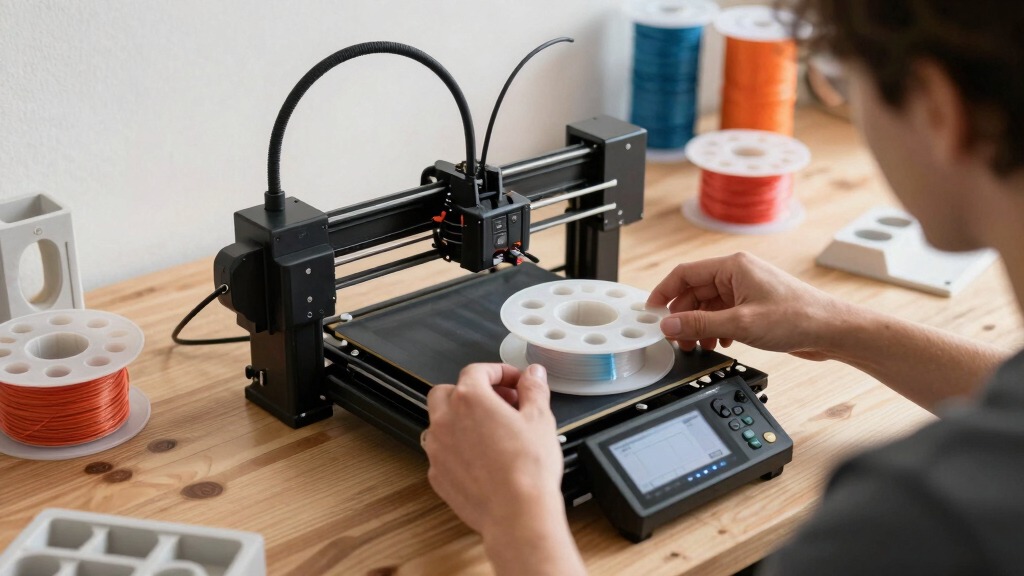
Choosing the best 3D printer for small batch production involves balancing quality, speed, and versatility. The Bambu Lab P1S stands out as the overall best for its reliable performance and user-friendly setup. The FLASHFORGE Adventurer 5M Pro offers excellent automation, reducing manual work, while the Creality Ender 3 V3 Plus provides a large build volume at an accessible price. These options reflect the common tradeoff: higher-end models deliver better consistency and speed but come at a higher cost, while budget-friendly units may require more maintenance or calibration. Continue reading for a detailed breakdown of each choice and how they compare for small batch production needs.

Get business pricing on tools and workshop supplies
- Business-only prices and quantity discounts
- Tax-exempt purchasing
- Multiple users, one account, clear invoices
Complete the kit


Key Takeaways
- The top-ranked printers balance speed, build volume, and ease of use, making them suitable for small batch runs without excessive complexity.
- Automation features like auto-leveling and multi-material capabilities are game-changers for reducing manual intervention and increasing productivity.
- Price often correlates with advanced features—higher upfront costs tend to offer better reliability and lower ongoing maintenance.
- Build volume remains a critical factor; larger sizes enable more diverse projects but may compromise speed or precision.
- Compatibility and support matter; brands with strong ecosystems and good customer service reduce downtime and frustration.
| Bambu Lab P1S 3D Printer, Ready-to-Use FDM 3D Printer |  | Best Overall for Versatile Small Batch Production | Product Dimensions: 15.31 x 18.03 x 15.31 inches | Item Weight: 38.9 pounds | VIEW LATEST PRICE | See Our Full Breakdown | |
| FLASHFORGE Adventurer 5M Pro 3D Printer with Auto Printing System |  | Best for High-Speed Home or Office Small Batch Production | Product Dimensions: 16 x 14 x 18 inches | Item Weight: 22 pounds | Max Nozzle Temperature: 280°C | VIEW LATEST PRICE | See Our Full Breakdown |
| FLASHFORGE Creator 5 Pro 4-Toolhead 3D Printer, Industrial Multi-Material & Color Printing |  | Best for Industrial-Grade Multi-Material Small Batch Production | Number of Toolheads: 4 | Heated Chamber Temperature: 65°C | Print Speed: 600mm/s | VIEW LATEST PRICE | See Our Full Breakdown |
| Bambu Lab A1 3D Printer, Ready-to-Use FDM 3D Printer for Beginners and Kids |  | Best for Beginners and Small Educational Batches | Product Dimensions: 21.76 x 20.83 x 12.87 inches | Item Weight: 22 pounds | VIEW LATEST PRICE | See Our Full Breakdown | |
| Creality Ender 3 V3 SE 3D Printer with 2kg PLA Filament Bundle |  | Best Budget-Friendly Choice for Small Batch Production | Print Speed: up to 250mm/s | Acceleration: 2500mm/s² | Build Volume: not specified | VIEW LATEST PRICE | See Our Full Breakdown |
| Creality Ender 3 V3 Plus 3D Printer, CoreXZ 600mm/s High-Speed Auto Leveling Direct Drive Extruder, Large Print Size 11.8×11.8×13.0in |  | Best Overall for Large-Scale Small Batch Production | Build Volume: 11.8×11.8×13.0 inches | Max Printing Speed: 600mm/s | Auto Leveling: Yes | VIEW LATEST PRICE | See Our Full Breakdown |
| Snapmaker U1 3D Printer, 4-Toolhead with 5s Toolchanger, Multi-Color Printing |  | Best for Multi-Color, Multi-Material Small Batch Production | Toolhead System: 4-toolhead with 5s tool changer | Build Volume: 270 x 270 x 270 mm | Print Speed: Up to 500 mm/s | VIEW LATEST PRICE | See Our Full Breakdown |
| Creality Ender 3 V3 SE 3D Printer Bundle with 4 Packs of PLA Filament (Black, White, Red, Blue) |  | Best Budget-Friendly, Fast, Reliable for Small Batch Production | Maximum Printing Speed: 250mm/s | Extruder: “Sprite” dual-gear | Auto Leveling: CR Touch | VIEW LATEST PRICE | See Our Full Breakdown |
| Bambu Lab P2S Combo, P2S 3D Printer & AMS 2 Pro, Multi-Color 3D Printing |  | Best for High-Speed, Multi-Color, Multi-Material Production | Print Speed: Up to 600 mm/s | Automatic Calibration: Yes | Filament Drying: Built-in | VIEW LATEST PRICE | See Our Full Breakdown |
| 3d printer for small batch production | Print Speed | Build Volume |
|---|---|---|
| Bambu Lab P1S 3D Printer | up to 500mm/s | not specified |
| FLASHFORGE Adventurer 5M Pro 3 | up to 600mm/s | 220 x 220 x 220 mm |
| FLASHFORGE Creator 5 Pro 4-Too | 600mm/s | — |
| Bambu Lab A1 3D Printer | up to 10,000 mm/s² acceleration | — |
| Creality Ender 3 V3 SE 3D Prin | up to 250mm/s | not specified |
| Creality Ender 3 V3 Plus 3D Pr | — | 11.8×11.8×13.0 inches |
| Snapmaker U1 3D Printer | Up to 500 mm/s | 270 x 270 x 270 mm |
| Creality Ender 3 V3 SE 3D Prin | — | Optional, based on model but typically around 220x220x250mm |
| Bambu Lab P2S Combo | Up to 600 mm/s | — |
More Details on Our Top Picks
Bambu Lab P1S 3D Printer, Ready-to-Use FDM 3D Printer
The Bambu Lab P1S stands out for its multi-color and multi-material capabilities, making it a top choice for those who want to produce complex, multi-color prototypes or small batches with high quality. Compared to the Bambu Lab A1, it offers faster speeds and an enclosed design, which benefits print consistency and safety. However, its reliance on the Bambu Lab AMS for multi-color printing introduces extra cost and setup steps. This model is ideal for users seeking a ready-to-use, high-speed printer that can handle a variety of filament types but are okay with some limitations on filament compatibility and multi-color process complexity.
Pros:- Vibrant multi-color/multi-material printing capabilities
- High-speed printing up to 500mm/s
- Automatic bed leveling for quick setup
- Enclosed design enhances print quality and safety
Cons:- Requires connection to Bambu Lab AMS for multi-color printing
- Supports limited filament types, not suitable for carbon/glass fiber composites
Best for: Small businesses or advanced hobbyists needing reliable, multi-material, multi-color production in a compact, enclosed system
Not ideal for: Casual hobbyists or those on a tight budget who prefer open-frame printers with broader filament support without extra accessories
- Product Dimensions:15.31 x 18.03 x 15.31 inches
- Item Weight:38.9 pounds
- First Available:August 15, 2025
- Print Speed:up to 500mm/s
- Build Volume:not specified
Our verdict“This printer suits users who need fast, multi-material small batch production with minimal setup, tolerating some filament restrictions.”
FLASHFORGE Adventurer 5M Pro 3D Printer with Auto Printing System
The FLASHFORGE Adventurer 5M Pro excels at rapid, precise printing with speeds reaching 600mm/s, making it a strong contender for quick turnaround small batches. Its auto-leveling and quick-release nozzles simplify setup, which is a notable advantage over the Bambu Lab A1 for ease of use. However, some users report calibration issues, and the build volume is somewhat limited, which might restrict larger projects or multiple small batches at once. This model is perfect for those who prioritize speed and quiet operation, especially in a home or office environment, but it’s less suited for larger-scale or multi-material demanding jobs.
Pros:- High-speed printing up to 600mm/s with excellent surface finishes
- Quick-release nozzles and auto-leveling for fast setup
- Quiet operation suitable for shared spaces
- Supports multiple engineering filaments including ABS and PETG
Cons:- Some calibration issues reported by users
- Limited build volume for larger batches
- Higher price point for casual users
Best for: Small-scale production teams or professionals needing quick turnaround prototypes with engineering-grade materials in a quiet setting
Not ideal for: Hobbyists or small businesses requiring large build volumes or extensive multi-material capabilities without calibration concerns
- Product Dimensions:16 x 14 x 18 inches
- Item Weight:22 pounds
- Max Nozzle Temperature:280°C
- Heated Bed Temperature:110°C
- Print Speed:up to 600mm/s
- Build Volume:220 x 220 x 220 mm
Our verdict“This printer is a smart choice for those needing rapid, high-quality small batches in a quiet environment but may require technical adjustments for optimal performance.”
FLASHFORGE Creator 5 Pro 4-Toolhead 3D Printer, Industrial Multi-Material & Color Printing
The FLASHFORGE Creator 5 Pro is engineered for demanding applications, featuring four independent toolheads and a heated chamber up to 65°C for multi-material, multi-color, high-speed production. Compared to the Bambu Lab P1S, it offers greater material flexibility and faster multi-color printing with minimal waste. Its complex setup and larger footprint are tradeoffs, making it less suitable for casual or small hobbyist use. This printer is best for industrial environments or professional settings where multi-material, multi-color, and high-speed precision are essential, and users have the technical skills or space to manage its complexity.
Pros:- Fast multi-color and multi-material printing with four independent toolheads
- Supports industrial-grade filaments like ABS, PC, PA
- Active heated chamber for better layer adhesion
- High-speed, accurate printing up to 600mm/s
Cons:- Complex setup requiring technical knowledge
- Higher price and larger size limit portability
- Bulkier design needs ample space
Best for: Industrial or professional teams needing multi-material, multi-color small batch runs with high speed and precision
Not ideal for: Hobbyists or small offices without the space or technical expertise to handle its setup and operational complexity
- Number of Toolheads:4
- Heated Chamber Temperature:65°C
- Print Speed:600mm/s
- Filament Compatibility:ABS, PC, PA
- Features:Active heated chamber, multi-material, rapid toolhead swapping
Our verdict“This printer is designed for professional environments requiring high throughput, multi-material versatility, and speed, but demands technical skill and space.”
Bambu Lab A1 3D Printer, Ready-to-Use FDM 3D Printer for Beginners and Kids
The Bambu Lab A1 shines as an accessible, high-speed 3D printer tailored for newcomers and educational settings, with automatic calibration and active flow rate compensation simplifying operation. It supports multi-color printing via AMS lite, which makes it ideal for small, colorful projects. While it offers impressive speed and quiet operation, the need for an extra purchase of AMS lite and potential setup complexity may challenge complete beginners. Compared to the Bambu Lab P1S, it is more beginner-friendly but slightly less versatile in multi-material capacity. This pick makes sense for schools or families focusing on straightforward, multi-color batch runs without extensive technical fuss.
Pros:- High-speed, precise printing up to 10,000 mm/s² acceleration
- Automatic full-auto calibration simplifies setup
- Supports multi-color printing with AMS lite
- Quiet operation with motor noise canceling
Cons:- Requires additional purchase of AMS lite for multi-color
- Setup might be complex for absolute beginners
- Limited build volume
Best for: Educational institutions, families, or beginners wanting easy multi-color printing for small projects
Not ideal for: Advanced users or small batch producers requiring multi-material capabilities or larger volumes without extra accessories
- Product Dimensions:21.76 x 20.83 x 12.87 inches
- Item Weight:22 pounds
- Print Speed:up to 10,000 mm/s² acceleration
Our verdict“This printer is perfect for beginners or educational use, offering speed and multi-color capabilities but requires extra accessories for full multi-color functionality.”
Creality Ender 3 V3 SE 3D Printer with 2kg PLA Filament Bundle
The Creality Ender 3 V3 SE offers a compelling mix of speed, reliability, and value, with a top speed of 250mm/s and auto-leveling via CR Touch, making it suitable for consistent small batch runs. Its straightforward design and included 2kg filament bundle lower the entry barrier for newcomers, while its open-frame design and less advanced features position it as a budget-friendly option. Compared to the Bambu Lab P1S, it lacks multi-material support and high-speed capabilities but compensates with affordability and simplicity. This model is best suited for hobbyists or small-scale producers prioritizing ease of assembly and cost over advanced multi-material features.
Pros:- High-speed printing up to 250mm/s
- Auto leveling with CR Touch for hassle-free setup
- Includes 2kg filament bundle for immediate use
- Easy assembly in about 20 minutes
Cons:- Build volume details are not specified
- Limited advanced features for multi-material or multi-color printing
- No enclosed design for noise reduction
Best for: Hobbyists or small businesses starting out with small batch production needing reliable, straightforward printing
Not ideal for: Pro users or those requiring multi-material or multi-color complex production, due to limited features
- Print Speed:up to 250mm/s
- Acceleration:2500mm/s²
- Build Volume:not specified
- Auto Leveling:Yes, CR Touch
- Filament Compatibility:PLA, PETG, TPU
- Assembly Time:about 20 minutes
Our verdict“This printer offers reliable, fast printing for small batch needs at an accessible price point, ideal for newcomers or hobbyists with moderate production demands.”
Creality Ender 3 V3 Plus 3D Printer, CoreXZ 600mm/s High-Speed Auto Leveling Direct Drive Extruder, Large Print Size 11.8×11.8×13.0in
The Creality Ender 3 V3 Plus stands out for its expansive build volume and blazing print speeds, making it ideal for small batches that need quick turnaround. Unlike the Ender 3 V3 SE, which is more suited for hobbyists with smaller projects, this model supports larger prototypes with minimal compromise on speed. The auto-leveling feature and sturdy direct drive extruder ensure precise results, even on bigger prints. However, its high maximum speed can lead to calibration challenges and potential print artifacts if not carefully managed—something less of a concern on the more modest Ender 3 V3 SE. This machine makes the most sense for startups or small businesses looking to scale production without sacrificing quality or speed, provided they’re comfortable with a steeper learning curve.
Pros:- Enormous build volume ideal for big batches
- Supports ultra-fast printing up to 600mm/s
- Auto-leveling and quick assembly simplify initial setup
- Durable tri-metal nozzle for long-term reliability
Cons:- High speed demands precise calibration to avoid print quality issues
- Steeper learning curve due to advanced features
Best for: Small manufacturing businesses or prototype developers needing large, fast productions
Not ideal for: Beginners or hobbyists working on small, intricate models due to setup complexity
- Build Volume:11.8×11.8×13.0 inches
- Max Printing Speed:600mm/s
- Auto Leveling:Yes
- Nozzle Type:Tri-metal
- Extruder:Direct drive
- Frame Material:Metal
- Z-axis:Precision optical shaft with synchronous belt
- Y-axis Motors:Two 500mN.m motors
Our verdict“This printer is best suited for experienced users needing large, fast-turnaround production runs without sacrificing detail.”
Snapmaker U1 3D Printer, 4-Toolhead with 5s Toolchanger, Multi-Color Printing
The Snapmaker U1 excels at producing multi-color and multi-material prototypes thanks to its innovative four-toolhead system and rapid 5-second tool changer. Compared with the Bambu Lab P2S, which offers faster speeds but less multi-color flexibility on a single print, the U1’s modular tool system makes complex multi-material projects more straightforward. Its high-speed CoreXY system ensures stable, accurate prints across different materials like PLA, ABS, and TPU. That said, its setup can be complex for newcomers, and the limited build volume restricts larger batch projects. This pick makes the most sense for creative teams or small studios that require versatile, multi-color outputs in a relatively compact form, willing to invest time into setup and calibration.
Pros:- Rapid 5-second automatic tool changing reduces downtime
- Supports multi-material and multi-color printing with minimal waste
- High-speed, stable CoreXY system for precise results
- User-friendly touchscreen and smart calibration
Cons:- Complex setup and calibration may challenge beginners
- Higher price point limits accessibility for casual users
- Build volume is moderate, restricting large batch capacity
Best for: Designers and small studios needing multi-color, multi-material prototypes
Not ideal for: Hobbyists seeking simple, single-material printing or larger batch production
- Toolhead System:4-toolhead with 5s tool changer
- Build Volume:270 x 270 x 270 mm
- Print Speed:Up to 500 mm/s
- Supported Materials:PLA, PVA, TPU, PETG, PCTG, ABS, ASA, PA, PC
- Calibration:Automatic toolhead offset calibration
- Display:3.5-inch touchscreen
Our verdict“This printer is ideal for creative teams and professionals prioritizing multi-material and multi-color prototypes in a compact, efficient package.”
Creality Ender 3 V3 SE 3D Printer Bundle with 4 Packs of PLA Filament (Black, White, Red, Blue)
The Ender 3 V3 SE Bundle delivers dependable, high-speed printing focused on efficiency and ease of use. With a maximum speed of 250mm/s, it’s a step below the ultra-fast Ender 3 V3 Plus but remains more than capable for small batch runs requiring rapid turnaround. The upgraded “Sprite” direct extruder and CR Touch auto bed leveling provide consistent results and simplified setup, compared to the more complex features of the Ender 3 V3 Plus. Its dual Z-axis improves stability, but its speed is still limited relative to the larger model, making it less suitable for very large or intricate projects that demand higher speeds or volume. This bundle is perfect for budget-conscious users who want reliable, quick prints with minimal fuss.
Pros:- Affordable price point with included filament packs
- Fast, stable printing with auto bed leveling
- Upgraded “Sprite” extruder for consistent extrusion
- Dual Z-axis for improved print stability
Cons:- Limited to PLA filament, restricting material versatility
- Speed capped at 250mm/s, slower than high-end models
- Setup can be complex for complete beginners
Best for: Small businesses or hobbyists needing a reliable, fast printer with basic multi-color capability
Not ideal for: Users requiring multi-material or multi-color complex prints beyond PLA, or larger batch production
- Maximum Printing Speed:250mm/s
- Extruder:“Sprite” dual-gear
- Auto Leveling:CR Touch
- Z-axis:Dual lead screws
- Filament:4 packs of PLA (Black, White, Red, Blue)
- Build Volume:Optional, based on model but typically around 220x220x250mm
Our verdict“This bundle offers a balanced mix of speed, reliability, and affordability for small batch runs with PLA, ideal for users starting out or on a budget.”
Bambu Lab P2S Combo, P2S 3D Printer & AMS 2 Pro, Multi-Color 3D Printing
The Bambu Lab P2S Combo offers exceptional speed and multi-material capabilities, making it ideal for complex small batch production. Its speeds reach 600mm/s, matching the Ender 3 V3 Plus’s high throughput, while the AMS 2 Pro automatically manages filament switching and drying, streamlining multi-color, multi-material projects. Compared to the Snapmaker U1, which requires more manual setup for multi-material work, the P2S provides a more integrated workflow suitable for busy production environments. Although it’s heavy and carries a learning curve, its quick calibration and reliable multi-material support make it a standout for professional use. This model is best for experienced users or teams needing rapid, multi-color runs with minimal fuss.
Pros:- High-speed printing up to 600 mm/s for rapid batch production
- Automatic calibration and filament management reduce manual effort
- Supports multi-color and multi-material printing with AMS 2 Pro
- Built-in filament drying and smart airflow improve print quality
Cons:- Heavy weight affects portability and setup flexibility
- Complex features require a learning curve for new users
- Multi-color printing on the P2S (single unit) isn’t supported without the Combo setup
Best for: Industrial or professional small batch producers needing quick multi-material, multi-color outputs
Not ideal for: Hobbyists or newcomers seeking a simple, beginner-friendly system or single-material prints
- Print Speed:Up to 600 mm/s
- Automatic Calibration:Yes
- Filament Drying:Built-in
- Multi-Color Support:Yes (with AMS 2 Pro)
- Dimensions:18 x 22 x 18 inches
Our verdict“This printer is a top choice for experienced professionals requiring fast, multi-material small batch production with minimal manual intervention.”

How We Picked
The selection process focused on printers that excel in small batch production scenarios, emphasizing performance, reliability, and ease of operation. We evaluated build quality, print speed, material versatility, automation features, and ongoing maintenance. Cost-effectiveness was also a key factor—balancing feature set against price to identify options that deliver the best value. Each product was compared against real-world needs for small-scale manufacturing, ensuring they provide consistent results without overcomplicating setup or operation. The ranking reflects a combination of these factors, prioritizing printers that offer a practical edge for small batch workflows while being accessible to a broad user base.Factors to Consider When Choosing Best 3d Printer For Small Batch Production
When choosing the best 3D printer for small batch production, it’s essential to understand which features directly impact your workflow. Beyond initial cost, factors like build volume, print speed, material compatibility, and automation significantly influence productivity and quality. A careful assessment of these elements helps avoid common pitfalls such as underestimating the need for reliable calibration or overpaying for features that won’t be used often. The right choice depends on your specific production volume, material needs, and budget constraints. Here are key considerations to guide your decision-making process.Build Volume and Size
For small batch production, a larger build volume allows for creating multiple parts or bigger prototypes in a single run. However, bigger isn’t always better if it compromises speed or precision. Smaller printers excel in rapid turnaround and easier handling but limit the size of individual parts. Consider your typical project size and whether batching multiple items in one print enhances efficiency. Balance the need for capacity with your available workspace and workflow demands to find the optimal size.
Print Speed and Automation
Speed directly impacts how many batches you can produce within a timeframe, making faster printers appealing for consistent output. Automation features, such as auto-leveling, filament sensors, and multi-material changers, reduce manual intervention and decrease setup time, which is vital for small batch runs. However, these features often come at a premium, so weigh their benefits against your production volume and technical comfort level. Automating repetitive tasks can significantly improve overall throughput with less frustration.
Material Compatibility and Versatility
Flexibility in materials expands your design possibilities and allows for different product applications. Some printers support a broad range of filaments, including composites or specialty materials, while others are limited to standard plastics like PLA or ABS. If your batches involve multiple materials or specialized resins, prioritize a printer with multi-material support. That said, multi-material systems tend to be more complex and expensive to maintain, so match your choice to your actual production needs.
Ease of Use and Support
For small batch production, minimizing downtime is crucial, making user-friendly interfaces and reliable customer support valuable assets. Look for printers with straightforward setup, intuitive controls, and accessible maintenance procedures. Brands with active communities and solid technical support can save you time and money troubleshooting. Avoid overly complex models if your team lacks extensive 3D printing experience, unless you’re prepared for a steeper learning curve and ongoing investment in training.
Cost of Ownership and Upgrades
Initial purchase price is just part of the total cost. Consider ongoing expenses such as filament, replacement parts, and potential upgrades to improve performance. Cheaper models might require frequent calibration or component replacements, which add to costs over time. Investing in a more durable, upgradeable printer can lead to better reliability and lower long-term expenses. Evaluate whether the upfront investment aligns with your expected production volume and quality standards to avoid hidden costs later.
Frequently Asked Questions
How does build volume affect small batch production?
Build volume determines the maximum size of each part you can produce in a single print. For small batch production, a larger build volume allows multiple items to be printed simultaneously or larger prototypes to be created in one go, improving efficiency. However, larger builds often take longer and may require more precise calibration. If your products are small and numerous, a moderate build size that balances speed and capacity usually offers the best workflow without unnecessary delays.
Is automatic bed leveling worth the extra cost?
Automatic bed leveling can significantly reduce setup time and improve print quality consistency, especially for small batches where precision matters. It minimizes human error and ensures that each print starts with an even, well-calibrated bed surface. While it adds to the initial price, the time saved and the reduction in failed prints often justify the expense. For frequent small batch runs, automation can streamline your process and boost overall productivity.
Should I prioritize speed over build quality?
While faster print speeds can increase throughput, they sometimes compromise surface finish and dimensional accuracy. For small batch production, a balanced approach is ideal—speed should not come at the expense of quality. Look for printers that offer adjustable speed settings, allowing you to optimize the tradeoff based on project requirements. Consistent quality often leads to less rework and better customer satisfaction, making it a wise priority.
What materials should I consider for small batch manufacturing?
Standard filaments like PLA and ABS are common choices for small batch production due to their ease of use and affordability. For more advanced applications, consider printers compatible with composites, flexible filaments, or specialty resins for higher durability or visual appeal. The material choice impacts the post-processing steps and mechanical properties of your parts, so select a printer that supports your desired materials without sacrificing print reliability.
How important is customer support and community for my 3D printer?
Strong customer support and an active user community can make a significant difference in your printing experience. Reliable support helps troubleshoot issues quickly, reducing downtime, especially during critical production runs. An engaged community provides shared solutions, upgrades, and advice that can extend your printer’s lifespan and improve your results. For small batch production, choosing a reputable brand with these resources can save time and avoid costly delays.