
Finding the best cutting machine for custom gift tags involves balancing precision, ease of use, and versatility. The Silhouette Cameo 5 Alpha stands out as the overall best for detailed designs, thanks to its advanced features and customization options. For simpler projects, the Cricut Joy offers a compact, user-friendly experience, making it ideal for beginners. Meanwhile, the Brother ScanNCut DX provides built-in scanning capabilities, perfect for those who want to incorporate personalized images into their tags. Each option presents tradeoffs: some excel in detail, others in simplicity or multifunctionality. Continue reading to see how these and other models stack up for creating stunning, custom gift tags.
Key Takeaways
- The top-ranked machines balance precision cutting with user-friendly features, making them suitable for a range of skill levels.
- More advanced models like the Silhouette Cameo 5 Alpha excel in detailed design customization but come with a higher price tag.
- Compact and beginner-friendly options such as Cricut Joy are perfect for quick projects but may lack some advanced features.
- Built-in scanning and versatile media compatibility are key factors that set premium models apart from basic cutters.
- Tradeoffs often involve choosing between ease of use, design complexity, and budget constraints.
| Silhouette Cameo 5 Alpha (α) Smart Cutting Machine – Matte Pink |  | Best Overall for Precision and Versatility | Color: Matte Pink | Cutting Speed: Up to 400mm/s | Maximum Material Thickness: 3mm | VIEW LATEST PRICE | See Our Full Breakdown |
| Brother ScanNCut DX SDX325 Electronic Cutting Machine |  | Best for Built-in Design Library and Scanning | Built-in Designs: 1,303 | Blade Sensor Thickness: Up to 3mm | Display Size: 5″ LCD touchscreen | VIEW LATEST PRICE | See Our Full Breakdown |
| Cricut Joy Machine & Digital Content Library Bundle |  | Best for Portability and Ease of Use | Weight: 3.9 lbs | Material Compatibility: 50+ materials | Cutting Length: Up to 4 ft | VIEW LATEST PRICE | See Our Full Breakdown |
| TEEAOE Ribbon Cutting Machine with Dual Tape Cutting and Memory Function |  | Best for Ribbon and Gift Wrap Customization | Tape Width Support: 6-60mm | Cut Length Range: 5-999mm | Modes: Auto, Manual, Continuous | VIEW LATEST PRICE | See Our Full Breakdown |
| Cricut Joy Xtra Smart Cutting Machine |  | Best for Endless Personalization and Inkjet Compatibility | Supported Materials: 50+ | Compatibility: Print-Then-Cut, vinyl, cardstock | Design Software: Design Space | VIEW LATEST PRICE | See Our Full Breakdown |
| Cricut Joy Craft Cutting Machine Bundle with Vinyl, Mats & Tools |  | Best Compact and User-Friendly for Beginners | Dimensions: 8.4″ x 4.25″ x 5.5″ | Connectivity: Bluetooth | Included Materials: Smart Vinyl Roll, Cutting Mats, Tool Set, Digital Guide | VIEW LATEST PRICE | See Our Full Breakdown |
| Cricut Maker 4 Starter Kit for Beginners – Smart Cutting Machine with Vinyl & Iron-On (HTV), Tools & Materials for Stickers, Shirts & DIY Crafts |  | Best All-in-One Starter for Versatile Projects | VIEW LATEST PRICE | See Our Full Breakdown | |||
| Brother ScanNCut SDX125E Electronic DIY Cutting Machine with Scanner |  | Best for Custom Designs with Built-In Scanning | Cutting Thickness: 3mm | Material Types: Paper, vinyl, fabric, balsa wood, chipboard, foam, felt | Included Designs: 682 | VIEW LATEST PRICE | See Our Full Breakdown |
| Likcut Glee S501 Vinyl Cutter Machine – Portable Smart Cutting Tool for DIY Crafts | 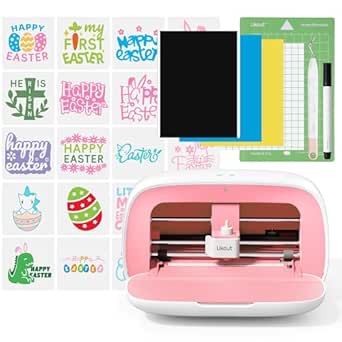 | Best for On-the-Go Crafting and Small Projects | Material Compatibility: 46+ materials | Cutting Width: 4.5 inches | Included Components: Vinyl, Adapter, USB C, Pen | VIEW LATEST PRICE | See Our Full Breakdown |
| Fiskars Precision Paper Trimmer |  | Best for Precise, Straight Cuts on Paper | Blade Type: Stainless steel wire | Cutting Arm Length: 15.6 inches | Weight Class: Lightweight | VIEW LATEST PRICE | See Our Full Breakdown |
| Cricut Explore 4 Machine with Vinyl and Iron-On Bundle – Beginner Friendly Craft Cutting Machine with Essential Materials, HTV and Adhesive Vinyl Variety Pack- DIY Decor Projects, Apparel and Decals |  | Best Overall for Versatile Crafting Beginners | Cutting Speed: Up to 2X faster than previous models | Materials Compatible: 100+ including paper, vinyl, iron-on, felt | Included Materials: Vinyl and iron-on sheets | VIEW LATEST PRICE | See Our Full Breakdown |
| Spellbinders T-066 Guillotine Paper Trimmer |  | Best for Precise Manual Cutting of Gift Tags | Cutting Area: 8.50 x 6.25 inches | Measurement Units: Imperial and metric | Blade Type: Guillotine | VIEW LATEST PRICE | See Our Full Breakdown |
| Fiskars Standard Tag Maker with Built-in Eyelet Setter |  | Best for Quick, Manual Tag Production with Eyelet Finishing | Tag Size: 2″ x 3″ | Cardstock Capacity: Up to 80-lb | Eyelets Included: 20 (3/16″) | VIEW LATEST PRICE | See Our Full Breakdown |
More Details on Our Top Picks
Silhouette Cameo 5 Alpha (α) Smart Cutting Machine – Matte Pink
The Silhouette Cameo 5 Alpha stands out for its exceptional cutting accuracy, thanks to a 4-point registration system that ensures flawless results on vinyl, paper, and fabric. Its Fast Sketch Mode accelerates design creation, making it suitable for those who need quick turnaround times. Compared with the Cricut Joy, this model offers more material versatility and higher precision, but comes with a higher price and a steeper learning curve, especially with its advanced software.
This pick makes the most sense for crafters who demand professional-quality tags and are willing to invest time in mastering its features.
Pros:- High-precision cutting with registration system
- Fast Sketch Mode for rapid design workflow
- Ultra-quiet operation suitable for shared spaces
- Supports materials up to 3mm thick
Cons:- Requires a learning curve for software features
- Premium price point may be prohibitive for casual users
Best for: Experienced hobbyists or small business owners who need detailed, high-precision cuts on various materials.
Not ideal for: Casual crafters or beginners seeking an easy, plug-and-play machine without a learning curve.
- Color:Matte Pink
- Cutting Speed:Up to 400mm/s
- Maximum Material Thickness:3mm
- Included Software:Studio Software
- Key Features:AutoBlade, Fast Sketch Mode, IPT, 4-point Registration
Bottom line: This machine is ideal for users who prioritize accuracy and versatility over simplicity and cost.
Brother ScanNCut DX SDX325 Electronic Cutting Machine
The Brother ScanNCut DX SDX325 offers an impressive 1,303 built-in designs, including quilt patterns and fonts, making it ideal for those who want a wide array of ready-made options without needing external design files. Its Blade Sensor Technology ensures precise cuts up to 3mm thick, comparable to the Silhouette Cameo but with the added benefit of on-board scanning for creating custom designs directly from images. While the touchscreen interface simplifies editing, the machine’s price and complexity may be overwhelming for casual users.
This is better suited for crafters who value automatic design and scanning capabilities for creating intricate gift tags and personalized projects.
Pros:- Large library of 1,303 designs
- Built-in scanning for custom image creation
- Wireless connectivity for easy file transfer
- User-friendly 5″ LCD touchscreen
Cons:- Higher price point than basic models
- Steeper learning curve for full functionality
Best for: Serious hobbyists or small-scale crafters who want built-in design flexibility and scanning features.
Not ideal for: Beginners or those on a tight budget who prefer simple, manual cutters without advanced tech.
- Built-in Designs:1,303
- Blade Sensor Thickness:Up to 3mm
- Display Size:5″ LCD touchscreen
- Wireless Connectivity:Yes
- Supported Materials:Vinyl, fabric, paper
Bottom line: This machine is perfect for those who want extensive design options and scanning ability for creating detailed gift tags.
Cricut Joy Machine & Digital Content Library Bundle
The Cricut Joy makes a compelling choice for crafters who need portability and quick setup. Weighing just 3.9 lbs, it’s perfect for on-the-go projects, especially with its ability to cut over 50 materials including vinyl and cardstock. The app-based Design Space simplifies the process, and with access to a vast library of 30 free images, it caters well to beginners and casual users. However, its limited width of approximately 4 feet and simpler feature set mean it can’t handle larger or more complex projects like the Silhouette Cameo or Brother ScanNCut.
This machine makes the most sense for hobbyists interested in personalized gift tags on small-scale projects without a steep learning curve.
Pros:- Lightweight and portable design
- Easy app-based setup and operation
- Cuts 50+ materials including vinyl and cardstock
- Includes a library of 30 free images
Cons:- Limited cutting width (~4 feet)
- Less suitable for large or complex projects
- Requires internet connection for full functionality
Best for: Beginners or crafters who prioritize portability and straightforward operation for small decor and gift tags.
Not ideal for: Experienced users or those needing larger cutting areas and advanced features.
- Weight:3.9 lbs
- Material Compatibility:50+ materials
- Cutting Length:Up to 4 ft
- Connectivity:Bluetooth
- Included Content:30 images
Bottom line: This compact cutter is ideal for beginners and on-the-move crafters focused on small, personalized gift tags.
TEEAOE Ribbon Cutting Machine with Dual Tape Cutting and Memory Function
The TEEAOE Ribbon Cutting Machine excels in cutting dual ribbons simultaneously, supporting widths from 6 to 60mm and lengths up to 999mm, making it highly efficient for gift wrapping and packaging. Its memory function allows storing six custom lengths, speeding up repetitive tasks. While this machine offers automatic and manual modes with safety sensors for jam prevention, its focus on ribbons and tape limits its versatility for paper or vinyl cutting compared to dedicated craft cutters. The lack of detailed specs and higher price point may be a consideration for some.
This pick makes sense for those primarily creating ribbons and custom packaging elements, especially in workshops or gift shops.
Pros:- Supports dual tape cutting simultaneously
- Stores up to six custom lengths
- Automatic and manual modes for flexibility
- Safety jam sensor prevents damage
Cons:- Limited to tape and ribbon, not suitable for paper or vinyl
- No detailed specs or price info available
Best for: Gift wrap specialists or small business owners who need efficient ribbon cutting with custom length memory.
Not ideal for: Crafters seeking a versatile cutter for paper, vinyl, or detailed gift tags, as this is specialized for ribbons.
- Tape Width Support:6-60mm
- Cut Length Range:5-999mm
- Modes:Auto, Manual, Continuous
- Memory Slots:6
- Safety Features:Jam sensor
Bottom line: This machine is best suited for professionals focused on ribbon and gift wrap creation, not general craft projects.
Cricut Joy Xtra Smart Cutting Machine
The Cricut Joy Xtra expands creative possibilities by cutting over 50 materials and offering Print-Then-Cut capabilities for full-color designs, making it ideal for vibrant, customized gift tags. Its compatibility with inkjet printers allows for creating stickers and complex designs without external software, unlike the Silhouette Cameo. The machine’s easy-to-use Design Space software and extensive free content library make it approachable for beginners, but its smaller cutting area and focus on simple projects may limit larger or more intricate designs. Compared to the Silhouette Cameo, it’s more intuitive but less versatile for detailed, multi-layered tags.
This makes the most sense for hobbyists wanting quick, colorful tags and a straightforward workflow.
Pros:- Supports 50+ materials including vinyl and cardstock
- Print-Then-Cut feature for full-color designs
- Easy to set up and use
- Access to large content library
Cons:- Limited cutting area for large projects
- Less suited for complex, multi-layered tags
- Requires inkjet printer for full-color designs
Best for: Beginners and casual crafters looking for a simple, versatile machine with printing capabilities.
Not ideal for: Advanced users requiring large-scale, multi-layered designs or extensive material support beyond basic crafts.
- Supported Materials:50+
- Compatibility:Print-Then-Cut, vinyl, cardstock
- Design Software:Design Space
- Cutting Width:Approximately 4 ft
- Connectivity:Wireless Bluetooth
Bottom line: This cutter is best for those seeking vibrant, personalized tags with minimal complexity and easy printing integration.
Cricut Joy Craft Cutting Machine Bundle with Vinyl, Mats & Tools
The Cricut Joy stands out for its small footprint and ease of use, making it ideal for those new to crafting or with limited space. Compared with larger machines like the Cricut Maker 4, it sacrifices some versatility and cutting capacity but excels in portability. Its Bluetooth connectivity and included digital guide allow for quick setup and straightforward design creation, perfect for quick gift tags. However, lacking a physical manual and not being compatible with Chromebooks might challenge tech-savvy users relying on offline workflows. This pick makes the most sense for casual crafters or small-space hobbyists who want a reliable starter machine without the bulk.
Pros:- Compact and portable design fits easily on small workspaces
- Includes essential materials and a digital guide for quick start
- Bluetooth connectivity simplifies setup and use
Cons:- No physical manual, relying solely on digital instructions
- Requires compatible iOS or Android device; not Chromebook-compatible
Best for: Beginners or crafters with limited space seeking an easy-to-use, all-in-one starter machine
Not ideal for: Experienced users or small businesses needing high-volume or complex cutting features
- Dimensions:8.4″ x 4.25″ x 5.5″
- Connectivity:Bluetooth
- Included Materials:Smart Vinyl Roll, Cutting Mats, Tool Set, Digital Guide
- Warranty:12-month manufacturer warranty
- Compatibility:iOS/Android (not Chromebook)
Bottom line: This machine is perfect for newcomers or casual users who prioritize simplicity and portability over advanced features.
Cricut Maker 4 Starter Kit for Beginners – Smart Cutting Machine with Vinyl & Iron-On (HTV), Tools & Materials for Stickers, Shirts & DIY Crafts
The Cricut Maker 4 Starter Kit is designed for those who want to explore various materials and craft styles right out of the box. Compared to the Brother ScanNCut SDX125E, it offers a more intuitive digital design experience and a broader range of compatible materials, though it may lack the built-in scanner’s direct drawing-to-cut feature. Its included tools, vinyl, and iron-on materials make it easy to create everything from stickers to custom apparel. The main tradeoff is that it’s bulkier and requires a bit more space and setup time than smaller devices but compensates with greater versatility. It’s ideal for hobbyists eager to experiment with multiple craft types without investing in separate machines.
Pros:- All-in-one kit with tools, vinyl, and iron-on materials included
- User-friendly setup with Cricut Design Space and guides
- Capable of creating stickers, shirts, cards, and more
Cons:- Larger footprint requiring more workspace
- Higher price point compared to basic models
Best for: Beginners wanting a versatile machine that can handle a wide array of craft projects from stickers to apparel
Not ideal for: Crafters seeking a compact, space-saving device solely for simple gift tags
Bottom line: This machine is best for beginners wanting an expandable, multi-material crafting experience without complicated setup.
Brother ScanNCut SDX125E Electronic DIY Cutting Machine with Scanner
The Brother ScanNCut SDX125E appeals to users who want to turn their own drawings into cut files, a feature that sets it apart from the primarily design-based Cricut models. Its built-in scanner and 682 included designs make it a powerful tool for personalized gift tags, especially for those who enjoy customizing their designs. However, its reliance on trial cuts and the need to test for accurate material settings can slow down workflow. Additionally, the 120V power requirement limits use outside the US. Compared to the Cricut options, this device emphasizes customization and precision, but with a steeper learning curve and slightly more complex operation, making it better suited for dedicated hobbyists or small-scale crafters.
Pros:- Built-in scanner converts hand-drawn designs directly into cut files
- Automatic material detection reduces blade adjustments
- Includes a large library of 682 designs
Cons:- Limited to US voltage; not compatible internationally
- Requires testing for material-specific settings
Best for: Crafters who want to incorporate custom artwork and drawings into their gift tags
Not ideal for: Users who prioritize quick, simple cuts or need portability due to its bulk
- Cutting Thickness:3mm
- Material Types:Paper, vinyl, fabric, balsa wood, chipboard, foam, felt
- Included Designs:682
- Screen Size:5″ touchscreen LCD
Bottom line: Ideal for creative crafters focused on personalized designs and custom artwork integration.
Likcut Glee S501 Vinyl Cutter Machine – Portable Smart Cutting Tool for DIY Crafts
The Likcut Glee S501 offers a compact, portable solution that emphasizes mobility and ease of use. Its ability to cut over 46 materials, including vinyl and cardstock, makes it versatile for small custom gift tags and labels. The device’s AI-enhanced precision and compatibility with mobile apps give it an edge for craft enthusiasts who want to craft anywhere, anytime. However, its limited 4.5-inch cutting width restricts larger projects, and the absence of print-and-cut functionality means it’s less suited for complex, multi-step designs. This model is best for hobbyists or small-scale crafters who need a lightweight, portable cutter for quick projects and labels.
Pros:- Cuts over 46 different materials with precision
- Lightweight and portable A5 size for easy transport
- AI-enhanced accuracy with app integration
Cons:- Limited to 4.5-inch cutting width
- No print-and-cut capabilities for complex designs
Best for: Craft lovers needing a portable, easy-to-use cutter for small custom tags and labels
Not ideal for: Users requiring larger cuts or batch production of gift tags
- Material Compatibility:46+ materials
- Cutting Width:4.5 inches
- Included Components:Vinyl, Adapter, USB C, Pen
- Item Height:11.5 cm
- Weight Class:Lightweight
Bottom line: This cutter is perfect for mobile crafters and small projects, but not for high-volume or larger tag production.
Fiskars Precision Paper Trimmer
The Fiskars Precision Paper Trimmer excels at delivering clean, straight cuts essential for professional-looking gift tags. Its stainless steel wire cut-line and triple-track system prevent wobbly, uneven results, especially when working with multiple sheets. While it isn’t a cutting machine that handles vinyl or thicker materials, its extendable 15.6-inch arm offers versatility for various paper sizes. Compared with electronic cutters, it provides unmatched precision for cutting paper and light cardstock, but lacks the ability to handle other materials or intricate shapes. This makes it the best choice for those who prioritize crisp, precise cuts on paper-based tags and labels.
Pros:- Ensures precise, straight cuts with SureCut technology
- Stable triple-track system prevents curved or uneven cuts
- Easy blade swapping for different cut styles
Cons:- Limited to paper and light materials only
- Higher price compared to basic manual trimmers
Best for: Crafters and small business owners focused on perfecting paper gift tags and labels
Not ideal for: Those needing to cut thicker materials or create complex shapes with a machine
- Blade Type:Stainless steel wire
- Cutting Arm Length:15.6 inches
- Weight Class:Lightweight
Bottom line: This trimmer is ideal for users who need accurate, clean cuts on paper-based gift tags and labels with minimal fuss.
Cricut Explore 4 Machine with Vinyl and Iron-On Bundle – Beginner Friendly Craft Cutting Machine with Essential Materials, HTV and Adhesive Vinyl Variety Pack- DIY Decor Projects, Apparel and Decals
The Cricut Explore 4 stands out for its speed and wide material compatibility, making it ideal for those just starting to craft custom gift tags. Compared with the Fiskars Tag Maker, which excels at simple tag production but lacks versatility, the Cricut offers more creative freedom with over 100 materials, including delicate paper, vinyl, and iron-on sheets. Its ability to cut up to twice as fast as previous Cricut models means faster workflow, though this comes with a steeper learning curve and higher initial cost. This machine is perfect for hobbyists eager to produce personalized tags, decals, and home decor with professional results, but less suited for those who prefer quick, straightforward tools without digital setup. The included bundle of vinyl and iron-on sheets helps new users jumpstart projects, and the digital guide offers comprehensive tutorials to ease the learning process.
Pros:- Cuts over 100 materials with precision, from paper to vinyl and fabric
- Faster cutting speeds improve workflow efficiency
- Includes essential materials and digital tutorials for beginners
- Works with additional blades and tools for advanced effects
Cons:- Higher price point and learning curve compared to manual options
- Requires digital setup and familiarity with design software
Best for: Beginners and DIY enthusiasts who want a flexible, high-quality machine for a variety of craft projects including gift tags.
Not ideal for: Crafters seeking a simple, manual tool with minimal setup and no digital components, like those who prefer quick, no-fuss tag making.
- Cutting Speed:Up to 2X faster than previous models
- Materials Compatible:100+ including paper, vinyl, iron-on, felt
- Included Materials:Vinyl and iron-on sheets
- Operation Mode:Digital with design software
- Size:5.9 inches tall
- Warranty:12 months
Bottom line: This pick makes the most sense for crafters who want a versatile, speed-boosted machine capable of producing professional-quality gift tags and DIY decor.
Spellbinders T-066 Guillotine Paper Trimmer
The Spellbinders Guillotine Paper Trimmer offers sharp, clean cuts perfect for making uniform gift tags, especially when precision is a priority. Unlike the Cricut Explore 4, which handles a broad range of materials, this trimmer specializes in cardstock, providing consistent 8.5 x 6.25-inch cuts with a finger guard for safety. Its measurement grids in both inches and centimeters ensure accurate sizing, but its manual operation means slower production and less flexibility for complex designs. This trimmer is ideal for crafters who prefer hands-on control and need perfectly aligned tags, but it’s less suitable for those wanting to create intricate or multi-layered designs without additional tools. Its sturdy build and clear guides make it a reliable choice for precise, small batch gift tag projects.
Pros:- Produces consistently clean, straight cuts on cardstock
- Measurement grids in both imperial and metric units for accuracy
- Finger guard enhances safety during use
- Compact size for easy storage
Cons:- Manual operation limits production speed
- Limited to straight cuts, not suitable for complex shapes or designs
Best for: Scrapbookers and small batch crafters who prioritize accuracy and clean cuts in cardstock gift tags.
Not ideal for: Large-scale or intricate design projects requiring detailed cuts or digital customization, like decals or multi-material tags.
- Cutting Area:8.50 x 6.25 inches
- Measurement Units:Imperial and metric
- Blade Type:Guillotine
- Safety Features:Finger guard
- Size:7.75 x 11 inches
- Material Capacity:Cardstock up to 80-lb
Bottom line: This trimmer is perfect for those who need precise, uniform tags from cardstock but don’t require digital or intricate cutting capabilities.
Fiskars Standard Tag Maker with Built-in Eyelet Setter
The Fiskars Tag Maker offers a straightforward way to produce personalized gift tags with a built-in eyelet setter, making it ideal for quick, manual projects. Compared to the Cricut Explore 4, which is more versatile but complex, this tool provides a simple lever system to punch and finish tags in a single step, perfect for small batches. It handles up to 80-lb cardstock, ensuring sturdy tags, but its fixed 2″ x 3″ size limits design flexibility. The small slot for inserting materials can be tricky to align, especially with thicker or textured papers, and it isn’t suitable for larger or more intricate tags. Still, its ease of use and durability make it a reliable choice for hobbyists producing a handful of tags for gifts or craft fairs.
Pros:- Quick, manual operation simplifies tag creation
- Built-in eyelet setter saves time and effort
- Handles thick cardstock up to 80-lb for sturdy tags
- Eliminates material waste with precise punching
Cons:- Limited to a fixed tag size, reducing design options
- Small insertion slot may be difficult to align with textured or thick papers
Best for: Small-scale crafters and gift givers who need quick, manual tag making with professional-looking eyelets.
Not ideal for: Producers seeking large or highly customized tags, or those needing digital design options, as this tool is strictly manual and fixed in size.
- Tag Size:2″ x 3″
- Cardstock Capacity:Up to 80-lb
- Eyelets Included:20 (3/16″)
- Built-in Eyelet Setter:Yes
- Material Compatibility:Various textured and thick cardstocks
- Warranty:Lifetime
Bottom line: This tool is ideal for small batch, manual gift tag production with professional finishing but limited size and design flexibility.
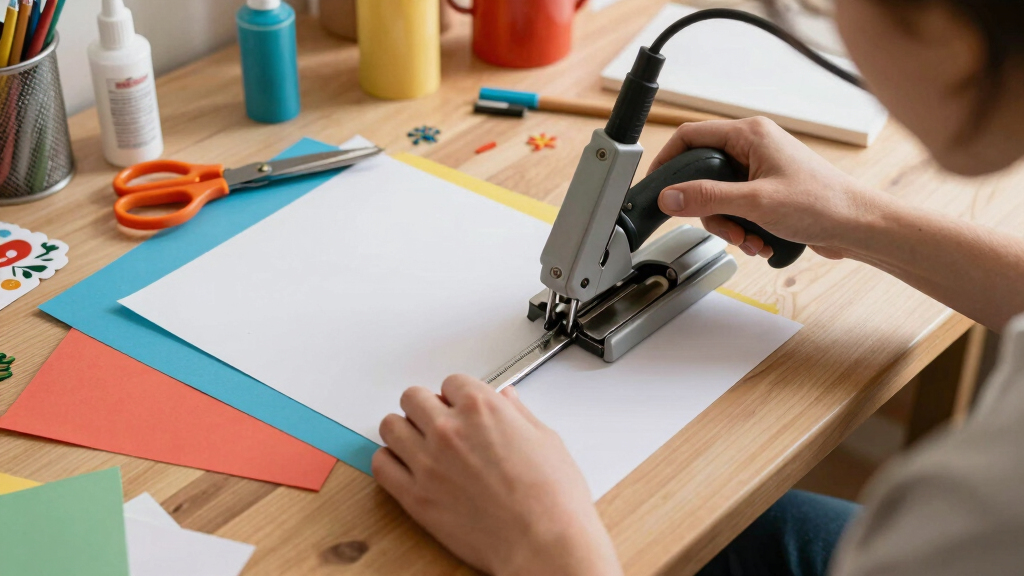
How We Picked
These products were evaluated based on their cutting precision, ease of setup and operation, versatility with media types, build quality, and overall value. Devices that offered a good balance of performance and user-friendliness ranked higher, while specialized features like built-in scanners or advanced software were weighted heavily for premium picks. Cost was also considered, ensuring that each model provides a meaningful benefit relative to its price. The ranking reflects how well each machine meets the needs of hobbyists and small business owners creating custom gift tags, with a focus on practical usability and design flexibility.Factors to Consider When Choosing Best Cutting Machine For Custom Gift Tags
Choosing the right cutting machine for custom gift tags requires understanding several key factors. Beyond basic cutting ability, consider how easy the machine is to operate, the types of materials it can handle, and whether it offers features like scanning or wireless connectivity. Your budget and the complexity of your designs will influence which model makes the most sense. Avoid the mistake of prioritizing features you don’t need, which can lead to overspending or choosing a machine that’s too complicated for your skill level. By weighing these considerations, you can find a device that streamlines your creative process and produces professional-looking tags.Performance and Precision
Look for a machine that consistently delivers accurate cuts, especially if your designs include intricate details or fine fonts. Higher-end models tend to have better blades and software algorithms that ensure cleaner results, which is vital for professional-looking gift tags. Cheaper options may struggle with delicate materials or complex cuts, leading to frustration and wasted materials. If precision is your priority, investing in a machine with advanced features is worth the extra cost.
Ease of Use and Learning Curve
Consider how familiar you are with cutting machines and whether you prefer a straightforward setup or are willing to invest time learning advanced software. Machines like Cricut Joy are designed for beginners with intuitive interfaces and minimal setup, while models like the Silhouette Cameo 5 Alpha offer more customization but require a steeper learning curve. Choosing a machine that matches your comfort level can help you avoid frustration and speed up your workflow.
Material Compatibility
Check which materials the machine can handle—such as paper, cardstock, vinyl, or even thin fabric—since gift tags often use a variety of media. Some models excel with thicker or specialty materials, giving you more creative flexibility. If you plan to incorporate different textures or embellishments, picking a versatile cutter ensures your designs look professional regardless of media choice.
Software and Connectivity
Evaluate whether the machine’s software is compatible with your computer or mobile device, and if it offers features like design libraries, custom fonts, or cloud storage. Wireless connectivity can streamline your workflow, allowing you to design on a tablet or phone and send files directly to the cutter. Poor software support can hinder your creative process, so consider this factor carefully.
Price and Value
Finally, match your budget with the features you need. Premium models offer advanced capabilities like scanning and multi-material cutting, but may be overkill for casual hobbyists. Conversely, budget options might lack certain features but still produce quality results for simple tags. Avoid overspending on features you won’t use, but don’t skimp on quality if you want professional results; the right balance depends on your specific needs.
Frequently Asked Questions
Can I use any materials with these cutting machines?
Most of these machines support a range of materials including paper, cardstock, vinyl, and thin fabrics. However, each model has its limits, particularly with thicker or specialty materials. Checking the manufacturer’s specifications before purchasing helps ensure your chosen machine can handle the media you plan to use for your gift tags. Using incompatible materials can damage the blade or the machine, so it’s worth verifying compatibility upfront.
Are digital design libraries included or do I need to create my own designs?
Many machines come with access to design libraries or include bundled content, making it easier to get started. Some, like Cricut and Silhouette models, also support importing custom designs or using free online resources. If you prefer creating your own designs, look for a machine with open software options and good compatibility with design programs. This flexibility can save you time and expand your creative possibilities.
How difficult is it to learn to operate these machines?
Ease of use varies widely. Entry-level models like Cricut Joy are designed for beginners with simple interfaces and guided setup, while more advanced cutters like the Silhouette Cameo 5 Alpha offer deeper customization but require more time to master. Many brands provide tutorials and online communities that can help shorten the learning curve. If you’re new to cutting machines, choosing a model with user-friendly software is advisable.
Will I need additional tools or accessories to make gift tags?
Most cutters come with basic tools like blades and cutting mats, but you might need additional accessories such as specialty blades for different media, transfer tape, or scoring tools for folding tags. Some bundles include essential supplies, which can be cost-effective. Planning your projects in advance helps determine what extras might be necessary to achieve professional-looking results.
Is it worth paying more for a machine with scanning capabilities?
If you plan to incorporate personalized images or hand-drawn designs into your gift tags, a machine with a built-in scanner, like the Brother ScanNCut, offers significant advantages. It allows direct digitization of physical artwork, saving time and expanding creative options. However, for simple designs or if you already have digital files, a standard cutter may suffice. Balancing your specific needs against the added cost helps clarify whether a scanner-equipped model is a worthwhile investment.