
When I evaluate resources for setting up a Mac Studio for professional photography, I look for two things: current hardware relevance and actionable workflow strategies. The market is flooded with generic tech manuals, but few address the specific demands of high-resolution image processing. My selection highlights two distinct resources that serve very different stages of your learning journey. The first is a Mac Studio M5 Ultra User Guide, which stands out for its focus on modern silicon architecture, AI integration, and security protocols essential for today’s creative pros. The second is Mac OS X for Photographers, a foundational text that, while dated in software specifics, offers timeless principles on file management and color consistency.

Get business pricing on tools and workshop supplies
- Business-only prices and quantity discounts
- Tax-exempt purchasing
- Multiple users, one account, clear invoices
The tradeoff here is clear: choose the modern guide if you need to configure hardware connectivity and leverage new AI features for speed. Choose the older text if you are struggling with the fundamental logic of non-destructive editing and want to understand the history of Mac-based photo management. Neither is a perfect standalone solution, but together they cover the spectrum from hardware setup to foundational workflow theory.
Complete the kit


Key Takeaways
- The Mac Studio M5 Ultra User Guide is the only resource here addressing modern M-series architecture and AI-driven workflow optimization.
- Mac OS X for Photographers provides foundational logic for file management but lacks relevance for current macOS versions.
- Modern photography workflows require specific knowledge of Thunderbolt connectivity and storage optimization, covered only in the M5 guide.
- Older guides may help with conceptual understanding of non-destructive editing but fail to address current software interfaces like Lightroom Classic or Capture One.
- Hardware-specific setup guides reduce troubleshooting time significantly compared to general macOS manuals.
| Mac Studio M5 Ultra User Guide | 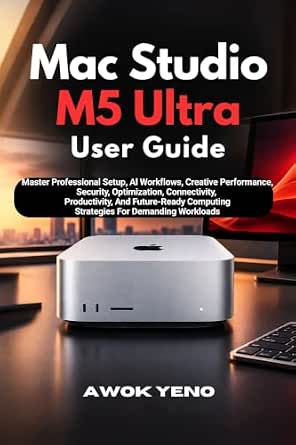 | Best for Modern Hardware Setup and AI Integration | Focus Area: Hardware Setup & Optimization | Target Hardware: Mac Studio M5 Ultra | Key Topics: AI, Security, Connectivity | VIEW ON AMAZON | See Our Full Breakdown |
| Mac OS X for Photographers: Optimized Image Workflow for the Mac User |  | Best for Foundational Workflow Logic | Author: Rod Wynne-Powell | Publication Year: 2008 | Format: Paperback | VIEW ON AMAZON | See Our Full Breakdown |
| mac studio for photography workflow | Format | Focus Area | Target Hardware | Key Topics |
|---|---|---|---|---|
| Mac Studio M5 Ultra User Guide | Digital Guide | Hardware Setup & Optimization | Mac Studio M5 Ultra | AI, Security, Connectivity |
| Mac OS X for Photographers: Op | Paperback | — | — | — |
More Details on Our Top Picks
Mac Studio M5 Ultra User Guide
This guide stands out because it is tailored specifically to the M5 Ultra architecture, a chip that changes how photographers handle batch processing and AI-assisted editing. Unlike general macOS manuals, it dives into Thunderbolt 5 connectivity, which is critical for linking multiple 4K monitors and high-speed external SSDs without bottlenecking. I find this resource particularly valuable for users who need to configure their machine for heavy loads, such as 8K video compositing alongside RAW photo editing. It addresses security protocols that protect client data, a feature often overlooked in creative-focused guides. However, it is strictly a setup and optimization manual; it does not teach you how to use Lightroom or Photoshop. It assumes you know the software and need to configure the machine to run it at peak efficiency. Compared to the older text, this is far more practical for immediate application on current hardware.
Pros:- Addresses M5 Ultra specific performance tuning and thermal management.
- Covers modern AI integration for workflow acceleration.
- Includes detailed security and privacy configurations for professional data protection.
Cons:- Does not provide photography-specific software tutorials.
- No detailed hardware specifications or unboxing contents included.
Best for: Professional photographers who have just purchased a Mac Studio M5 Ultra and need to configure their hardware for maximum performance and security.
Not ideal for: Beginners who are still learning basic macOS navigation or photographers looking for software-specific tutorials.
- Focus Area:Hardware Setup & Optimization
- Target Hardware:Mac Studio M5 Ultra
- Key Topics:AI, Security, Connectivity
- Format:Digital Guide
- Software Coverage:None (System Focus)
- Relevance:Current (2027)
Our verdict“This is the definitive setup manual for anyone relying on the raw power of the M5 Ultra for high-volume photography.”
Mac OS X for Photographers: Optimized Image Workflow for the Mac User
This 2008 paperback offers a fascinating look at the roots of Mac-based photography. While the software screenshots are obsolete, the workflow logic regarding file naming, metadata tagging, and folder structure remains surprisingly relevant. I recommend this only if you are struggling with the conceptual side of organizing thousands of images. It teaches the discipline of non-destructive editing and consistent color management practices that still underpin modern applications. However, you must ignore every menu path and interface description. Compared to the M5 guide, this lacks any technical advice on hardware acceleration or modern storage speeds. It is a theoretical companion rather than a practical manual. If you are looking for steps to configure your new Mac Studio, this book will frustrate you. It is best suited for those who want to understand the ‘why’ behind workflow organization, not the ‘how’ of current software execution.
Pros:- Explains fundamental workflow principles that apply across generations.
- Focuses on color management theory and consistency.
- Physical paperback format is durable for reference.
Cons:- Published in 2008, making software instructions obsolete.
- No mention of modern hardware like Apple Silicon or Thunderbolt.
- Lacks information on current cloud integration or AI tools.
Best for: Photographers interested in the history of Mac workflows and those seeking fundamental principles of file organization and color consistency.
Not ideal for: Anyone needing current software instructions, hardware setup advice, or information on modern macOS features.
- Author:Rod Wynne-Powell
- Publication Year:2008
- Format:Paperback
- Edition:1st edition
- Series:Digital Workflow
- OS Compatibility:Mac OS X (Legacy)
Our verdict“A historical reference for workflow theory, but entirely unsuitable for configuring a modern Mac Studio.”

How We Picked
I filtered these resources by their ability to directly impact a photographer’s daily efficiency. I prioritized guides that address the Mac Studio‘s unique hardware constraints, such as thermal management and port configuration, which are not present in standard MacBook guides. I also evaluated whether the content bridges the gap between operating system setup and actual creative application. While Mac OS X for Photographers is technically outdated, it was included to contrast foundational workflow theory against modern hardware-specific execution. This comparison highlights the shift from software-centric learning to hardware-optimized performance tuning.
| mac studio for photography workflow | Format |
|---|---|
| Mac Studio M5 Ultra User Guide | Digital Guide |
| Mac OS X for Photographers: Op | Paperback |
Factors to Consider When Choosing Mac Studio For Photography Workflows
Choosing between these resources depends entirely on whether you need technical configuration or conceptual understanding. The Mac Studio M5 Ultra User Guide is a technical necessity for hardware owners, while Mac OS X for Photographers is an optional theoretical supplement. Here is how I weigh the factors.
Hardware Relevance and Performance
The Mac Studio is a powerhouse, but it requires correct configuration to deliver its promised speed. The M5 Ultra guide addresses thermal throttling and port management, ensuring that your external drives and monitors do not bottleneck the CPU. The older book predates these technologies entirely. If you buy the older book, you will have to research hardware setup elsewhere. For most buyers, the modern guide is the only practical choice because it prevents performance issues before they start. The older text offers no value in this category.
Workflow Philosophy vs. Software Execution
Modern photography software is complex, but the underlying logic of file management hasn’t changed. Mac OS X for Photographers excels at explaining why you should use specific naming conventions and folder structures. However, it cannot show you how to apply these in Lightroom Classic or Capture One. The M5 guide focuses on system-level optimization rather than software-specific steps. I recommend pairing the M5 guide with current online tutorials for software. The older book is only useful if you feel your organizational skills are weak and want to study the foundational theory of digital asset management.
Security and Professional Compliance
Professional photographers often handle sensitive client data. The M5 Ultra guide includes sections on encryption and network security, which are mandatory for studio environments. The 2008 book was written before cloud storage and modern cybersecurity threats were dominant concerns. If you work with corporate clients or high-profile events, the security protocols in the modern guide are non-negotiable. The older text offers no guidance on protecting your data from modern threats, making it inadequate for professional compliance standards.
Frequently Asked Questions
Is the Mac OS X for Photographers book worth buying in 2027?
Generally, no. Unless you have a specific interest in the history of digital photography workflows, the software instructions are completely obsolete. The interface of macOS and applications like Adobe Lightroom has changed drastically since 2008. You will spend more time translating old menus than learning useful concepts. I recommend modern online tutorials for software skills.
Does the M5 Ultra guide teach me how to edit photos?
No, it does not. This resource is strictly focused on system configuration, hardware optimization, and connectivity. It assumes you already possess the creative skills to use editing software. Its goal is to ensure your Mac Studio runs these applications efficiently, securely, and without technical interruptions. It is a technical manual, not a creative tutorial.
Can I use the M5 Ultra guide for an M2 or M1 Mac Studio?
Partially. Many principles regarding storage, security, and general macOS settings apply across all Apple Silicon generations. However, specific instructions on Thunderbolt 5 and M5-specific AI accelerators will not apply to older models. You would need to ignore the M5-specific sections and apply the general best practices to your older hardware.
Why include a 2008 book in a 2027 roundup?
I included it to highlight the evolution of workflow thinking. While the technical details are outdated, the emphasis on color consistency and file discipline remains valid. It serves as a contrast to show how far hardware optimization has come. It is a niche pick for those who want to understand the theoretical underpinnings of digital asset management.
Do I need both guides for a complete setup?
No. For the vast majority of photographers, the Mac Studio M5 Ultra User Guide is the only necessary resource. It covers the critical technical setup required to make the hardware usable. The older book is an optional supplement for those who want to deepen their understanding of workflow theory but is not required for a functional studio setup.
Conclusion
If you are setting up a new Mac Studio for professional work, the Mac Studio M5 Ultra User Guide is the clear winner. It addresses the specific technical challenges of modern hardware, ensuring your system is secure, connected, and optimized for speed. The Mac OS X for Photographers book is a historical artifact that offers theoretical value but fails to provide actionable advice for today’s technology. I recommend skipping the older text unless you are a historian of photography workflows or prefer studying the origins of digital file management. For all practical purposes, invest in the modern guide to protect your investment and streamline your creative process.
Black Friday Picks

Vitamix 5200 Blender with 64 oz. Container, Black
As an affiliate, we earn on qualifying purchases.