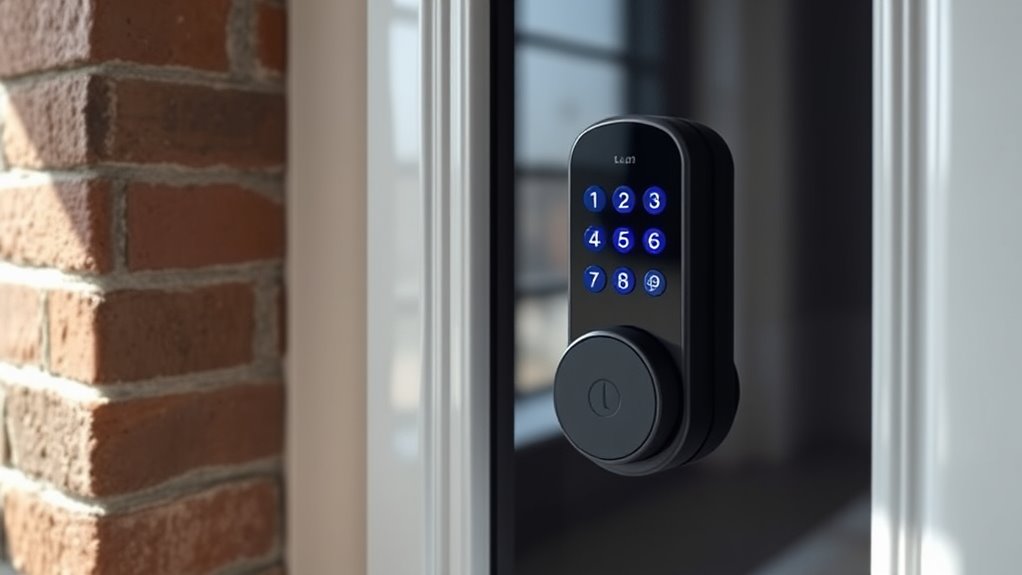

Choosing a smart lock for an apartment involves balancing security, ease of use, and compatibility with your lifestyle. The best overall pick is the Philips Wi-Fi Smart Deadbolt, offering reliable keyless entry and seamless app control. For those prioritizing quick access, the August Silver Wi-Fi Smart Lock stands out for its effortless installation and smart home integration. Meanwhile, the eufy Security Smart Lock C220 is a strong choice for users seeking fingerprint access combined with sturdy build quality. All options come with tradeoffs—some sacrifice simplicity for advanced features, while others prioritize affordability over premium security. Continue reading for a detailed breakdown to help you find the perfect smart lock for your apartment needs.

Get business pricing on tools and workshop supplies
- Business-only prices and quantity discounts
- Tax-exempt purchasing
- Multiple users, one account, clear invoices
Complete the kit


Key Takeaways
- Top-ranked locks combine reliable Wi-Fi connectivity with intuitive app controls for seamless access management.
- Fingerprint recognition delivers quick, keyless entry but can add to the price and complexity of the lock.
- Installation ease varies significantly; some locks are DIY-friendly, while others may require professional help.
- Compatibility with existing smart home systems like Alexa or Google Assistant enhances convenience but isn’t universal.
- Price ranges from budget options to premium models, with tradeoffs in features and durability.
| Smart Door Lock with Knob, Keyless Entry, Fingerprint, Passcode, NFC, Mechanical Key, App Control, Auto-Lock, Black |  | Best Overall for Multi-Method Access and Ease of Use | Color: Black | Material: Metal | Handle Material: Metal | VIEW ON AMAZON | See Our Full Breakdown |
| Smart Door Handle Lock with Keypad and Fingerprint, Yamiry Fingerprint Knob for Front Door |  | Best for Property Managers and Busy Households | Brand: Yamiry | Recommended Uses: Indoors and Exterior doors | Included Components: Exterior assembly, Interior assembly, 2 Key Fobs, 2 Mechanical keys, Screw set, Adjustable latch | VIEW ON AMAZON | See Our Full Breakdown |
| Philips Wi-Fi Smart Deadbolt Lock, Keyless Entry Door Lock |  | Best for Tech-Savvy Users Who Want Remote Control | Connectivity: Wi-Fi (2.4GHz only) | Power: AA alkaline batteries (not included) | Supported Door Thickness: 1-3/8″ to 2″ | VIEW ON AMAZON | See Our Full Breakdown |
| eufy Security Smart Lock C220, Fingerprint Keyless Entry Door Lock |  | Best for Durability and Long Battery Life | Unlock Methods: Fingerprint, app, keypad, physical key, voice control | Battery Life: 8 months | Battery Type: 8 AA batteries | VIEW ON AMAZON | See Our Full Breakdown |
| eufy Security Smart Lock FamiLock C32, Fingerprint Keyless Lock with Handle |  | Best for Fast, Seamless Fingerprint Access on Interior Doors | Fingerprint Recognition Speed: 0.3 seconds | Recognition Type: 360-degree | Wi-Fi: Built-in 2.4 GHz | VIEW ON AMAZON | See Our Full Breakdown |
| Fingerprint Door Lock, Smart Fingerprint Door Knob with Lock, Matte Black |  | Best for Interior Doors and Privacy Control | Material: Matte Black finish | Battery Life: 1 year | Power Supply: USB Type-C | VIEW ON AMAZON | See Our Full Breakdown |
| August Silver Wi-Fi Connected Smart Keyless Entry Door Lock |  | Best for Seamless Smart Home Integration | Compatibility: Fits most single cylinder deadbolts | Connectivity: Wi-Fi (802.11 b/g/n) | App Compatibility: iOS and Android | VIEW ON AMAZON | See Our Full Breakdown |
| Desloc B200 Fingerprint Smart Door Lock, Keyless Entry Deadbolt |  | Best for All-Weather Durability and Fast Access | Unlock Methods: Fingerprint, PIN, app control, voice, keys | Fingerprint Recognition Speed: Less than 0.3 seconds | Fingerprint Capacity: Up to 50 | VIEW ON AMAZON | See Our Full Breakdown |
| ULTRALOQ Bolt SE Wi-Fi Smart Lock with Matter over Thread | 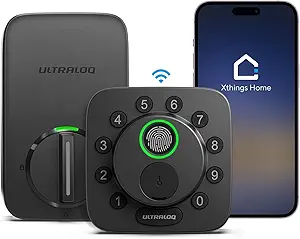 | Best for Ecosystem Compatibility and Long Battery Life | Fingerprint Capacity: 50 | Passcode Capacity: 50 | Connectivity: Wi-Fi 2.4 GHz, Matter over Thread | VIEW ON AMAZON | See Our Full Breakdown |
| Wyze Auto-Lock Bolt v2 Fingerprint Keyless Entry Smart Lock |  | Best for Quick, AI-Enhanced Recognition and Versatile Access | Battery Life: 8 months | Power Source: 8 AA batteries, USB-C backup | Connectivity: Wi-Fi | VIEW ON AMAZON | See Our Full Breakdown |
| Tapo Smart Wi-Fi Deadbolt Door Lock, Keyless Tactile Buttons, DL100 |  | Best Overall for Versatile Smart Home Integration | Power: 4xAA batteries (included) | Battery Life: Up to 200 days in Wi-Fi mode, 300 days in Bluetooth mode | Weatherproof Rating: IP54 | VIEW ON AMAZON | See Our Full Breakdown |
| Veise VE017 Fingerprint Smart Door Lock with App Control, Matte Black |  | Best Value for Advanced Security & DIY Installation | Material: All-zinc alloy, scratch-resistant | Battery Life: ≥12 months | Waterproof Rating: IP55 | VIEW ON AMAZON | See Our Full Breakdown |
| Bluetooth Fingerprint Smart Lock with Handle & Keypad – Fits Most US Doors, DIY Install, Keyless Entry: Code, FOB, Auto-Lock |  | Best for Rental Properties & Busy Families | Unlock Methods: Fingerprint, keypad, FOB, code, app, physical key | Door Compatibility: 1-3/8″ to 2-1/4″ standard US doors | Installation: DIY, no drilling needed | VIEW ON AMAZON | See Our Full Breakdown |
| GHome Smart Fingerprint Door Lock, 4-in-1 Keyless Entry with App Control and Auto Lock |  | Best for Privacy & Local Data Storage | Fingerprint Capacity: 20 fingerprints | Password Capacity: 20 passwords | Battery: 400mAh rechargeable | VIEW ON AMAZON | See Our Full Breakdown |
| Fingerprint Smart Deadbolt with Keypad – Keyless Entry Lock for Home, Apartment, Office, Airbnb, Rental, Kids & Seniors, App & Code Access, Auto-Lock, Easy DIY Install, Compatible with Alexa & Google |  | Best for Multi-User Access & Remote Management | Supports: Left & right doors | Fingerprint Capacity: 100+ | Code Capacity: 100+ | VIEW ON AMAZON | See Our Full Breakdown |
| smart locks for apartment | Connectivity |
|---|---|
| Smart Door Lock with Knob | — |
| Smart Door Handle Lock with Ke | — |
| Philips Wi-Fi Smart Deadbolt L | Wi-Fi (2.4GHz only) |
| eufy Security Smart Lock C220 | — |
| eufy Security Smart Lock FamiL | — |
| Fingerprint Door Lock | Bluetooth (app control), optional gateway |
| August Silver Wi-Fi Connected | Wi-Fi (802.11 b/g/n) |
| Desloc B200 Fingerprint Smart | — |
| ULTRALOQ Bolt SE Wi-Fi Smart L | Wi-Fi 2.4 GHz, Matter over Thread |
| Wyze Auto-Lock Bolt v2 Fingerp | Wi-Fi |
| Tapo Smart Wi-Fi Deadbolt Door | Wi-Fi, Bluetooth, Alexa, Google Home, Samsung SmartThings |
| Veise VE017 Fingerprint Smart | Wi-Fi (via G1 Gateway), Alexa/Google Assistant |
| Bluetooth Fingerprint Smart Lo | Bluetooth, Wi-Fi (with gateway for voice control) |
| GHome Smart Fingerprint Door L | — |
| Fingerprint Smart Deadbolt wit | — |
More Details on Our Top Picks
Smart Door Lock with Knob, Keyless Entry, Fingerprint, Passcode, NFC, Mechanical Key, App Control, Auto-Lock, Black
This lock stands out for offering a comprehensive array of access options—fingerprint, passcode, NFC, mechanical key—and seamless app control. Unlike the eufy Security Smart Lock C220, it combines biometric and digital methods in a user-friendly package, making it ideal for those who want versatility without complex setup. The requirement to register an administrator fingerprint before first use can slow initial setup, and the lack of USB charging means emergency power is limited to external batteries, which might inconvenience some users. Its simple installation for wooden doors and automatic locking enhance everyday convenience, especially for households prioritizing multiple access methods.
Pros:- Multiple unlocking options including fingerprint, passcode, NFC, and mechanical key
- App management enables remote control, access sharing, and activity logs
- Easy installation without drilling or wiring
Cons:- Requires administrator fingerprint registration before first use
- Cannot be charged via USB, only emergency power available
Best for: Homeowners seeking an easy-to-install, multi-access smart lock for wooden apartment doors.
Not ideal for: Renters or users with metal or non-wooden doors, as installation and compatibility are limited to wood and specific thicknesses.
- Color:Black
- Material:Metal
- Handle Material:Metal
- Weight:1.2 pounds
- Door Thickness Compatibility:1.18″ – 1.97″
- Power Source:Battery (internal), USB emergency port
Our verdict“This lock suits users who want flexible, keyless access with straightforward setup for wooden doors.”
Smart Door Handle Lock with Keypad and Fingerprint, Yamiry Fingerprint Knob for Front Door
The Yamiry Fingerprint Knob excels with multiple unlocking options—fingerprint, app, passcodes, key fobs, and voice via Alexa—making it highly suitable for multi-user environments such as rentals or shared living. Compared to the Philips Wi-Fi Smart Deadbolt Lock, it offers quick installation and a reversible handle, accommodating both left and right-handed doors. However, it relies on a WiFi gateway for voice control, which adds extra setup complexity and cost, and some reviews note occasional connectivity hiccups. Its focus on ease of installation and user management makes it ideal for busy households or property managers needing quick, flexible access control.
Pros:- Multiple unlocking options including fingerprint, app, passcodes, key fobs, and Alexa voice
- Reversible handle suitable for both door orientations
- Quick installation in about 10 minutes without additional drilling
- Remote access management and activity tracking via mobile app
Cons:- Requires separate WiFi gateway for Alexa voice functionality
- Occasional connectivity issues reported by users
- Higher price compared to traditional locks
Best for: Landlords, property managers, and large households requiring versatile, remotely manageable locking solutions.
Not ideal for: Single-occupant renters seeking a straightforward, budget-friendly lock without the need for voice or app control.
- Brand:Yamiry
- Recommended Uses:Indoors and Exterior doors
- Included Components:Exterior assembly, Interior assembly, 2 Key Fobs, 2 Mechanical keys, Screw set, Adjustable latch
- Model Number:Yamiry YR01
- UPC:709226220161
- Number of Pieces:1
Our verdict“This lock makes sense for users who prioritize flexible, remotely manageable access in multi-user or rental settings.”
Philips Wi-Fi Smart Deadbolt Lock, Keyless Entry Door Lock
The Philips Wi-Fi Smart Deadbolt offers extensive remote access options—app, passcodes, fingerprint, physical key, and voice commands—plus customizable codes and real-time alerts, making it a strong choice for those who want to control their lock from anywhere. Compared with the eufy Security Smart Lock C220, it provides a broader range of unlocking methods and remote control without additional hubs, but it requires a 2.4GHz Wi-Fi network and batteries are not included, potentially adding to initial setup costs. Its auto-lock feature and real-time notifications enhance security, but the lack of a door sensor limits awareness of door status, which could be a concern for some users.
Pros:- Multiple unlocking options including app, passcode, fingerprint, physical key, and voice
- Remote control over Wi-Fi without extra hub
- Customizable access codes and real-time activity notifications
Cons:- Requires a 2.4GHz Wi-Fi network, not compatible with 5GHz
- Batteries are sold separately
- No door sensor to detect open/closed status
Best for: Tech-savvy homeowners seeking a highly customizable, remotely controllable lock for apartments with Wi-Fi connectivity.
Not ideal for: Users without a stable 2.4GHz Wi-Fi network or those who prefer battery-included devices with simpler setups.
- Connectivity:Wi-Fi (2.4GHz only)
- Power:AA alkaline batteries (not included)
- Supported Door Thickness:1-3/8″ to 2″
- Range:65 ft
- Voice Control:Alexa, Google Assistant
- Auto-Lock Timer:10-180 seconds
Our verdict“This lock is best suited for users comfortable with Wi-Fi and seeking flexible, remote access management for their apartment doors.”
eufy Security Smart Lock C220, Fingerprint Keyless Entry Door Lock
The eufy Security Smart Lock C220 shines with its durable construction, weather resistance, and long battery life—up to 8 months—making it suitable for various climates. It offers multiple unlocking methods—fingerprint, app, keypad, physical key, and voice commands—similar to the Yamiry Fingerprint Knob, but with added weatherproofing and a BHMA Grade 3 certification for security. Its self-learning AI fingerprint recognition improves performance over time, though battery life can vary based on usage. Installation is straightforward with compatibility for most standard deadbolts, but it lacks backup power options beyond batteries, which could be a concern during extended outages.
Pros:- Multiple unlocking options including fingerprint, app, keypad, physical key, and voice
- Long battery life of up to 8 months
- Weather-resistant and certified for outdoor use
- Self-learning AI fingerprint recognition
Cons:- Battery life may vary with usage
- Requires compatibility with standard deadbolts
- No backup power beyond batteries
Best for: Homeowners in need of a weatherproof, highly durable lock with long-lasting batteries and multiple unlocking methods.
Not ideal for: Users seeking a budget-friendly or highly compact lock for interior use only, as this model is more suited for outdoor or exposed environments.
- Unlock Methods:Fingerprint, app, keypad, physical key, voice control
- Battery Life:8 months
- Battery Type:8 AA batteries
- AI Recognition:Self-learning fingerprint recognition
- Waterproof Rating:IP53
- Certification:BHMA Grade 3
Our verdict“This lock makes sense for users prioritizing durability, weatherproofing, and long-term reliability in outdoor or exposed apartment entrances.”
eufy Security Smart Lock FamiLock C32, Fingerprint Keyless Lock with Handle
The eufy FamiLock C32 stands out for its rapid 0.3-second fingerprint unlocking and 360-degree recognition, making it ideal for busy households or offices where quick access is essential. It integrates built-in Wi-Fi for remote management, similar to the Philips Wi-Fi Deadbolt, but is specifically designed for interior doors like bedrooms or storage rooms. Installation is quick and straightforward, and the lock is suitable for standard interior doors, with a focus on speed and convenience. However, it’s not recommended for front doors, and its battery life of five months means frequent replacements are necessary for high usage.
Pros:- Fast fingerprint unlocking in 0.3 seconds
- Built-in Wi-Fi for remote management
- Easy 15-minute installation on standard interior doors
- Seamless integration with Alexa and Google Assistant
Cons:- Limited to interior door applications
- Battery life of approximately 5 months requires regular replacement
- Batteries are not included
Best for: Interior spaces such as bedrooms, offices, or storage rooms where quick access and remote management are priorities.
Not ideal for: Front doors or exterior entrances, as it is not weatherproof or designed for outdoor conditions.
- Fingerprint Recognition Speed:0.3 seconds
- Recognition Type:360-degree
- Wi-Fi:Built-in 2.4 GHz
- Battery Life:5 months
- Battery Type:4 AA batteries
- Compatibility:Standard interior doors
Our verdict“This lock is ideal for users seeking rapid, fingerprint-based access for interior doors with remote control capabilities.”
Fingerprint Door Lock, Smart Fingerprint Door Knob with Lock, Matte Black
This upgraded smart lock stands out for its versatile combination of fingerprint, app, and mechanical key options, making it ideal for interior doors, bedrooms, or Airbnb rentals. Compared with the August Wi-Fi lock, it offers more modes like Privacy and Silent, enhancing customizable security. However, it’s less suitable for outdoor use due to limited weather resistance and Bluetooth-only app control, which restricts remote access without a gateway. Its rechargeable battery lasts about a year, and installation is straightforward with a screwdriver, but careful setup is needed to avoid connectivity hiccups. This lock is best suited for those prioritizing privacy and ease of use in indoor settings.
Pros:- Keyless entry via fingerprint and app control for convenience
- Multiple modes including Privacy and Silent for customizable security
- Rechargeable battery with low battery alerts ensures ongoing operation
Cons:- Not suitable for outdoor use due to limited weather resistance
- App control limited to Bluetooth range unless gateway is purchased
Best for: Homeowners or Airbnb hosts seeking a flexible, easy-to-install interior lock with multiple modes.
Not ideal for: Users wanting a weather-resistant outdoor lock or remote access beyond Bluetooth range.
- Material:Matte Black finish
- Battery Life:1 year
- Power Supply:USB Type-C
- Connectivity:Bluetooth (app control), optional gateway
- Modes:Passage, Normal, Privacy, Silent
- Installation:Easy, screwdriver required
- Suitable For:Interior doors, bedrooms, apartments, Airbnb
Our verdict“This lock makes the most sense for indoor use where privacy and multiple control options are valued over remote access features.”
August Silver Wi-Fi Connected Smart Keyless Entry Door Lock
This lock excels in supporting remote access and smart home integration, making it ideal for those who want a simple upgrade to their existing deadbolt. Compared with the ULTRALOQ Bolt SE, it’s easier to install—taking around 10 minutes—and supports auto-locking and auto-unlocking, which enhance daily convenience. However, it requires Wi-Fi for full features, and the smart keypad and biometric options are sold separately, which can increase costs. It’s best suited for users who value easy installation and compatibility with their existing deadbolt but don’t need weather resistance or advanced automation. It makes the most sense for apartment dwellers who want a straightforward, Wi-Fi-enabled upgrade.
Pros:- Supports remote access and smart home integration
- Supports auto-lock and auto-unlock for added convenience
- Easy to install on most standard deadbolts
Cons:- Requires Wi-Fi connection for full functionality
- Smart keypad and biometric features are sold separately
Best for: Renters or residents seeking a quick, Wi-Fi-compatible upgrade for interior or exterior doors with minimal fuss.
Not ideal for: People wanting integrated biometric security or outdoor use in harsh weather conditions.
- Compatibility:Fits most single cylinder deadbolts
- Connectivity:Wi-Fi (802.11 b/g/n)
- App Compatibility:iOS and Android
- Installation Time:Approximately 10 minutes
- Additional Features:Auto-Lock, DoorSense, voice assistant
- Suitable For:Most standard exterior or interior doors
Our verdict“This pick makes the most sense for those who want a simple, Wi-Fi-enabled upgrade without complex installation or weather considerations.”
Desloc B200 Fingerprint Smart Door Lock, Keyless Entry Deadbolt
The Desloc B200 stands out for its rapid AI-powered fingerprint recognition, unlocking in less than 0.3 seconds, making it perfect for busy households. Compared with the Wyze Auto-Lock Bolt v2, it offers more access options, including PIN, app, voice commands, and physical keys, all while being weather-resistant (IP54-rated). Installation is straightforward on standard US doors, and its long battery life—up to 12 months—reduces maintenance. However, it requires 4 AA batteries (not included) and a G2 Gateway for voice control, adding some extra step and cost. It’s best suited for users who need a reliable, weather-resistant lock with multiple access options. This makes the most sense for households in varied climates or those who want fast, secure fingerprint access.
Pros:- Fast unlocking with AI-powered fingerprint recognition
- Multiple access options including PIN, app, voice, and physical keys
- Weather-resistant design suitable for outdoor use
Cons:- Requires 4 AA batteries, which are not included
- G2 Gateway needed for voice control and Bluetooth management
Best for: Families living in diverse weather conditions or needing quick, reliable fingerprint unlocking.
Not ideal for: Users looking for a fully integrated smart lock with built-in Wi-Fi or without the need for additional gateways.
- Unlock Methods:Fingerprint, PIN, app control, voice, keys
- Fingerprint Recognition Speed:Less than 0.3 seconds
- Fingerprint Capacity:Up to 50
- Installation:Designed for US standard doors
- Battery:4 AA batteries (not included)
- Water Resistance:IP54
Our verdict“This lock is best for those who prioritize speed, durability, and multiple access options in outdoor or harsh environments.”
ULTRALOQ Bolt SE Wi-Fi Smart Lock with Matter over Thread
The ULTRALOQ Bolt SE shines for its support of Matter over Thread, making it ideal for users invested in a broader smart home ecosystem. Compared with the Desloc B200, it offers longer battery life—up to 18 months—and supports multiple access methods including fingerprint, passcodes, app, and voice control. Its IP65 rating ensures durability against weather, making it suitable for outdoor use. Installation is straightforward in around 10 minutes, but it requires a compatible Matter hub for remote management, which could be an extra step for some. This lock is best for homeowners or renters who want a long-lasting, ecosystem-friendly smart lock with robust weather resistance. This is the pick for those prioritizing integration with a future-proof smart home system.
Pros:- Supports multiple access methods including fingerprint, passcodes, app, and voice
- Long battery life of up to 18 months reduces maintenance
- Weather-resistant (IP65) suitable for outdoor use
Cons:- Requires a Matter over Thread hub for remote management
- Door sensor not included, limiting automation
Best for: Tech-savvy residents committed to a Matter-compatible smart home setup, needing outdoor durability.
Not ideal for: Users without a compatible hub or those seeking a lock with built-in Wi-Fi without additional ecosystem requirements.
- Fingerprint Capacity:50
- Passcode Capacity:50
- Connectivity:Wi-Fi 2.4 GHz, Matter over Thread
- Battery Life:Up to 18 months
- Material:Zinc alloy
- Weather Resistance:IP65
Our verdict“This lock is perfect for those wanting a durable, long-lasting smart lock integrated into a broader smart home ecosystem.”
Wyze Auto-Lock Bolt v2 Fingerprint Keyless Entry Smart Lock
The Wyze Auto-Lock Bolt v2 offers rapid fingerprint unlocking in just 0.5 seconds, thanks to AI learning that improves recognition over time. It supports multiple access methods—app, code, backup keys, and fingerprint—making it flexible for household members or visitors. Compared with the Desloc B200, its 8-month battery life requires more frequent replacements, but its USB-C backup ensures continued operation during outages. Its IP53 rating is suitable for indoor or covered outdoor use, though it’s less resistant than the ULTRALOQ Bolt SE. This lock is ideal for users who want quick, reliable biometric access without extensive installation or ecosystem commitments. This pick is best for those prioritizing speed, convenience, and multi-credential access in a compact form.
Pros:- Fast fingerprint recognition in 0.5 seconds
- AI learning enhances recognition accuracy over time
- Multiple unlocking options including app, code, and backup keys
Cons:- Battery replacement needed approximately every 8 months
- Requires Wi-Fi for remote features
Best for: Busy households seeking fast fingerprint access with flexible unlocking options and simple installation.
Not ideal for: People who need a long-lasting outdoor lock or a highly weather-resistant device.
- Battery Life:8 months
- Power Source:8 AA batteries, USB-C backup
- Connectivity:Wi-Fi
- Material:Tempered glass
- Water Resistance:IP53
Our verdict“This lock makes sense for those who want speedy biometric access and versatile entry methods in an easy-to-install package.”
Tapo Smart Wi-Fi Deadbolt Door Lock, Keyless Tactile Buttons, DL100
The Tapo DL100 stands out for offering a comprehensive range of unlocking methods, including keypad, Bluetooth, Wi-Fi, and voice commands, making it highly adaptable for different user preferences. Compared to the eufy Security Smart Lock C220, it provides more seamless smart home connectivity and activity logs, but it sacrifices some durability with a BHMA Grade 3 rating versus higher-grade options. Its weatherproof build and long battery life support consistent usage, though it requires batteries replacement over time and some technical setup during installation. This lock is ideal for users who want flexibility and smart home compatibility in a durable, weather-resistant package.
Pros:- Multiple unlocking options including keypad, Bluetooth, Wi-Fi, and voice commands
- Easy to manage access for family and guests via app with activity logs
- Weatherproof with long battery life for outdoor durability
Cons:- Requires batteries replacement after extended use
- Installation may involve some technical setup
- Limited to BHMA Grade 3 durability, not the highest grade available
Best for: Tech-savvy homeowners seeking a versatile, Wi-Fi-enabled lock with multiple access options
Not ideal for: Residents needing the highest durability or long-term professional-grade security, as it is BHMA Grade 3
- Power:4xAA batteries (included)
- Battery Life:Up to 200 days in Wi-Fi mode, 300 days in Bluetooth mode
- Weatherproof Rating:IP54
- Certification:BHMA Grade 3
- Dimensions (Outdoor):5.88 x 2.65 x 2.2 inches
- Connectivity:Wi-Fi, Bluetooth, Alexa, Google Home, Samsung SmartThings
Our verdict“This pick is best suited for users who prioritize flexible access methods and smart home integration with durable weatherproofing.”
Veise VE017 Fingerprint Smart Door Lock with App Control, Matte Black
The Veise VE017 offers a sophisticated AI-powered fingerprint system combined with app control, making it a strong choice for those wanting biometric security at a reasonable price. Unlike the GHome Smart Fingerprint Lock, it includes a G1 Gateway for remote access, which adds flexibility but also introduces an extra component to manage. Its all-metal, scratch-resistant design ensures durability, while features like activity logs and anti-peeping passwords boost security. While the setup is straightforward for DIYers, the necessity of a separate gateway for remote control could be a hassle for some. This lock fits best for users seeking a high-security, fingerprint-centric lock with easy installation and long battery life.
Pros:- Advanced AI fingerprint recognition with quick verification
- Multiple unlocking options including app, fingerprint, keypad, and mechanical key
- Remote access management with detailed activity logs
Cons:- G1 Gateway required for remote control and smart home integration
- Batteries not included, may need replacement after extended use
- Some features might require additional setup or compatible devices
Best for: Homeowners or small property managers looking for a secure, easy-to-install fingerprint lock with remote access capabilities
Not ideal for: Users who prefer a simple, battery-independent lock without extra components or who don’t want to manage a gateway
- Material:All-zinc alloy, scratch-resistant
- Battery Life:≥12 months
- Waterproof Rating:IP55
- Connectivity:Wi-Fi (via G1 Gateway), Alexa/Google Assistant
- Security Features:AES128 encryption, activity logs, anti-peeping password
- Installation:DIY, 15 minutes
Our verdict“This lock offers excellent biometric security and remote management for users comfortable with a slightly more complex setup.”
Bluetooth Fingerprint Smart Lock with Handle & Keypad – Fits Most US Doors, DIY Install, Keyless Entry: Code, FOB, Auto-Lock
This Bluetooth Fingerprint Smart Lock excels in offering a variety of access methods—fingerprint, keypad, FOB, code, app, or physical key—making it ideal for busy households or rental setups. Its straightforward DIY installation avoids drilling, making it accessible for most users. Compared to the Fingerpint Smart Deadbolt with Keypad, it emphasizes auto-lock and compatibility with Alexa and Google Assistant, but it relies on a gateway for voice control, which adds complexity. Battery life is decent, but frequent replacements could be needed depending on usage. It makes the most sense for tenants or homeowners who want flexible, keyless access without complicated installation.
Pros:- Multiple unlocking options for convenience and security
- Easy DIY installation without drilling
- Compatible with Alexa and Google for voice commands
Cons:- Requires a gateway for voice assistant integration
- Battery life may require frequent replacement
- App setup can be complex for some users
Best for: Renters or families needing an easy-to-install, multi-access lock with remote control options
Not ideal for: Users who prefer a purely Wi-Fi-based system without the need for a gateway or who require the highest security standards
- Unlock Methods:Fingerprint, keypad, FOB, code, app, physical key
- Door Compatibility:1-3/8″ to 2-1/4″ standard US doors
- Installation:DIY, no drilling needed
- Connectivity:Bluetooth, Wi-Fi (with gateway for voice control)
Our verdict“This lock offers flexible, keyless access ideal for rental properties and busy households with a preference for DIY setup.”
GHome Smart Fingerprint Door Lock, 4-in-1 Keyless Entry with App Control and Auto Lock
The GHome Smart Fingerprint Door Lock emphasizes privacy with local data storage and fast AI recognition, making it suitable for users wary of cloud-based risks. Its four unlocking methods—fingerprint, keypad, app, and mechanical key—cover most access needs. Compared to the Veise VE017, it offers fewer connectivity options but enhances privacy and quick recognition, which is ideal for sensitive environments. Installation is straightforward, and its rechargeable battery supports frequent use. However, its limited fingerprint and code capacity may not suit large households, and app management is necessary for remote features. This lock fits best for those prioritizing local data security and quick biometric access.
Pros:- Fast recognition with AI learning enhances reliability
- Local fingerprint data storage keeps privacy intact
- Easy installation and rechargeable battery
Cons:- Requires smartphone app for full management
- Battery life depends on usage frequency
- Limited to certain door thicknesses
Best for: Privacy-conscious homeowners or small offices seeking fast, local biometric unlocking
Not ideal for: Large households or users who need extensive user profiles or remote management without local storage
- Fingerprint Capacity:20 fingerprints
- Password Capacity:20 passwords
- Battery:400mAh rechargeable
- Charging Time:4-6 hours
- Unlocks per Charge:10,000
- Door Thickness Compatibility:1-3/8″ to 2-1/4″
Our verdict“This lock is best suited for privacy-focused users who value fast biometric access and local data security.”
Fingerprint Smart Deadbolt with Keypad – Keyless Entry Lock for Home, Apartment, Office, Airbnb, Rental, Kids & Seniors, App & Code Access, Auto-Lock, Easy DIY Install, Compatible with Alexa & Google
The Fingerprint Smart Deadbolt offers extensive user profiles with support for over 100 fingerprints and codes, making it ideal for households or rental properties with multiple users. Its auto-lock feature and compatibility with Alexa and Google Assistant add convenience, though it requires a gateway for voice control, similar to other locks in this category. Its straightforward DIY installation supports most doors, and remote management allows scheduling and access control from afar. While the battery capacity is sufficient for daily use, frequent replacements might be necessary for high traffic. This lock makes the most sense for larger families or multi-tenant setups needing detailed user management and remote control.
Pros:- Supports over 100 fingerprint and code profiles
- Supports remote management and scheduling via app
- Easy DIY installation compatible with most doors
Cons:- Gateway required for remote control and voice commands
- Limited to 100+ users, which may be insufficient for very large properties
- Batteries may need frequent replacement with high usage
Best for: Multi-user households or rental hosts requiring extensive user profiles and remote access
Not ideal for: Single-occupant homes or users seeking a purely local, non-cloud-based solution
- Supports:Left & right doors
- Fingerprint Capacity:100+
- Code Capacity:100+
- Compatibility:Alexa, Google Assistant
- Installation:DIY, supports most doors
- Auto-Lock:Yes
Our verdict“This lock is ideal for busy households or rental hosts who need extensive user management and remote control capabilities.”

How We Picked
To determine the best smart locks for apartments, I evaluated each option based on performance, ease of installation, build quality, and smart home compatibility. I prioritized locks with strong security features, reliable connectivity, and user-friendly controls. Cost was also a factor, but I emphasized value over low price alone, favoring models that offer meaningful features for their price. The ranking reflects a balance between advanced tech and straightforward usability, ensuring each pick serves a specific type of user—from beginners to tech enthusiasts. This approach guarantees that readers find options tailored to their security needs and budget constraints.Factors to Consider When Choosing Smart Locks For Apartments
When selecting a smart lock for an apartment, understanding key factors can prevent costly mistakes and ensure long-term satisfaction. Consider your existing door setup, your tech ecosystem, and your security priorities. The right lock should integrate seamlessly into your daily routine while providing reliable safety. Here are the main considerations to keep in mind:Compatibility with Your Door and Doorframe
Before choosing a smart lock, verify that it fits your door’s dimensions and lock type. Some models are designed for standard US doors, while others may require specific prep work or minor modifications. Incorrect sizing or incompatible hardware can lead to installation issues or compromised security. Always measure your door’s thickness, hole spacing, and existing lock type to avoid surprises. Additionally, consider whether you want a lock that replaces the deadbolt entirely or one that attaches over your existing hardware—each has different installation and security implications.
Connectivity and Smart Home Integration
Most smart locks today connect via Wi-Fi or Bluetooth, but their compatibility with your smart home ecosystem varies. If you already use Alexa, Google Assistant, or Apple HomeKit, choose a lock that integrates smoothly with these systems to enable voice commands and automation. Poor connectivity can cause delays or lockouts, so look for models with strong signal stability. Keep in mind that Wi-Fi-enabled locks often require a dedicated hub or bridge, adding complexity and cost. Assess your tech setup to pick a lock that enhances, rather than complicates, your smart home environment.
Security Features and Access Options
Beyond basic keyless entry, look for locks with multiple access methods—such as fingerprint, passcode, NFC, or mechanical keys—so you have backup options. Fingerprint sensors provide quick, contactless access but can sometimes be less reliable in wet or dirty conditions. Passcodes are straightforward but vulnerable if not changed regularly. Mechanical keys serve as an essential fallback, especially during power or connectivity failures. Weigh the importance of advanced features against potential vulnerabilities or maintenance needs, especially if you live in a high-traffic or high-security environment.
Battery Life and Power Backup
Battery longevity varies widely among smart locks, with some needing replacement every few months, while others last over a year. Frequent battery changes can be inconvenient, especially if the lock is installed in hard-to-reach places. Look for models with low-battery alerts and emergency power options, like external USB ports. Additionally, consider whether the lock has a backup key or alternative power source to prevent lockouts during power failures or dead batteries. A durable power setup reduces maintenance and ensures consistent security.
Price and Value
Smart locks range from budget-friendly options to premium models with advanced features. Cheaper locks often lack robust security or smart home integration, making them suitable for renters who want simple convenience. Premium options tend to include stronger build quality, multiple access methods, and better connectivity, which justifies the higher price. Balance your budget with your security needs—investing in a slightly more expensive lock can provide peace of mind and reduce the risk of failure or breach. Remember, a good smart lock is an investment in your home’s safety and convenience.
Frequently Asked Questions
Can I install a smart lock myself, or do I need professional help?
Most modern smart locks are designed for DIY installation, often requiring just basic tools and some careful measurements. Many models include detailed instructions and even video guides, making setup straightforward for those with some handy skills. However, if your door has an unusual configuration or if the lock is part of a complex security system, professional installation might be advisable. Proper installation is critical for security and functionality, so don’t hesitate to seek help if you’re unsure or encounter difficulties during setup.
Will a smart lock work if the Wi-Fi or power goes out?
Many smart locks include backup methods such as mechanical keys or battery-powered manual operation to ensure access during outages. Some models also feature low-battery alerts, giving you time to replace batteries before failure. However, locks relying solely on Wi-Fi or app-based controls can be inaccessible if connectivity is lost, so choosing a model with multiple access options is wise. Ensure your lock has a reliable backup method to maintain security even during power or internet disruptions.
Are smart locks secure enough to prevent unauthorized entry?
When properly installed and configured, smart locks can be as secure as traditional deadbolts, especially those with multi-factor authentication like fingerprint plus passcode. Look for locks with strong encryption, tamper alerts, and sturdy construction to prevent forced entry. Keep software and firmware updated to patch vulnerabilities, and avoid sharing access codes unnecessarily. While no lock can guarantee absolute security, high-quality models provide a significant upgrade over traditional locks by offering audit trails and remote control features.
Which features are most important for an apartment smart lock?
For apartments, the most vital features include reliable Wi-Fi connectivity, multiple access options, and ease of installation. Quick, contactless entry methods like fingerprint or NFC are highly convenient for daily use. Additionally, compatibility with your existing smart home system can enhance automation and voice control. Security features such as tamper alarms and encryption are essential, but so is ease of use—avoiding overly complex setups or frequent maintenance. Prioritize features that match your lifestyle and security expectations for peace of mind.
How does the price of a smart lock influence its quality and features?
Generally, higher-priced smart locks tend to offer more advanced security features, better build quality, and seamless smart home integration. Budget models often provide basic keyless entry, which may suffice for renters or low-risk environments but can lack durability or reliability. Investing in a mid-range or premium lock can deliver enhanced security, longer battery life, and more versatile access methods. However, price isn’t always a direct indicator of quality—carefully compare features and reviews to find the best value for your needs.
Conclusion
For those seeking a reliable, all-around smart lock, the Philips Wi-Fi Smart Deadbolt makes a compelling choice thanks to its balance of security and ease of use. Renters or budget-conscious buyers might find the Wyze Auto-Lock Bolt v2 offers excellent value with straightforward installation. If you prefer a premium experience with advanced biometric security, the eufy Security Smart Lock C220 is worth considering. Beginners or those with simple needs should prioritize models with DIY-friendly setups, while tech-savvy users should look for locks with robust smart home integrations. Ultimately, the right lock depends on your security priorities, budget, and how you plan to use it daily.
Black Friday Picks

Vitamix 5200 Blender with 64 oz. Container, Black
As an affiliate, we earn on qualifying purchases.