
TL;DR

Get business pricing on tools and workshop supplies
- Business-only prices and quantity discounts
- Tax-exempt purchasing
- Multiple users, one account, clear invoices
Prebuilt AI workstations are now often as affordable as building your own, thanks to supply chain issues and bulk buying. The choice depends on your need for speed, customization, and support versus control and learning. For many, a prebuilt offers faster deployment and less hassle.
Imagine this: you need a powerful AI workstation fast. You’re debating whether to build your own or buy prebuilt. The old rule was simple — DIY was cheaper, buy prebuilt for convenience. But in 2026, that’s no longer true. Supply chain hiccups and bulk buying have shifted the landscape. Build vs Buy a Prebuilt AI Workstation.
This article breaks down the real tradeoffs: cost, speed, support, and how much control you want. Whether you’re a hobbyist, a startup, or a big AI shop, understanding these factors helps you make smarter choices for your workload and wallet.
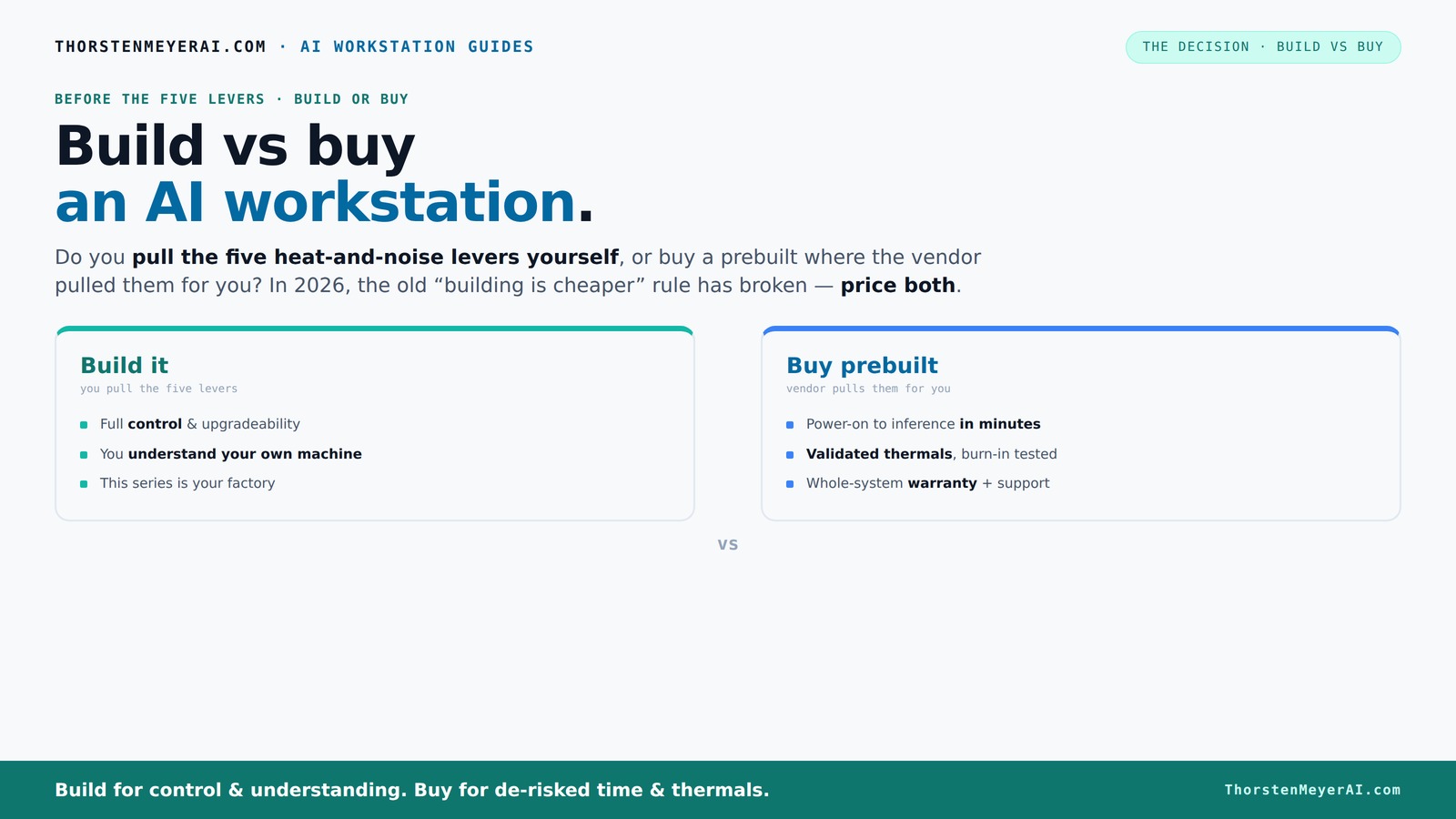
Build vs buy
an AI workstation.
The real question behind this whole series: do you pull the five heat-and-noise levers yourself, or buy a prebuilt where the vendor pulled them for you? And in 2026, the old “building is cheaper” rule has broken. Match your situation in Part 3.
Key Takeaways
- Component shortages in 2026 make prebuilt AI workstations often as affordable as DIY builds, especially for high-end configs.
- Prebuilts save time, reduce setup headache, and come with validated thermals and warranties—ideal for quick deployment.
- DIY builds offer unmatched control over every component, cooling, and future upgrades, perfect for customization enthusiasts.
- Always compare actual prices today before deciding—what was cheaper last year might no longer be true.
- The best choice depends on your workload, technical skill, timeline, and whether you value control or convenience most.
As an affiliate, we earn on qualifying purchases.
Why the old build-is-cheaper rule no longer holds in 2026
Building your own AI workstation used to be a no-brainer for saving money. But recent supply chain issues have changed that. Components like high-end GPUs, DDR5 RAM, and SSDs now cost more than before, with prices jumping 20-30% since 2024.
For example, a DIY build that used to cost $1,200 now easily hits $1,500 or more. Meanwhile, prebuilt vendors bought components early, locking in prices before shortages hit. Some systems are now priced so close to DIY that the difference is negligible.
So, if you’re counting dollars, don’t assume DIY is always cheaper anymore. Always compare actual prices for your specs today. This shift makes the build-vs-buy decision more about time, support, and control than just cost. Learn more about building and buying options.
Who pulls the levers? Building your own vs buying a prebuilt
Building your own AI workstation means you control five key levers: undervolting GPUs, matching cooling solutions, optimizing airflow, tuning fan curves, and placement. It’s like being your own thermal engineer. These controls matter because thermal management directly impacts performance, longevity, and noise levels. Poor thermal design can cause overheating, throttling, or hardware failure, which in turn leads to costly downtime or replacements. Mastering these levers allows you to squeeze maximum performance and efficiency from your system, but it requires expertise and time.
Buying prebuilt shifts this work to the vendor. Companies like Lambda or BIZON test and tune their systems at the factory. They run 24–48 hours of stress testing, tune fans, and even install water cooling for quieter operation. You pay for that peace of mind and expert validation. This approach reduces the risk of thermal issues, which are common pitfalls in DIY builds, especially when pushing hardware to its limits. Proper thermal management ensures stable performance, extends hardware lifespan, and minimizes noise—factors critical for professional AI workloads. Build vs Buy a Prebuilt AI Workstation. The choice hinges on whether you want to pull these levers yourself or trust someone else to do it for you, impacting your system’s reliability and your workload’s stability.
When a prebuilt system is your best bet
If your priority is getting started quickly—without fuss—a prebuilt AI workstation is often the smarter choice. It arrives ready with the OS, CUDA, TensorFlow, and other AI stacks installed. Just power it on and go. This immediacy can be critical when deadlines are tight or when you lack the time or expertise to assemble and tune a system yourself.
Support and warranties matter too. Prebuilt vendors run extensive burn-in tests, confirm the system won’t throttle under load, and stand behind their hardware. If a GPU fails mid-training, you call support, not troubleshoot parts yourself. This support network reduces downtime, which can be costly in professional settings. Multi-GPU setups, which are notoriously tricky to optimize, also lean toward prebuilt. Vendors validate power supplies and cooling specifically for these demanding configurations, ensuring stability and performance out of the box. If you’re rushing into a project or don’t want the hassle of troubleshooting hardware or thermal issues, prebuilt systems minimize risk and downtime, allowing you to focus on your AI workloads instead of system maintenance.
When building your own makes sense
If you enjoy tinkering or need a machine tailored to very specific AI workloads, building your own can be worth it. You pick each component—GPU, CPU, RAM, storage—optimized for your tasks. This level of customization can lead to significant performance gains, especially when your workloads are specialized or require unique configurations that prebuilt systems might not offer.
For example, a researcher working on fine-tuning large language models (LLMs) might need a system with 2TB of RAM and four GPUs for parallel processing. Building allows you to select ultra-quiet fans, custom cooling solutions, and future expandability, ensuring your system can grow with your needs. This tailored approach can also result in better thermal efficiency, lower noise, and potential cost savings if you already have some compatible components.
However, it takes time, technical skill, and patience. You’ll troubleshoot compatibility issues, BIOS updates, and thermal tweaks. Mistakes or overlooked details can lead to instability or hardware damage. But if control, customization, and maximizing performance are your priorities, building keeps you in the driver’s seat, enabling you to optimize every aspect of your system for specific AI workloads.
Cost comparison: building vs buying today
| Factor | Build | Buy |
|---|---|---|
| Hardware cost | Often cheaper on parts alone, but recent shortages push prices higher. The key tradeoff is whether you can source quality components at reasonable prices or face delays and inflated costs that erode the traditional savings of DIY. | Comparable or slightly higher due to assembly, validation, and warranty. While prebuilt systems might seem more expensive upfront, their integrated testing and support can offset the initial price difference, especially when factoring in potential troubleshooting costs of DIY. |
| Assembly and setup time | Significant — expect 10–20 hours or more, including troubleshooting and thermal tuning. This time investment can be critical if you need the system urgently or lack technical expertise. | Minimal — unpack, power on, and configure. This saves valuable time, allowing you to focus on your AI projects rather than system assembly and debugging. |
| Support and warranty | Separate warranties for each component; troubleshooting on you. If issues arise, diagnosing which part is failing can be time-consuming and frustrating, especially without vendor support. | Single vendor support, often 3–5 years. This consolidated support simplifies troubleshooting and can reduce downtime, ensuring your AI work isn’t delayed. |
| Customization | Complete control over every part and cooling, enabling tailored performance and thermal management. This flexibility can lead to better optimization but requires expertise and effort. | Limited to vendor options, but validated for compatibility. While less flexible, this approach reduces the risk of incompatibility issues and ensures the system operates reliably under load. |
What you should consider before deciding
Ask yourself: How soon do I need the system? Do I want full control over every component? Can I troubleshoot hardware issues myself? If you’re short on time or prefer a hassle-free experience, prebuilts win because they reduce setup time and risk. If you love tweaking, customizing, and learning, building might be your jam, offering the satisfaction of crafting exactly what you need.
Also, consider future upgrades. Prebuilts often limit expansion options, making upgrades more difficult or expensive. DIY builds usually allow you to swap in new GPUs, increase RAM, or add storage more easily, extending the system’s lifespan and adapting to evolving workloads. The tradeoff is time and effort versus flexibility—your decision should align with your technical comfort level and long-term plans.
The real decision: speed and certainty or control and customization?
The core choice boils down to what matters most to you. Do you want a system that works right out of the box, with support and validated thermal design? Or do you prefer to fine-tune every detail, even if it takes longer? This decision impacts your workflow, learning curve, and potential for optimizing performance.
Remember, in 2026, the gap between build and buy on price has narrowed. Your decision hinges on your need for speed, support, and control. If rapid deployment and reliability are critical, prebuilt systems deliver peace of mind. If you’re passionate about customizing and learning, building offers unmatched control and satisfaction. Understanding your priorities will help you choose the right path for your AI ambitions.
Frequently Asked Questions
Is it cheaper to build my own AI workstation in 2026?
Not always. Recent component shortages and bulk buying have made prebuilt systems often as cost-effective as DIY, especially for high-end configurations. Always compare prices for your specific specs before deciding. The key is that supply chain disruptions and bulk discounts have leveled the playing field, so the traditional cost savings of DIY are less pronounced. In some cases, the time and effort required to assemble and troubleshoot a DIY system can outweigh the marginal hardware savings, making prebuilt options equally or more attractive economically.
What are the hidden costs of building my own system?
Time spent on research, troubleshooting, assembly, and thermal tuning adds up. You may also face compatibility issues or need to buy additional tools or cooling solutions. These hidden costs can sometimes outweigh hardware savings, especially if you encounter delays or hardware failures. Additionally, the need for technical expertise and ongoing maintenance can be overlooked. Investing your own time and effort has real value, and neglecting these factors might lead to unexpected expenses or frustrations that diminish the initial cost advantage.
How much performance difference is there between prebuilt and custom systems?
Performance is mainly driven by component choice. Prebuilts often validate thermal and power delivery, ensuring reliable operation under load. DIY systems can match or exceed this performance with careful component selection and tuning, but require more effort and expertise. The real difference lies in the quality of thermal management and how well the system is optimized for your workload. Properly built and tuned DIY systems can outperform prebuilt systems, especially when pushing hardware to its limits, but only if the builder understands the tradeoffs and manages thermal and power configurations effectively.
Can I upgrade a prebuilt AI workstation later?
Yes, but it depends on the system design. Many prebuilts limit expandability—check if there’s room for extra RAM, additional GPUs, or bigger power supplies before buying. Proprietary components or limited internal space can restrict future upgrades, making it less flexible than a DIY build. If upgradeability is a priority, consider systems with open architecture or modular designs. Planning ahead ensures your investment remains relevant as your AI workloads evolve, balancing initial convenience with long-term adaptability.
Which is better for AI training: build or buy?
If you need a tailored setup with specific GPU counts or cooling, building might be better. It allows you to customize the hardware precisely for your workload, potentially squeezing out extra performance and efficiency. For quick deployment, reliable operation, and minimal hassle, a prebuilt is often more practical, especially if you lack the time or expertise to fine-tune a system. The choice depends on your priorities: if performance customization and learning are your goals, build; if speed and stability matter most, buy.
Conclusion
In the end, the choice between building or buying your AI workstation isn’t just about dollars. It’s about speed, support, and control. As component prices fluctuate and supply issues persist, remember: the best system is the one that gets you to your goals without unnecessary hassle.
What will you choose? A ready-to-run powerhouse or a custom machine built to your exact specs? Your AI journey is about to get a lot more tailored—and a lot more interesting.
Fall yard work Picks
leaf blowers
As an affiliate, we earn on qualifying purchases.