
Kerf compensation is about adjusting your design to account for the material removed during laser cutting, ensuring perfect fit and accuracy. Since kerf width varies with materials and settings, you need to measure it precisely and modify your CAD files accordingly by adding or subtracting half the kerf. Proper setup, calibration, and tools can automate this process, helping you achieve consistent, tight-fitting parts. Keep going to discover detailed steps for mastering kerf compensation in your projects.
Key Takeaways
- Adjust your design dimensions by half the measured kerf width to ensure parts fit precisely after cutting.
- Measure kerf accurately with test cuts to determine material-specific removal width for proper compensation.
- Use CAD/CAM software features or automation tools to incorporate kerf correction into your design files.
- Regularly calibrate and maintain your laser cutter to achieve consistent kerf measurement and cut quality.
- Balance laser speed and power settings to control kerf width, optimizing fit and minimizing material waste.
As an affiliate, we earn on qualifying purchases.
What Is Kerf and Why Is It Important in Laser Cutting?

Have you ever wondered why laser cuts sometimes don’t fit perfectly? It all comes down to kerf—the width of material removed during cutting. Understanding kerf is essential because material properties like thickness and density influence how much material is vaporized or melted. This variability impacts the cut’s precision and the final fit of your parts. Additionally, knowing about kerf helps you maintain laser safety; different materials require specific laser settings to prevent accidents or damage. By accounting for kerf, you can adjust your design files to compensate for material removal, ensuring parts fit together seamlessly. Recognizing the importance of material properties and proper safety measures makes your laser cutting more accurate, reducing waste and improving overall results. Material characteristics play a crucial role in determining kerf width, so understanding them can lead to better cut quality. Moreover, understanding how material properties influence kerf enables you to optimize your laser parameters for consistent results.
Furthermore, staying informed about laser safety protocols ensures a safer working environment during your cutting projects.
How Does Kerf Affect the Fit of Laser-Cut Parts?

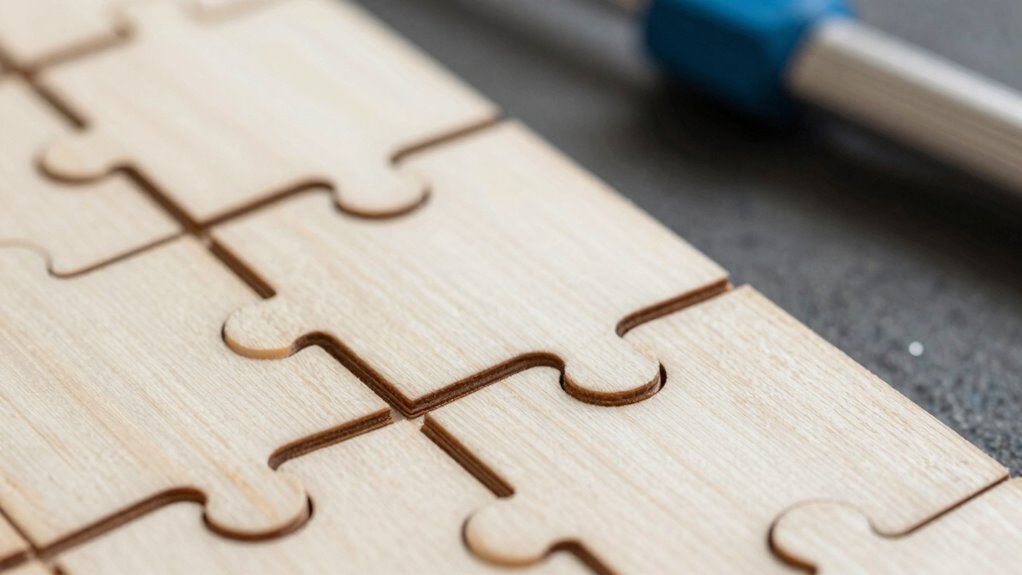
Ever wonder why laser-cut parts sometimes don’t fit together perfectly? Kerf plays a big role in this, as the width of the cut removes material, affecting the final dimensions. If you don’t factor in kerf, your parts may be too tight or too loose, especially when fitting multiple pieces. Material expansion can also influence fit, as certain materials change size with temperature or moisture, compounding the issue. Design tolerances set the acceptable range of fit, but neglecting kerf can push parts outside those limits. To ensure a precise fit, you need to understand how kerf impacts your project and adjust your designs accordingly. Properly managing kerf helps you achieve clean, accurate joints that fit perfectly every time.
How to Measure Kerf Width Accurately in Your Projects

To guarantee your laser cuts are accurate, you need to measure kerf width precisely. Accurate measurement techniques ensure you account for material and machine variations. First, prepare a test cut with known dimensions. Second, use a caliper or a fine ruler to measure the width of the kerf at multiple points, noting any inconsistencies. Third, apply calibration methods by comparing your measurements against the intended cut sizes, adjusting your machine settings accordingly. These steps help you determine the true kerf width and improve your project accuracy. Regularly repeating this process ensures consistent results. Remember, precise measurement techniques and diligent calibration methods are key to achieving perfect fits in your laser-cut projects. Additionally, understanding industry trends can help you stay updated on best practices and tools for precise measurements. Being aware of technological advancements can also optimize your calibration and measurement processes, leading to better overall results. Incorporating precision measurement tools can further enhance your ability to achieve accurate cuts consistently. Recognizing the importance of calibration ensures your machine remains aligned with your desired specifications. Paying attention to machine maintenance can also prevent inaccuracies in your cuts over time.
How to Calculate and Apply Kerf Compensation for Perfect Fits

Calculating and applying kerf compensation is essential for ensuring your laser-cut parts fit together perfectly. To do this, start by determining your kerf width and adjusting your design dimensions accordingly. Keep in mind that material expansion and contraction can affect final sizes, so consider these factors within your design tolerances. When you cut, add or subtract half the kerf width from your measurements, depending on whether you’re enlarging or reducing parts. For tight fits, err on the side of minimal adjustment, but always test with sample cuts first. Properly applying kerf compensation helps account for material behavior and ensures your finished pieces align as intended, resulting in precise, professional-quality assemblies. Additionally, understanding the material properties can enhance your ability to predict how your materials will respond during cutting. Being aware of material behavior can help you fine-tune your kerf adjustments to achieve optimal fit and finish. Incorporating knowledge of material thickness variations can further improve your accuracy and consistency in final dimensions. Also, considering the cutting parameters can help you refine your process for the best possible results. A thorough understanding of laser settings will enable you to further optimize your cuts for consistency and precision.
Best Practices for Setting Up Your Laser Cutter for Precise Kerf Adjustment

To achieve precise kerf adjustment, start by calibrating your laser beam focus to guarantee clean and accurate cuts. Next, fine-tune your cutting speed settings to match your material and desired finish. Finally, select the proper material type, as different materials require specific adjustments for ideal results. Additionally, understanding smart contract functionality can help optimize automated processes and improve overall cutting precision. Incorporating proper safety procedures ensures safe operation and consistent results during your laser cutting projects. Consistently monitoring and adjusting machine calibration can further enhance accuracy and repeatability in your cuts. Regularly reviewing water quality is also essential, as contaminants can impact laser performance and the quality of your cuts. Paying attention to thermal behavior can help you better anticipate and compensate for material expansion or contraction during cutting, leading to more consistent kerf widths.
Calibrate Laser Beam Focus
Properly calibrating your laser beam focus is essential for achieving precise kerf adjustments. When your laser focus is sharp and consistent, your cuts become cleaner and more accurate. To do this effectively:
- Make certain your laser beam is properly aligned, checking beam alignment regularly to prevent deviations.
- Adjust the focus lens so the laser hits the material at the ideal focal point, usually indicated by a clear, sharp dot.
- Test the focus on scrap material, making small adjustments until the beam produces a fine, concentrated spot.
- Regularly monitor laser performance to maintain optimal focus and kerf accuracy over time. Additionally, maintaining a clean lens and proper laser maintenance can significantly improve cutting precision.
- Ensuring your laser cutter is properly calibrated according to manufacturer specifications can help sustain consistent kerf width and quality.
Adjust Cutting Speed Settings
Adjusting your cutting speed is essential for controlling kerf width and ensuring clean cuts. When you increase the cutting speed, the laser has less time to melt or vaporize material, resulting in a narrower kerf. Conversely, slowing down the cut allows more laser energy to interact with the material, producing a wider kerf. You should also consider laser power; higher power settings can compensate for faster speeds, maintaining cutting quality. Finding the right balance between cutting speed and laser power is key to achieving precise kerf widths. Experiment with small adjustments, making note of the results, until you find settings that produce consistent, smooth cuts with minimal material loss. Properly calibrated speed and power settings directly improve your kerf accuracy and overall cut quality.
Select Proper Material Type
Why does selecting the right material matter for precise kerf adjustment? Your material choice directly impacts kerf width and cut quality. Different materials and sheet thicknesses cut differently, affecting how much material is removed during that initial cut. Proper material selection guarantees you can accurately calibrate your laser cutter for ideal results. Additionally, understanding your material’s laser interaction properties helps optimize your settings and achieve consistent, professional cuts.
Here are three key tips:
- Choose materials with consistent composition to avoid unpredictable kerf variations.
- Match your sheet thickness to your laser’s capabilities; thicker sheets may require different settings.
- Test various materials beforehand to see how they respond, helping you refine your kerf compensation adjustments.
Tools and Software to Automate Kerf Compensation Efforts

To effectively manage kerf compensation, many professionals turn to specialized tools and software that automate the process. These solutions utilize software automation to adjust designs precisely and measurement tools to guarantee accuracy. Using automated software reduces manual calculations and minimizes errors, saving you time and effort. Common tools include CAD/CAM programs with built-in kerf correction features and measurement devices that calibrate cutting parameters. Here’s a quick overview:
| Tool Type | Function | Benefits |
|---|---|---|
| CAD Software | Design adjustments with kerf | Precise, repeatable cuts |
| Measurement Tools | Measure material and kerf size | Accurate compensation |
| CAM Software | Automate kerf calculations | Streamlined workflow |
| Laser Controllers | Real-time adjustments | Improved fit |
| Calibration Devices | Verify tool accuracy | Consistent results |
These tools help you achieve perfect fits with minimal effort, and integrating measurement data ensures ongoing precision throughout your projects. Additionally, understanding software automation can significantly enhance your efficiency and consistency.
Real-World Examples of Achieving Perfect Fits With Kerf Compensation

Many professionals have successfully used automated tools and software to achieve perfect fits in their projects. By combining proper material selection and precise design adjustments, they ensure kerf compensation is accurately applied. Here are three real-world examples:
- Selecting thinner plywood for intricate inlays reduces the kerf gap, making assembly smoother.
- Adjusting the design dimensions in CAD to account for the laser’s kerf guarantees tight-fitting joints without rework.
- Using a material with consistent thickness, like acrylic, minimizes unexpected variations, allowing for more reliable kerf compensation results.
- Paying attention to material properties and their effects on kerf accuracy helps in planning better cuts and fitment.
These examples show that understanding material properties and refining your design are key to achieving perfect fits. With practice, you can replicate these successes and produce precision-cut pieces that fit perfectly every time.
Troubleshooting Common Kerf-Related Fit Issues and Fine-Tuning Your Process

Even with careful planning, kerf-related fit issues can still arise during your projects. Material warping or slight blade misalignment often cause gaps or tight fits. To troubleshoot, check your blade alignment regularly to ensure it’s straight and true. Warped materials can be corrected with proper clamping or pre-heating. Adjusting your laser parameters, like power and speed, can also refine cut precision. Use this table to guide your fine-tuning:
| Issue | Cause | Solution |
|---|---|---|
| Loose fit | Insufficient kerf compensation | Increase kerf allowance |
| Tight fit | Material warping | Flatten or stabilize material |
| Gaps or misalignments | Blade misalignment | Realign blade before cutting |
| Uneven cuts | Laser power inconsistency | Calibrate laser regularly |
| Warping during cut | Excess heat buildup | Reduce speed or increase cooling |
Frequently Asked Questions
Can Kerf Compensation Be Automated in Different Laser Cutter Brands?
Yes, kerf compensation can be automated across different laser cutter brands, thanks to its increasing automation potential. Many modern laser cutting software options support automation features and are compatible with various machines. You just need to verify your software integrates kerf adjustment tools or plugins, which can streamline the process. Check your specific laser cutter’s software compatibility to see if automatic kerf compensation is supported, simplifying precise cuts every time.
How Does Material Type Influence Kerf Width and Compensation Needs?
Hold your horses, as material variability greatly impacts kerf width and compensation. Different materials like acrylic, wood, or metal respond uniquely to cutting techniques, causing kerf to vary. You need to adjust your settings accordingly because thinner materials usually cut with a narrower kerf, while thicker or denser ones demand more compensation. Always test and calibrate for each material to guarantee perfect fits, just like an old-world craftsman perfects his craft.
What Are the Limitations of Kerf Compensation in Complex Assemblies?
You’ll face precision limitations when using kerf compensation in complex assemblies, as intricate designs can lead to inaccuracies. The more complicated the assembly, the harder it becomes to perfectly adjust for kerf, risking misalignments or gaps. While kerf compensation improves fit, it isn’t foolproof for highly detailed or tight-tolerance projects. Expect some trial and error, and always verify your cuts before final assembly.
How Often Should Kerf Measurements Be Recalibrated During Projects?
You should recalibrate kerf measurements regularly, ideally after every few projects or when cutting different materials, to guarantee measurement accuracy. Frequent calibration maintains precision as blade wear or machine adjustments can affect results over time. By monitoring and adjusting your calibration frequency based on cutting consistency, you’ll keep your kerf compensation accurate, preventing gaps or misalignments in your assemblies. This proactive approach ensures perfect-fitting laser-cut pieces every time.
Are There Specific Software Tools Best Suited for Precise Kerf Adjustments?
You should choose software with strong integration capabilities and an intuitive user interface for precise kerf adjustments. Programs like LightBurn or RDWorks excel because they seamlessly connect with laser controllers and offer user-friendly controls. By selecting software tailored for your machine, you guarantee accurate kerf compensation, saving time and material. Regularly update your software to benefit from improved features and maintain ideal precision during your projects.
Conclusion
Mastering kerf compensation is your secret weapon for laser-cut perfection. With precise measurements and smart adjustments, you’ll turn rough cuts into flawlessly fitting masterpieces—like magic, but real. Don’t let kerf chaos ruin your projects; instead, harness this knowledge to achieve jaw-dropping accuracy every time. Once you get the hang of it, your cuts will be so perfect, they’ll make even professional manufacturers do a double take. Get ready to elevate your laser game to legendary status!