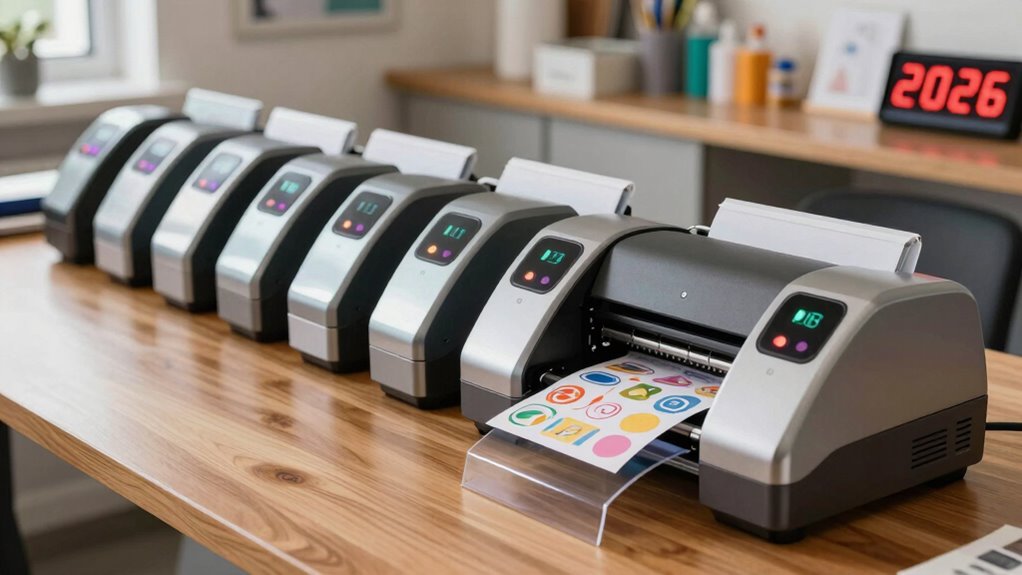
Choosing the right cold laminator machine for stickers depends largely on whether you need speed for bulk production or precision for single-item crafts. My top recommendation is the VEVOR 29.5-Inch Manual Cold Laminator for its exceptional build quality and wide capacity, making it ideal for serious sticker sellers who handle large sheets or multiple small prints simultaneously. For those with limited desk space, the MYKLLIFF 9-Inch Portable Thermal Laminator offers a compact footprint that fits easily on small workstations, though it sacrifices width for portability. The primary tradeoff in this category lies between width and manual effort; wider machines require more physical cranking but allow for batch processing, while narrower units are faster per unit but limit your print size. I evaluated these nine models based on roller consistency, ease of jamming, and build durability to help you find the perfect fit for your workflow.

Get business pricing on tools and workshop supplies
- Business-only prices and quantity discounts
- Tax-exempt purchasing
- Multiple users, one account, clear invoices
Complete the kit



Key Takeaways
- Wide-format manual laminators like the VEVOR 29.5-Inch offer the highest throughput for batch processing, but they demand significant desk space and physical effort compared to smaller units.
- Hybrid machines that offer both hot and cold modes provide versatility, but the cold mode often lacks the pressure consistency of dedicated cold laminators, leading to potential bubbling on thick sticker stock.
- Entry-level 9-inch models are excellent for hobbyists but frequently struggle with thicker vinyl or holographic sticker materials, often resulting in uneven adhesion or jams.
- The inclusion of accessories like corner rounders and trimmers in kits adds value but does not compensate for poor roller alignment, which is the primary cause of sticker waste.
- Manual crank mechanisms vary greatly in smoothness; cheaper models often feature loose gears that cause speed inconsistencies, directly impacting the clarity and bond strength of the laminate.
| VEVOR 29.5-Inch Manual Cold Laminator |  | Best for Oversized Stickers | Working width: 29.5 inches | Maximum material thickness: 10 mm | Operation: Manual hand crank | VIEW ON AMAZON | See Our Full Breakdown |
| YE381 13-Inch Thermal and Cold Laminator Machine with Trimmer, Corner Rounder, and 50 Pouches |  | Best Starter Kit | Maximum width: 330 mm (13 inches) | Laminating modes: Thermal and cold | Warm-up time: 3–5 minutes | VIEW ON AMAZON | See Our Full Breakdown |
| PeiXWming V350 350 mm Cold and Hot Roll Laminator |  | Best Adjustable Roll Laminator | Model: V350 | Maximum film width: 350 mm (13.7 inches) | Maximum material thickness: 0.8 mm (0.031 inches) | VIEW ON AMAZON | See Our Full Breakdown |
| Oztwel Manual Cold Laminator, 12-Inch |  | Best for Small Cold-Lamination Jobs | Maximum laminating width: 10 inches (254 mm) | Maximum laminating thickness: 0.2 inches (5 mm) | Operation: Manual cold laminating | VIEW ON AMAZON | See Our Full Breakdown |
| MYKLLIFF 9-Inch Portable Thermal Laminator with Hot and Cold Modes |  | Best Compact Option | Size: 9 inches | Format: A4 | Modes: Hot and cold | VIEW ON AMAZON | See Our Full Breakdown |
| MAXDONE 13-Inch Thermal and Cold Laminator, 4-in-1 |  | Best for Hybrid Workflows | Brand: MAXDONE | Maximum pouch width: 13 inches | Compatible sizes: A3, A4, A5, A6 | VIEW ON AMAZON | See Our Full Breakdown |
| Qfun 13-Inch Thermal and Cold Laminator Machine with Sheets |  | Best Starter Kit | Brand: Qfun | Feed width: 13 inches | Warm-up time: 60 seconds | VIEW ON AMAZON | See Our Full Breakdown |
| Kejector 13-Inch Laminator with 50 Laminating Sheets, Cutter and Corner Rounder |  | Best for Consumable Value | Brand: Kejector | Inlet width: 13 inches | Supported sizes: A3, A4, A5, A6, A7 | VIEW ON AMAZON | See Our Full Breakdown |
| Qfun 13-Inch Thermal and Cold Laminator Machine |  | Best Compact Portable Unit | Brand: Qfun | Lamination types: Thermal and cold | Rollers: 2 | VIEW ON AMAZON | See Our Full Breakdown |
| cold laminator machine for sticker | Warm-up time |
|---|---|
| VEVOR 29.5-Inch Manual Cold La | — |
| YE381 13-Inch Thermal and Cold | 3–5 minutes |
| PeiXWming V350 350 mm Cold and | — |
| Oztwel Manual Cold Laminator | — |
| MYKLLIFF 9-Inch Portable Therm | About 3 minutes |
| MAXDONE 13-Inch Thermal and Co | 90 seconds |
| Qfun 13-Inch Thermal and Cold | 60 seconds |
| Kejector 13-Inch Laminator wit | — |
| Qfun 13-Inch Thermal and Cold | 1 minute |
More Details on Our Top Picks
VEVOR 29.5-Inch Manual Cold Laminator
The 29.5-inch working width makes this the lineup’s clearest choice for wide sticker sheets, large decals, and poster-sized designs. Unlike the YE381 13-Inch Thermal and Cold Laminator, it feeds broad material through rollers instead of limiting work to pouch-sized documents. Its manual crank needs no electricity, and adjustable rollers accommodate material up to 10 mm thick. The all-metal frame, folding table, and non-slip feet support larger jobs and easier storage. That capacity comes with a footprint of more than three feet and a 14.2 kg weight, so it is less suited to a small desk. It also handles cold lamination only; buyers who need hot pouch laminating should look at the YE381 or PeiXWming V350 instead.
Pros:- 29.5-inch width accommodates oversized sticker sheets and other broad materials
- Manual operation works without electricity or a warm-up period
- Adjustable rollers handle material up to 10 mm thick
- Folding table and non-slip feet support setup and storage
Cons:- Cold-only operation cannot seal thermal pouches
- Hand-crank feeding takes more effort and attention than powered models
- Large, heavy frame is awkward for small workspaces
Best for: Sticker makers laminating wide-format sheets, decals, or poster-sized artwork without access to a power outlet
Not ideal for: People laminating only small stickers at a compact workstation or anyone who needs thermal pouch lamination
- Working width:29.5 inches
- Maximum material thickness:10 mm
- Operation:Manual hand crank
- Lamination type:Cold roll
- Number of rollers:2
- Frame:All metal
- Dimensions:36.1 × 16.1 × 9.8 inches
- Weight:14.2 kg
Our verdict“Choose the VEVOR if wide cold-laminated sticker sheets matter more than compact storage or powered convenience.”
YE381 13-Inch Thermal and Cold Laminator Machine with Trimmer, Corner Rounder, and 50 Pouches
For someone setting up a sticker finishing station from scratch, the YE381’s included tools give it an advantage over the PeiXWming V350, which requires separately sourced film. Its box includes 50 pouches, a three-pattern trimmer, and a corner rounder, while the 13-inch capacity spans business-card sizes to A3. Cold mode is useful for heat-sensitive sticker projects, and thermal mode adds flexibility for documents and other work. The tradeoff is that it is a pouch laminator, so it is less suited to continuous roll-film jobs than the VEVOR or PeiXWming. It also needs 3–5 minutes to warm up for thermal use, has a 250 mm/min feed speed, and calls for breaks rather than prolonged operation.
Pros:- Cold and thermal modes cover heat-sensitive stickers and general pouch work
- 13-inch maximum width accommodates formats up to A3
- Includes 50 pouches, a trimmer, and a corner rounder
- Jam-release button helps clear stuck sheets
Cons:- Thermal mode requires a 3–5 minute warm-up
- Thickness limits and pouch requirements can make jams a concern
- Instructions advise against prolonged use
Best for: First-time sticker makers who want pouch lamination, basic trimming tools, and starter pouches in one package
Not ideal for: High-volume shops feeding continuous roll film or users who need extended, uninterrupted laminating sessions
- Maximum width:330 mm (13 inches)
- Laminating modes:Thermal and cold
- Warm-up time:3–5 minutes
- Laminating speed:250 mm/min
- Supported pouch thickness:160–250 microns
- Heating system:2 rollers
- Included accessories:Corner rounder, three-pattern trimmer, 50 pouches
- Weight:5.16 lb
Our verdict“Pick the YE381 for a versatile pouch-based starter setup with accessories, provided your sticker work does not require continuous roll lamination.”
PeiXWming V350 350 mm Cold and Hot Roll Laminator
The PeiXWming V350 suits sticker makers who want roll lamination with more control over how film feeds and presses. Adjustable tension and roller pressure can help manage skewing, curling, and wrinkles, while the digital temperature display supports its cold, single-sided hot, and double-sided hot modes. At 350 mm wide, it handles broader work than the 13-inch YE381, and its roll format is better suited to ongoing sheets than pouch-by-pouch finishing. The VEVOR is wider still at 29.5 inches and needs no power, so it remains a better fit for very large cold-only projects. The V350’s 0.8 mm thickness limit restricts rigid materials, and film is not included. Its 700 W heating system also makes it less appealing if you only need simple cold lamination.
Pros:- Supports cold, single-sided hot, and double-sided hot roll lamination
- Adjustable film tension and roller pressure help control feed and finish
- Digital temperature control includes memory and safety features
- 350 mm width supports larger projects than the YE381
Cons:- Laminating film is not included
- Maximum material thickness is limited to 0.8 mm
- Powered heating adds complexity for buyers who only need cold lamination
Best for: Sticker businesses and serious hobbyists who run varied roll-film jobs and want adjustable feed pressure plus hot-mode flexibility
Not ideal for: Occasional makers seeking a low-complexity cold-only machine, or users laminating materials thicker than 0.8 mm
- Model:V350
- Maximum film width:350 mm (13.7 inches)
- Maximum material thickness:0.8 mm (0.031 inches)
- Supported modes:Cold, single-sided hot, and double-sided hot
- Working speed:Up to 43.3 inches/min
- Power:700 W
- Temperature precision:±3°C
- Laminating film included:No
Our verdict“Choose the V350 for adjustable, multi-mode roll finishing when its 350 mm width and thin-material limit fit your sticker workflow.”
Oztwel Manual Cold Laminator, 12-Inch
The Oztwel is a straightforward pick for makers laminating small sticker sheets and paper pieces who want to avoid heat and warm-up time. Its manual rollers and adjustable pressure knob offer a simpler cold-only approach than the powered YE381, and the included 50 A6 pouches make it ready for small-format pouch work. The stated 10-inch laminating width is notably narrower than its 12-inch product name suggests, so I would size projects to the listed working width rather than assume it accepts 12-inch sheets. Compared with the VEVOR, it takes up less space and is much lighter, but it cannot handle oversized designs. Manual feeding also means pressure and speed depend on the operator, which can lead to wrinkles if a sheet enters unevenly.
Pros:- Cold operation needs no heat or warm-up period
- Adjustable pressure knob gives some control over roller contact
- Includes 50 A6 pouches for small-format projects
- At 4.2 lb, it is more manageable than the VEVOR roll laminator
Cons:- Listed maximum laminating width is only 10 inches
- Manual handle requires steady feeding and effort
- Uneven roller speed or pressure can wrinkle a project
Best for: Home crafters laminating small stickers, photos, and cards who prefer a compact, cold-only manual machine
Not ideal for: Makers with sticker sheets wider than 10 inches, high-volume runs, or a need for thermal lamination
- Maximum laminating width:10 inches (254 mm)
- Maximum laminating thickness:0.2 inches (5 mm)
- Operation:Manual cold laminating
- Number of rollers:2
- Roller diameter:1 inch (25 mm)
- Weight:4.2 lb
- Included accessories:50 A6 laminating pouches
Our verdict“The Oztwel fits small, occasional cold-lamination jobs if its listed 10-inch width covers your sticker sheets.”
MYKLLIFF 9-Inch Portable Thermal Laminator with Hot and Cold Modes
The MYKLLIFF is the most portable fit here for makers laminating A4-sized stickers and small batches at home, in a classroom, or on the move. At 9 inches, it gives up the width of the YE381 and PeiXWming V350, but a three-minute warm-up and hot-and-cold modes make it more flexible than the manual Oztwel. Cold lamination uses self-adhesive sheets, which are not included, so sticker makers need to supply compatible materials. The ABS jam-release lever is a practical feature for clearing a misfeed, though it does not remove the need to match pouch thickness: the recommended range is 3–4.5 mil. This is a compact pouch machine, not a roll laminator for broad or continuous sticker sheets.
Pros:- Compact 9-inch format is suited to portable and small-workspace use
- Hot and cold modes handle both pouches and self-adhesive sheets
- Three-minute warm-up gets thermal work underway quickly
- Jam-release lever helps address stuck material
Cons:- Cold-lamination self-adhesive sheets are not included
- Narrower capacity than the 13-inch YE381 and PeiXWming V350
- Best results depend on using compatible 3–4.5 mil pouches
Best for: Mobile crafters, teachers, and home users laminating A4 or smaller sticker sheets who also want thermal pouch capability
Not ideal for: Sticker sellers processing wide sheets or continuous rolls, or buyers who need cold-lamination sheets included
- Size:9 inches
- Format:A4
- Modes:Hot and cold
- Warm-up time:About 3 minutes
- Recommended pouch thickness:3–4.5 mil
- Jam release:ABS release lever
- Warranty:1 year
Our verdict“Choose the MYKLLIFF for portable A4 sticker projects and mixed hot-and-cold pouch use, not wide roll work.”
MAXDONE 13-Inch Thermal and Cold Laminator, 4-in-1
This model is a strong contender for users who need flexibility between heat and cold methods. Unlike the Oztwel Manual Cold Laminator, which relies entirely on manual pressure, the MAXDONE offers motorized speed, making it far more efficient for high-volume sticker batches. The 90-second warm-up is competitive, though slightly slower than the Qfun alternatives. However, a significant drawback is that cold lamination requires self-adhesive sheets sold separately, adding ongoing costs and friction to the process. If you primarily stick to thermal pouches, this is excellent; if you need true cold lamination without buying specific consumables, look elsewhere.
Pros:- Motorized speed is significantly faster than manual options like the Oztwel
- Supports wide A3 materials, offering more room than 9-inch portable units
- Anti-jam button provides a safety net for uneven sticker sheets
- Dual-mode capability covers most standard laminating needs
Cons:- Cold mode requires proprietary self-adhesive sheets not included in the box
- Strict 0.5 mm thickness limit may reject thicker sticker substrates
- Slightly slower warm-up time compared to faster Qfun models
Best for: Users who alternate between heat-sealing standard stickers and using specialized self-adhesive cold pouches for heat-sensitive materials.
Not ideal for: Beginners wanting a ready-to-go cold lamination setup, as the required self-adhesive sheets are not included.
- Brand:MAXDONE
- Maximum pouch width:13 inches
- Compatible sizes:A3, A4, A5, A6
- Supported pouch thickness:2.5–4 mil (60–100 mic)
- Warm-up time:90 seconds
- Laminating speed:13.98 inches/min
- Modes:Thermal and cold
- Warranty:2 years
Our verdict“This pick makes the most sense for hybrid users who need motorized speed and don’t mind sourcing separate cold-pouches.”
Qfun 13-Inch Thermal and Cold Laminator Machine with Sheets
This Qfun model stands out for its comprehensive accessory bundle, which includes a cutter, corner rounder, and 30 pouches. Compared to the Kejector 13-Inch Laminator, which also includes accessories, this Qfun version adds hole punches and binder rings, making it better suited for creating full sticker books rather than just individual decals. The 60-second warm-up is among the fastest in this group, reducing wait times between batches. The tradeoff is throughput; at roughly two A4 sheets per minute, it may feel slow for commercial volume. However, for hobbyists wanting an all-in-one solution without hunting for separate tools, this package offers the best immediate utility.
Pros:- Includes a robust set of accessories including hole punches and binder rings
- Fastest warm-up time in the group at just 60 seconds
- Comes with 30 assorted pouches to start laminating immediately
- Built-in storage keeps small accessories organized and accessible
Cons:- Laminating speed of 450 mm/min is slower than some dedicated competitors
- May require trimming for materials exactly at the 13-inch limit
- Plastic construction may feel less durable than metal-bodied industrial units
Best for: Hobbyists and small business owners who want a complete sticker-making toolkit with cutting and binding tools included.
Not ideal for: High-volume commercial printers, as the processing speed of two A4 sheets per minute creates a bottleneck.
- Brand:Qfun
- Feed width:13 inches
- Warm-up time:60 seconds
- Laminating speed:450 mm/min
- Pouch thickness:3 mil and 5 mil
- Modes:Hot and cold
- Included pouches:30 (A3/A4/A5/A6)
- Functions:Laminating, cutting, corner rounding, punching, and binding
- Safety features:Jam-release button and 45-minute auto shut-off
Our verdict“This option is ideal for beginners who value convenience and want every tool they need in one box.”
Kejector 13-Inch Laminator with 50 Laminating Sheets, Cutter and Corner Rounder
The Kejector wins on included consumables, offering 50 laminating sheets compared to the 30 provided by the Qfun 13-Inch Thermal and Cold Laminator Machine with Sheets. This makes it a better financial choice for users who plan to laminate many stickers right out of the box. The 78-second preheat is reasonable, sitting between the fastest and slowest options here. However, the maximum total thickness limit of 9.8 mil is a strict constraint; if you use thicker cardstock or vinyl, seals may fail. While the accessories are useful, the lack of hole punches means it is less versatile for book-binding than the Qfun alternative. Choose this if volume of sheets matters more than tool variety.
Pros:- Includes 50 laminating sheets, offering more initial value than competitors
- Dual rollers ensure smoother feeding for delicate sticker sheets
- Anti-jam release lever is easy to access and operate
- Paper cutter and corner rounder are included for basic finishing
Cons:- Conflicting warranty terms in product listings create uncertainty
- Strict 9.8 mil thickness cap limits use with thicker sticker materials
- Lacks hole punch and binding tools found in the Qfun bundle
Best for: Users who prioritize getting the most laminating pouches upfront and plan to laminate standard thin paper stickers.
Not ideal for: Creators working with thick vinyl or cardstock, as the 9.8 mil total thickness limit restricts material choices.
- Brand:Kejector
- Inlet width:13 inches
- Supported sizes:A3, A4, A5, A6, A7
- Laminating modes:Hot and cold
- Preheat time:78 seconds
- Lamination speed:430 mm/min
- Rollers:Dual
- Supported pouch thickness:3–4 mil
- Included sheets:50: 5 A3, 10 A4, 10 A5, 25 A6
Our verdict“This model is the smart buy for those who want to start laminating immediately with minimal upfront supply costs.”
Qfun 13-Inch Thermal and Cold Laminator Machine
This Qfun unit is lighter and more streamlined than the feature-heavy Qfun 13-Inch Thermal and Cold Laminator Machine with Sheets, weighing just 2.06 kg. It is designed for users who need mobility over maximum accessory inclusion. While it still includes a cutter and corner rounder, the 12 laminating sheets are a far cry from the 50 offered by the Kejector, meaning you will need to buy supplies sooner. The automatic shut-off and one-minute warm-up are convenient for intermittent use. However, the lack of hole punches and binder rings makes it less suitable for creating full sticker albums. It is a solid middle-ground choice for portability without the bulk of the larger kits.
Pros:- Lightweight 2.06 kg design makes it easy to store and transport
- Includes essential accessories like a cutter and corner rounder
- Automatic shut-off enhances safety during intermittent use
- Supports both thermal and cold modes for versatility
Cons:- Only 12 included sheets require immediate replenishment for heavy users
- Lacks the hole punch and binder rings of the larger Qfun model
- Plastic build quality may feel less robust than heavier alternatives
Best for: Mobile creators or small space dwellers who need a lightweight machine with basic finishing tools.
Not ideal for: Users who want a large initial supply of pouches, as it includes only 12 sheets compared to larger bundles.
- Brand:Qfun
- Lamination types:Thermal and cold
- Rollers:2
- Maximum entry width:13 inches
- Compatible pouch thickness:3 and 5 mil
- Warm-up time:1 minute
- Included laminating sheets:12 (3 each in A3, A4, A5, and A6)
- Weight:2.06 kg
- Automatic shut-off:Yes
Our verdict“This pick is best for those who prioritize portability and basic functionality over extensive accessory bundles.”

How We Picked
I selected these nine cold laminators by focusing on three critical performance metrics: roller pressure consistency, material compatibility, and ergonomic design. First, I prioritized machines with adjustable pressure settings or high-quality silicone rollers, as uniform pressure is the single most important factor in preventing air bubbles and ensuring long-term sticker durability. Second, I evaluated each unit’s ability to handle common sticker materials, including clear vinyl, holographic film, and matte laminate, noting where cheaper plastic rollers failed to grip thick media without slipping. Third, I considered the physical workflow. A laminator that jams frequently or requires excessive force to crank through standard 8.5×11-inch sheets is a bottleneck for any sticker business. I ranked the products by weighing their build quality against their price point, giving preference to metal-gear mechanisms over plastic ones and machines with wider entry points for batch processing. This approach highlights which tools are built for daily commercial use versus those suitable for occasional hobbyist projects.
Factors to Consider When Choosing Cold Laminator Machine For Stickers
Selecting the right laminator requires looking beyond the marketing claims to understand how the machine interacts with your specific sticker materials and workflow constraints.Width Capacity and Batch Efficiency
The width of the laminator dictates how many stickers you can process in a single pass. A 29.5-inch wide machine allows you to run a full sheet of printed stickers side-by-side, effectively doubling or tripling your output compared to a 13-inch model. However, wider machines require significantly more desk depth and room to feed the output. If you primarily produce small die-cut stickers, a 13-inch model is often sufficient and saves valuable workspace. I recommend measuring your largest standard print sheet before buying; if you plan to scale up to 11×17-inch prints later, a 9-inch machine will become obsolete immediately.
Manual Crank vs. Electric Drive
Most affordable cold laminators are manual, relying on a hand crank. The quality of the gear mechanism is critical here. Plastic gears in budget models often strip or slip under the tension of thick vinyl, causing the laminate to wrinkle or the sticker to feed unevenly. Metal gears provide a smoother, more consistent feed rate, which is vital for avoiding bubbles. While electric models exist, they are rare in this specific price bracket for cold-only units. If you choose manual, test the crank resistance; it should feel firm but smooth, not gritty or loose, as this directly correlates to the longevity of the unit under daily use.
Roller Material and Pressure Adjustment
The rollers are the heart of the laminator. Silicone rollers are superior to hard plastic or rubber because they grip the laminate film without damaging delicate printed ink. More importantly, look for machines with adjustable pressure knobs. Sticker materials vary in thickness; a thin clear laminate needs different pressure than a thick matte finish. Fixed-pressure machines often struggle with thicker media, leading to peeling edges or poor adhesion. The ability to dial in the pressure allows you to fine-tune the bond for different vinyl types, reducing waste and ensuring your stickers survive outdoor exposure.
Cold vs. Hybrid Functionality
Many machines marketed for stickers offer both hot and cold modes. While this seems like a bonus, I advise caution with hybrid units if your primary focus is cold lamination. Heated rollers can warp certain vinyl sticker materials if the temperature control is imprecise. Furthermore, the presence of heating elements adds bulk and complexity. If you only need cold lamination—which is safer for heat-sensitive inks and vinyl—a dedicated cold laminator is often more reliable and easier to maintain. Only choose a hybrid model if you also plan to laminate paper documents, business cards, or ID badges that require heat activation.
Maintenance and Jam Clearance
Jams are the most common frustration in sticker lamination. Look for models with a reverse crank function or a quick-release lever for the top roller. This feature allows you to back out a jammed sheet without tearing your printed sticker, saving both time and money. Cheap models often lack this, forcing you to pull the jammed material forward, which usually ruins the print. Additionally, consider the ease of cleaning adhesive residue. Open-frame designs allow you to wipe down the rollers easily, whereas enclosed units can be difficult to service, leading to buildup that causes scratches on future batches.
Frequently Asked Questions
Can I use a cold laminator for waterproof stickers?
Yes, cold lamination is actually preferred for many waterproof vinyl stickers because it avoids the risk of melting or warping the vinyl substrate. However, the effectiveness depends entirely on the adhesive quality of the laminate film you use, not just the machine. Ensure you purchase high-quality, self-adhesive laminate films designed for outdoor use. The laminator’s job is to apply consistent pressure to bond the film to the sticker; if the machine’s rollers are uneven or the pressure is too low, air bubbles will form, allowing water to seep in and cause peeling. Therefore, a laminator with adjustable pressure settings is significantly better for waterproof applications than a fixed-pressure budget model.
Why does my sticker laminate keep bubbling after it comes out?
Bubbling is almost always a sign of inconsistent pressure or trapped air during the feeding process. This often happens if the laminate film and the sticker sheet are not aligned perfectly before entering the rollers, or if the machine’s rollers are worn and uneven. Another common cause is feeding the material too quickly; manual crank users often rush the process, causing the film to stretch and snap back, creating bubbles. To fix this, slow down your crank speed and ensure the leading edge of the laminate is smooth and taut before it hits the rollers. If the problem persists, check if your machine allows for pressure adjustment and increase it slightly to improve adhesion.
Is it better to laminate before or after cutting stickers?
For most sticker businesses, it is best to laminate before cutting. This method, known as ‘laminate-then-cut,’ ensures that the edges of the sticker are sealed with the laminate film, providing maximum protection against peeling and moisture. If you cut first and then laminate, you must align the laminate precisely over each individual sticker, which is time-consuming and prone to misalignment. Laminating the full sheet first allows you to use a plotter or scissors to cut through both the vinyl and the laminate simultaneously, resulting in a clean, durable edge. This approach also protects your printer’s output from smudging during the cutting process.
Do I need a machine with a corner rounder and trimmer?
While not strictly necessary for lamination, these accessories add significant convenience for small-batch producers. A built-in trimmer saves you from hunting for scissors or a paper cutter, keeping your workflow contained to one station. Corner rounders are particularly useful for stickers, as sharp corners are the first place stickers tend to peel up during use. However, do not let these accessories drive your purchase decision if the core laminator quality is poor. A machine with mediocre rollers and a bundled trimmer is worse than a high-quality laminator sold alone. Prioritize roller quality and build durability first, then consider accessories as a nice-to-have bonus.
Can cold laminators handle thick holographic vinyl?
Standard cold laminators can handle holographic vinyl, but you must check the maximum thickness capacity of the machine. Holographic films are often thicker and stiffer than standard clear laminate. If the machine’s rollers have a narrow gap, the vinyl may jam or the adhesive may not bond properly due to insufficient pressure. Look for models that specify a high maximum media thickness or offer adjustable roller gaps. For very thick holographic stock, a manual laminator with robust metal gears and adjustable pressure is far superior to a lightweight plastic model, which may flex under the strain and cause uneven lamination or mechanical failure.
Conclusion
Choosing the right cold laminator for your sticker business comes down to matching the machine’s capacity with your production volume and material types. The VEVOR 29.5-Inch Manual Cold Laminator stands out as the best overall choice for serious sellers who need to process large sheets efficiently and value durability over compactness. For those with limited space or who only need to laminate standard letter-sized sheets, the MYKLLIFF 9-Inch Portable Thermal Laminator offers the best balance of portability and functionality, making it the best value for beginners. If you require versatility for both paper and vinyl documents, the YE381 13-Inch Thermal and Cold Laminator is a solid hybrid pick, though it requires careful temperature management to avoid warping vinyl. Ultimately, prioritize machines with adjustable pressure and metal gears to ensure your stickers remain durable and professional-looking, regardless of which model fits your budget.
Fall yard work Picks
leaf blowers
As an affiliate, we earn on qualifying purchases.