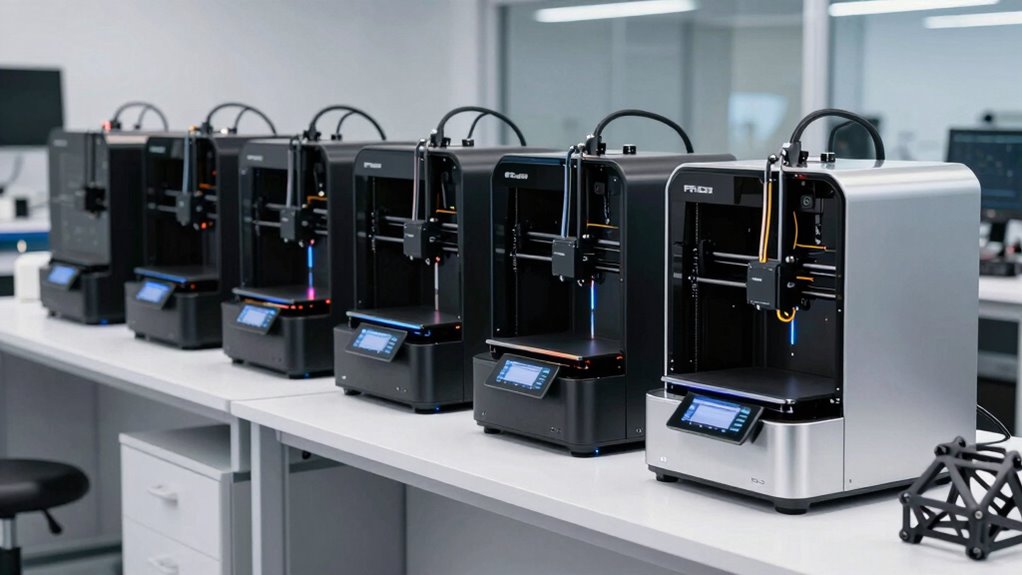

Choosing a professional FDM 3D printer involves balancing high performance, reliability, and versatility. The Original Prusa MK4S stands out as the best overall for its speed and print quality, while the FLASHFORGE Creator 5 Pro offers multi-material capability for complex projects. However, tradeoffs such as higher costs or larger footprints are common in this category. Keep reading to see a detailed breakdown of the top models to match your specific needs.

Get business pricing on tools and workshop supplies
- Business-only prices and quantity discounts
- Tax-exempt purchasing
- Multiple users, one account, clear invoices
Complete the kit


Key Takeaways
- The top-ranked printers combine high speed with excellent print quality, crucial for professional workflows.
- Multi-material and multi-color capabilities are a key differentiator for advanced users needing complex prototypes.
- Build volume varies widely; larger models are better suited for industrial or large-scale projects, but often come at a premium.
- Ease of maintenance and user interface significantly impact daily productivity in professional settings.
- Price often correlates with features, but the most expensive models aren’t always necessary for every professional use case.
| Creality K2 Plus Combo 3D Printer Bundle with PETG Filament 1.75mm and Space Pi Filament Dryer |  | Best for Large-Scale Multi-Color Projects | Filament Diameter: 1.75mm | Filament Weight: 4 kg | Materials Supported: PLA, ABS, PETG, PA-CF, PLA-CF, PET, ASA, PPA-CF | VIEW ON AMAZON | See Our Full Breakdown |
| Original Prusa MK4S Fully Assembled High-Speed FDM Desktop 3D Printer |  | Best for Reliable, High-Quality Prototyping | Product Dimensions: 19.6 x 15.7 x 21.6 inches | Item Weight: 15.4 pounds | Print Size: 9.84 x 8.3 x 8.6 in | VIEW ON AMAZON | See Our Full Breakdown |
| FLASHFORGE Creator 5 Pro 3D Printer with 4 Toolheads and Multi-Material Printing |  | Best for Multi-Material Industrial-Grade Production | Number of Toolheads: 4 | Heated Chamber Temperature: 65°C | Max Printing Speed: 600mm/s | VIEW ON AMAZON | See Our Full Breakdown |
| Bambu Lab P1S 3D Printer, Ready-to-Use FDM 3D Printer |  | Best for Beginners and Multi-Material Enthusiasts | Product Dimensions: 15.31 x 18.03 x 15.31 inches | Item Weight: 38.9 pounds | VIEW ON AMAZON | See Our Full Breakdown | |
| Creality K2 Plus Combo 3D Printer, Multi-Color Printing, Fast Speed, Dual AI Cameras, Auto Leveling, Large Build Volume 350x350x350mm |  | Best for Large, Automated Multi-Color Production | Build Volume: 350x350x350mm | Max Speed: 600mm/s | Nozzle Temperature: High-temp with Hardened Steel Tip | VIEW ON AMAZON | See Our Full Breakdown |
| Creality K2 Plus Combo 3D Printer 350x350x350mm with 16-Color Printing and Creality Hyper PLA Filament |  | Best Overall for Large-Scale Multicolor Projects | Build Volume: 350x350x350mm | Color Printing: 16-color | Speed: up to 600mm/s | VIEW ON AMAZON | See Our Full Breakdown |
| Creality K2 Plus Combo 3D Printer Bundle with CFS*3 |  | Best for High-Precision Multi-Color Printing with Automation | Maximum Speed: 600mm/s | Acceleration: 30000mm/s² | Filament Compatibility: PLA, ABS, PETG, PA-CF, PLA-CF, PET, ASA, PPA-CF | VIEW ON AMAZON | See Our Full Breakdown |
| Creality K2 Plus Combo 3D Printer with Multi-Color Printing and RFID PLA Filament |  | Best for User-Friendly Multi-Color Production | Filament Diameter: 1.75mm | Filament Weight: 4KG | Color Support: up to 16 colors with 4 CFS units | VIEW ON AMAZON | See Our Full Breakdown |
| Bambu Lab A1 3D Printer, Ready-to-Use FDM 3D Printer for Beginners and Kids |  | Best for Beginners and Educational Use | Product Dimensions: 21.76 x 20.83 x 12.87 inches | Item Weight: 22 pounds | VIEW ON AMAZON | See Our Full Breakdown | |
| Creality K2 Plus Combo 3D Printer Bundle with Hyper RFID PLA Filament Black & White 2 Pack |  | Best for High-Volume, High-Detail Printing in Large Format | Build Volume: 350*350*350mm | Filament Compatibility: High-temp filaments up to 350°C | Print Speed: 600mm/s | VIEW ON AMAZON | See Our Full Breakdown |
More Details on Our Top Picks
Creality K2 Plus Combo 3D Printer Bundle with PETG Filament 1.75mm and Space Pi Filament Dryer
The Creality K2 Plus Combo stands out for its impressive multi-color capabilities, supporting up to 16 colors, which makes it ideal for complex, detailed prints. Its high-speed operation and advanced acceleration enable faster production compared to many traditional FDM printers, while the automatic auto-leveling and heated chamber ensure higher print consistency. The inclusion of dual AI cameras offers real-time monitoring, a feature that surpasses the simpler setups of the Bambu Lab P1S. However, the setup process is more involved, requiring some technical knowledge to fully leverage its multi-material and multi-color features. Its large footprint and premium price tag might also deter casual hobbyists. This model makes the most sense for professionals or studios needing large, multi-color output with automation features.
Pros:- Supports multi-color printing with up to 16 colors for complex designs
- High-speed printing up to 600mm/s accelerates large projects
- Automatic auto-leveling and heated chamber improve print quality
- Dual AI cameras enable real-time monitoring and error detection
Cons:- Setup may be complex and intimidating for less experienced users
- Large size may not fit in smaller workspaces
- High cost could be prohibitive for casual users
Best for: Large-scale production environments or professionals working on multi-color, multi-material prototypes
Not ideal for: Small workshops or hobbyists with limited space and minimal technical experience
- Filament Diameter:1.75mm
- Filament Weight:4 kg
- Materials Supported:PLA, ABS, PETG, PA-CF, PLA-CF, PET, ASA, PPA-CF
- Auto-Leveling:Yes, dual motorized Z-axes with strain gauge
- High-temp Nozzle:Yes, with hardened steel tip
- Camera:Dual AI cameras
Our verdict“This is a powerful choice for professional environments where multi-color, multi-material large-format printing is a priority.”
Original Prusa MK4S Fully Assembled High-Speed FDM Desktop 3D Printer
The Prusa MK4S is renowned for its dependable, high-quality output, making it a reliable choice for small workshops or design studios. Its advanced motion compensation and input shaping ensure cleaner, more precise surfaces compared to less sophisticated models like the Bambu Lab P1S. The open-source nature allows for long-term upgrades, appealing to users who want a customizable machine. While its 19.6 x 15.7-inch footprint is manageable for many workspaces, the initial setup can be complex for newcomers, and its higher price reflects its professional-grade capabilities. Compared with the Creality K2 Plus, it offers less multi-color flexibility but excels in consistent, detailed prints. This makes it ideal for users prioritizing reliability and quality over multi-material versatility.
Pros:- Produces high-quality, precise surface finishes reliably
- Open-source and upgradeable for long-term customization
- Includes lifetime technical support from Prusa
- Compact design suitable for most workspaces
Cons:- Relatively large footprint may require ample space
- Setup complexity can challenge beginners
- Higher price point compared to entry-level printers
Best for: Prototyping, small-scale production, and users valuing consistent high-quality output
Not ideal for: Hobbyists seeking multi-color or multi-material printing without a steep learning curve
- Product Dimensions:19.6 x 15.7 x 21.6 inches
- Item Weight:15.4 pounds
- Print Size:9.84 x 8.3 x 8.6 in
- Input Shaping:Yes
- Material Included:1 kg spool of Prusament PLA Galaxy Black
- Country of Manufacture:European Union
Our verdict“This printer is best suited for professionals and serious hobbyists focused on consistent, high-quality prints with upgrade potential.”
FLASHFORGE Creator 5 Pro 3D Printer with 4 Toolheads and Multi-Material Printing
The FlashForge Creator 5 Pro offers unmatched versatility with four independent toolheads, making it suitable for multi-material and multi-color projects at an industrial level. Its active heated chamber up to 65°C allows for printing with a variety of advanced filaments like ABS, PC, and PA, which many consumer-grade printers can’t handle. Its high-speed capability of 600mm/s is impressive, but the setup can be complex, especially given the multiple toolheads and safety features like HEPA filtration. Compared to the Bambu Lab P1S, it provides much greater material flexibility but at a higher cost and larger footprint. This printer is well-suited for production environments where speed and multi-material capability are essential but less so for small-scale or beginner users.
Pros:- Supports multi-material and multi-color printing with four independent toolheads
- Fast printing speeds up to 600mm/s for high throughput
- Enclosed heated chamber supports advanced filament types
- Safety features including HEPA and carbon filtration
Cons:- Setup complexity demands technical proficiency
- Higher cost and larger size limit accessibility for casual users
- Initial calibration can be time-consuming
Best for: Industrial or R&D environments needing multi-material, multi-color, high-speed manufacturing
Not ideal for: Hobbyists or small studios with limited technical expertise and space
- Number of Toolheads:4
- Heated Chamber Temperature:65°C
- Max Printing Speed:600mm/s
- Filament Compatibility:ABS, PC, PA
- Features:Active heated chamber, multi-material, automated calibration
Our verdict“This machine excels in multi-material, multi-color production at an industrial level, ideal for R&D or professional manufacturing settings.”
Bambu Lab P1S 3D Printer, Ready-to-Use FDM 3D Printer
The Bambu Lab P1S combines ease of use with capable multi-material, multi-color printing, making it an appealing choice for newcomers and intermediate users alike. Its automatic bed leveling simplifies setup compared to more manual systems like the Prusa MK4S, while its enclosed design enhances print quality and safety. Although it supports a variety of filament types such as PLA, PETG, and TPU, it doesn’t cater to more demanding materials like carbon fiber or glass fiber-reinforced filaments, unlike the Creality K2 Plus or FlashForge Creator 5 Pro. Its weight of nearly 39 pounds and reliance on Bambu Lab’s AMS system for multi-color printing could be limitations for some. Still, it offers a good balance of performance and simplicity for those entering the professional FDM space.
Pros:- Vibrant multi-color/multi-material printing capabilities
- Automatic bed leveling for quick setup
- Enclosed design improves print consistency
- Ready-to-use, minimal calibration required
Cons:- Requires connection to Bambu Lab AMS for multi-color printing
- Heavy at 38.9 pounds, less portable
- Limited filament compatibility for high-end materials
Best for: Beginners transitioning into multi-material printing or small studios needing reliable, straightforward operation
Not ideal for: Users requiring advanced materials like carbon fiber or needing ultra-lightweight portable printers
- Product Dimensions:15.31 x 18.03 x 15.31 inches
- Item Weight:38.9 pounds
- Supported Filament:PLA, PETG, TPU, PVA, PET ABS, ASA; Capable: PA, PC
- First Available:August 15, 2025
Our verdict“This printer offers an excellent entry point for multi-material printing with straightforward operation suitable for hobbyists and small studios.”
Creality K2 Plus Combo 3D Printer, Multi-Color Printing, Fast Speed, Dual AI Cameras, Auto Leveling, Large Build Volume 350x350x350mm
The Creality K2 Plus Combo is designed for users needing large-volume, multi-color printing with automation. Its massive 350mm cube build volume and 600mm/s speed make it suitable for sizable prototypes or parts, while the dual AI cameras and auto-leveling streamline multi-color and multi-material workflows. The high-temperature capabilities support a wide range of materials, including some advanced filaments, although the multi-color system (CFS) requires additional connection and is not included, adding complexity. Its large size and sophisticated features mean it’s best for experienced users or professional settings. Compared to the smaller Bambu Lab P1S, it offers more volume but at the cost of increased setup complexity and space requirements.
Pros:- Large build volume of 350x350x350mm for sizable parts
- Supports multi-color and multi-material printing for creative flexibility
- High-speed printing up to 600mm/s accelerates production
- Automated auto leveling and AI camera monitoring simplify operation
Cons:- Multi-color system requires additional setup and connection
- Complex for users without technical experience
- High price and large footprint limit accessibility
Best for: Professionals or teams producing large, multi-material, multi-color items requiring automation
Not ideal for: Small workshops or hobbyists with limited space or less technical expertise
- Build Volume:350x350x350mm
- Max Speed:600mm/s
- Nozzle Temperature:High-temp with Hardened Steel Tip
- Materials Supported:PLA, ABS, PETG, PA-CF, PLA-CF, PET, ASA, PPA-CF
- Auto Leveling:Yes
- Cameras:Dual AI cameras
Our verdict“Ideal for professional users needing large, automated multi-color production with high speed and volume capacity.”
Creality K2 Plus Combo 3D Printer 350x350x350mm with 16-Color Printing and Creality Hyper PLA Filament
The Creality K2 Plus Combo stands out for its enormous 350x350x350mm build volume, making it ideal for large prototypes and complex models. Its ability to switch seamlessly between 16 colors ensures vibrant, multicolor prints that surpass many competitors like the Bambu Lab A1, which is more geared toward beginners. The high speeds up to 600mm/s combined with 0.05mm precision enable detailed, professional results, but this comes with a tradeoff: the setup process can be complex and intimidating for users without technical experience. Additionally, the need for multiple filament units increases operational costs and logistical complexity.
bestFor: Large-scale professionals or studios that prioritize multicolor, high-speed printing with minimal compromises on size.
notIdealFor: Hobbyists or small workshop owners who lack technical expertise or space for such a large machine.
- Large build volume suitable for big projects
- Vibrant multicolor printing with seamless filament switching
- Fast speeds with high precision
- Advanced AI monitoring for hassle-free operation
- Complex setup that may require technical knowledge
- Potentially high cost due to advanced features
- Requires multiple filament units for full multicolor capability
Verdict: This pick is perfect for large-scale professionals seeking a high-performance, multicolor capable 3D printer, despite its setup complexity.
- Build Volume:350x350x350mm
- Color Printing:16-color
- Speed:up to 600mm/s
- Precision:0.05mm
- Filament Support:Creality Hyper PLA, PA-CF, ASA
- Noise Level:45dB
- Frame Material:Aerospace-grade aluminum
- Sensors:18 sensors
- Monitoring:Dual AI cameras
Our verdict“Best Overall for Large-Scale Multicolor Projects — a strong pick in this lineup.”
Creality K2 Plus Combo 3D Printer Bundle with CFS*3
The Creality K2 Plus Combo with CFS*3 offers multi-color printing support up to 16 colors, supported by its automated filament management system, making it well-suited for detailed multi-material projects. Its actively heated chamber and high-temp nozzle allow printing with a variety of materials like ABS and PETG, similar to the Creality K2 Plus Combo with Hyper PLA Filament. While it excels in multi-material versatility, the build volume is not specified, which could be a limiting factor for larger models. The setup may be complex for newcomers, given the multiple CFS units and automation features, but this makes it a strong choice for experienced users who want maximum automation and color control.
bestFor: Professionals or advanced hobbyists needing multi-material, multi-color capabilities with automated filament management.
notIdealFor: Beginners or those with limited space, due to setup complexity and unclear build volume details.
- Supports up to 16 colors with CFS units
- High-speed, stable printing with a sturdy frame
- Compatible with a range of high-temperature filaments
- Automated filament management and sensor cutter
- Build volume not specified, limiting project size
- Complex setup requiring technical skill
- Potentially high cost and availability issues
Verdict: This model is best suited for experienced users demanding multi-material, high-speed, multi-color printing with automation.
- Maximum Speed:600mm/s
- Acceleration:30000mm/s²
- Filament Compatibility:PLA, ABS, PETG, PA-CF, PLA-CF, PET, ASA, PPA-CF
- Frame Material:Die-cast tech, sturdy matrix frame
- Filament System:Automatic Material System, Sensor Filament Cutter
- Chamber:Actively heated chamber
- Nozzle:High-temp, hardened steel tip
Our verdict“Best for High-Precision Multi-Color Printing with Automation — a strong pick in this lineup.”
Creality K2 Plus Combo 3D Printer with Multi-Color Printing and RFID PLA Filament
The Creality K2 Plus with RFID PLA Filament emphasizes ease of use, supporting up to 16 colors through its four CFS units and featuring RFID-based filament recognition, streamlining multi-color printing. Its high-speed capabilities and 0.03mm accuracy make it suitable for detailed and durable models, comparable to the Bambu Lab A1 but with a focus on simplified filament handling. The setup remains somewhat technical, especially when integrating multiple CFS units, but the RFID system reduces errors and filament waste, making it accessible for users who prioritize convenience over raw size or advanced features.
bestFor: Small studios or experienced hobbyists wanting multi-color, high-speed printing with minimal filament fuss.
notIdealFor: Complete beginners or those with limited workspace, since setup still requires some technical understanding.
- Supports multi-color printing with up to 16 colors
- Automatic RFID filament recognition
- High speed and accuracy for detailed prints
- Supports flexible, durable PLA filament
- Build volume details are limited
- Setup complexity with multiple CFS units
- Price might be prohibitive for casual users
Verdict: This printer balances ease of multi-color printing with automation, ideal for users with some technical experience.
- Filament Diameter:1.75mm
- Filament Weight:4KG
- Color Support:up to 16 colors with 4 CFS units
- Printing Speed:up to 600mm/s
- Acceleration:30000mm/s²
- Filament Recognition:RFID-enabled
- Dimensional Accuracy:+/-0.03mm
- Material:PLA
Our verdict“Best for User-Friendly Multi-Color Production — a strong pick in this lineup.”
Bambu Lab A1 3D Printer, Ready-to-Use FDM 3D Printer for Beginners and Kids
The Bambu Lab A1 is designed with simplicity and speed in mind, making it perfect for newcomers and younger users. Its automatic calibration and active flow rate compensation deliver reliable, high-quality prints without extensive setup, unlike the more complex Creality models. While it supports multi-color printing via AMS Lite, this feature involves an extra purchase, which slightly complicates the all-in-one appeal. Its user-friendly touchscreen and quiet operation make it accessible for educational settings or small home workshops, but limited details on build volume could restrict larger projects.
bestFor: Beginners, educators, or families who want straightforward, safe, and fast multi-color printing.
notIdealFor: Professionals requiring large build volumes or specialized high-temperature materials, as details are limited.
- Automatic calibration and high-speed, precise printing
- Supports multi-color with optional AMS Lite
- Quiet operation with noise canceling motors
- Intuitive touchscreen interface
- Requires extra purchase for multi-color capabilities
- Limited build volume information
- Less suited for large or industrial projects
Verdict: This model is best suited for educational environments and beginners seeking easy, multi-color printing in a compact form.
- Product Dimensions:21.76 x 20.83 x 12.87 inches
- Item Weight:22 pounds
- First Available:May 17, 2024
- Manufacturer:Shenzhen Tuozhu Technology Co., Ltd
Our verdict“Best for Beginners and Educational Use — a strong pick in this lineup.”
Creality K2 Plus Combo 3D Printer Bundle with Hyper RFID PLA Filament Black & White 2 Pack
The Creality K2 Plus Combo Bundle offers a large 350x350x350mm build volume, making it a strong choice for big, detailed models. Its high-speed capabilities up to 600mm/s, combined with support for high-temp filaments like ASA and PPA, make it suitable for complex, high-strength parts. The multi-color CFS system allows mixing materials and colors, providing versatility similar to the other K2 Plus models, but with a focus on high-volume, multi-material production. Its size and setup complexity mean it’s better for well-equipped workshops rather than small hobby setups. The high price reflects its professional-grade features, potentially limiting access for casual users.
bestFor: Professional workshops or serious hobbyists needing large, multi-material, multi-color printing for complex projects.
notIdealFor: Small-scale or space-constrained environments, due to its size and setup requirements.
- Huge build volume suitable for large projects
- High-speed, high-accuracy printing
- Supports high-temp filaments up to 350°C
- Multi-color and multi-material support with CFS system
- Complex setup requiring technical expertise
- High cost may be prohibitive for casual users
- Size may not fit limited workspaces
Verdict: This large-format, multi-material printer is ideal for professional or serious hobbyist environments demanding high volume and precision, despite its size and cost.
- Build Volume:350*350*350mm
- Filament Compatibility:High-temp filaments up to 350°C
- Print Speed:600mm/s
- Nozzle Material:Hardened steel
- Accuracy:0.05mm
- Filament Spools:4 CFS units, 16-color capacity
- Temperature Maintenance:Up to 60°C chamber temperature
Our verdict“Best for High-Volume, High-Detail Printing in Large Format — a strong pick in this lineup.”

How We Picked
Each printer was evaluated based on performance, build quality, ease of use, versatility, and value. We prioritized models with consistent high-quality output, reliable operation, and features that support complex or high-volume professional work. Cost was a factor, but only as it related to feature set and durability. The ranking reflects a balance between cutting-edge capabilities and practical usability for professional environments, ensuring that each option offers a clear advantage for specific user needs.Factors to Consider When Choosing Professional Fdm 3d Printer
When selecting a professional FDM 3D printer, it’s essential to consider factors beyond initial features. Understanding your specific project requirements, such as material compatibility, build volume, and speed, helps narrow choices. Additionally, consider the long-term costs of operation and maintenance, as these can significantly impact overall value. A well-chosen printer can streamline your workflow, but choosing the wrong one may lead to delays or compromised quality. Here are key factors to keep in mind:Performance and Print Quality
High performance and excellent print quality are non-negotiable for professional-grade printers. Look for models with reliable extrusion systems, precise layer resolution, and stable heat management. Cheaper or less capable printers may save money upfront but often sacrifice detail and consistency, which are vital for prototypes or end-use parts. Prioritize brands with a reputation for durability and precision, especially if your projects demand high accuracy.
Build Volume and Scalability
The size of the printing area directly impacts what you can produce. Larger build volumes support bigger parts or multiple smaller items in one run, boosting productivity. However, they also increase the cost and footprint of the machine. Consider whether your projects require frequent large prints or if a smaller, more manageable size suffices. Remember that larger printers may also mean more complex calibration and maintenance.
Material Compatibility and Flexibility
Most professional FDM printers support a range of materials, but some excel with specific filaments like PETG, ABS, or specialty composites. Multi-material and multi-color options add complexity but expand creative potential. Be cautious of printers that require proprietary filaments or have limited material options, as these can increase operational costs and reduce flexibility. Assess your typical material needs to choose a model that aligns well with your workflow.
Ease of Use and Maintenance
Professional printers should minimize downtime and simplify troubleshooting. Features like auto-leveling, touchscreen controls, and modular components improve usability. Conversely, machines with complex calibration or hard-to-access parts can slow down production and increase maintenance costs. Balance advanced features with straightforward operation, especially if your team has varying skill levels or limited technical support.
Cost and Total Value
While high-end printers come with a hefty price tag, they often deliver superior durability, speed, and precision. However, be wary of over-investing in features that won’t be necessary for your typical workload. Evaluate total ownership costs, including filament, maintenance, and potential upgrades. Sometimes, a slightly less feature-rich model offers better value if it meets your core needs without unnecessary extras.
Frequently Asked Questions
Can a professional FDM 3D printer handle high-volume production?
Yes, many professional FDM models are designed to support high-volume production, especially those with larger build volumes and fast printing speeds. Features like auto-filament changing, multi-material capabilities, and robust construction help maintain consistency during extended runs. However, continuous operation may increase maintenance needs, so choosing a reliable model with good support is essential.
What materials should I prioritize for professional FDM printing?
For professional applications, materials like PETG, ABS, and specialty composites provide a good balance of strength, temperature resistance, and printability. Multi-material printers expand options further, allowing for complex assemblies or multi-color parts. Selecting a printer compatible with your preferred materials reduces the need for upgrades and ensures consistent results across projects.
Is a larger build volume always better for professional work?
Not necessarily. While a larger build volume offers flexibility for bigger parts or multiple items, it also increases the cost, size, and complexity of calibration. For many professional users, a medium-sized but highly reliable printer provides sufficient capacity without the downsides of a huge footprint. Consider your typical project size and workflow to determine the right balance.
How important is automation in professional FDM 3D printers?
Automation features like auto-bed leveling, filament sensors, and remote monitoring significantly improve productivity and reduce manual intervention. They are especially valuable in high-volume environments where minimizing downtime is critical. However, they can also add to the initial cost, so weigh their benefits against your operational demands and budget.
Should I prioritize speed over print quality?
Speed and quality often trade off against each other. For detailed prototypes or parts requiring precision, prioritizing print quality makes sense. Conversely, if your focus is on rapid iterations or large batch production, faster settings may be more appropriate, even if it slightly reduces resolution. The key is matching the printer’s capabilities to your specific project priorities.
Conclusion
For those seeking the best overall performance in a professional setting, the Original Prusa MK4S offers exceptional quality and reliability. Budget-conscious buyers or small-scale operations might find the Bambu Lab P1S or the Bambu Lab A1 better suited due to their ease of use and affordability. If your focus is on multi-material capabilities, the FLASHFORGE Creator 5 Pro delivers impressive versatility. High-volume production teams or large-scale manufacturers should consider models with extensive build volumes and automation features, like the Creality K2 Plus series. Ultimately, your choice depends on your specific project needs, budget, and the level of complexity involved in your work.
Fall yard work Picks
leaf blowers
As an affiliate, we earn on qualifying purchases.