

When leaving a high-conflict situation, you should prioritize backing up essential legal documents like birth certificates, social security cards, driver’s licenses, passports, marriage certificates, court orders, and custody agreements. Keep physical copies in a secure, waterproof container and digital backups encrypted and stored off-site. Also, back up personal records such as financial statements, medical histories, and insurance policies. Protecting these crucial documents early helps guarantee your safety, legal rights, and seamless changeover—if you want to know how to organize everything effectively, continue below.
Key Takeaways
- Prioritize backing up essential legal documents such as birth certificates, IDs, marriage certificates, and court orders.
- Secure financial records, including bank statements, tax returns, and investment documents, in encrypted digital or physical formats.
- Create copies of important medical histories and insurance policies for quick access during transition.
- Store physical copies in a fireproof, waterproof container and ensure digital backups are encrypted and accessible remotely.
- Make multiple copies and store them with trusted contacts or off-site locations for redundancy and safety.

Leaving a high-conflict situation requires careful planning, especially when it comes to safeguarding your important information. You need to prioritize what’s most critical to protect your legal documentation and personal records. These items are essential because they serve as proof of your identity, rights, and history, and losing them could complicate your future stability. Your first step is to gather all necessary legal documentation. This includes birth certificates, social security cards, driver’s licenses, passports, marriage certificates, and any court orders or custody agreements. Keep these in a secure, portable container, such as a fireproof and waterproof safe or a lockbox, so they stay protected regardless of what happens during your move. These documents are vital in establishing your identity, proving your rights, and managing legal processes in your new environment.
Prioritize securing essential legal documents in a waterproof, fireproof container to protect your identity and rights during transition.
Alongside legal documentation, you should focus on backing up your personal records. This includes financial records like bank statements, tax returns, pay stubs, and investment information. Personal records also encompass medical histories, insurance policies, and important contact information. Digitally backing up these records is essential because physical copies can be lost or damaged. Use encrypted cloud storage or secure external drives to keep copies accessible yet protected from unauthorized access. This approach ensures you can retrieve critical information quickly if needed for legal proceedings, financial transactions, or healthcare. Proper data backup is crucial to avoid losing access to these vital records during a crisis. Additionally, understanding the importance of secure data storage can help you choose the best methods to protect your digital backups from potential threats. Being aware of privacy considerations can further help you make informed decisions about who has access to your sensitive information.
As you gather these documents, remember to organize them carefully. Create labeled folders or categories on your digital backups to make retrieval straightforward. You might also want to make multiple copies—one for yourself, one for a trusted friend or attorney, and a secure off-site location. This redundancy helps prevent losing everything if your primary copies are compromised or inaccessible during a crisis. Being proactive about security measures can significantly reduce the risk of data breaches or loss. Recognizing the importance of organized record keeping can streamline your process and prevent unnecessary stress during an already challenging time. It’s also beneficial to stay informed about data protection best practices to further safeguard your information.
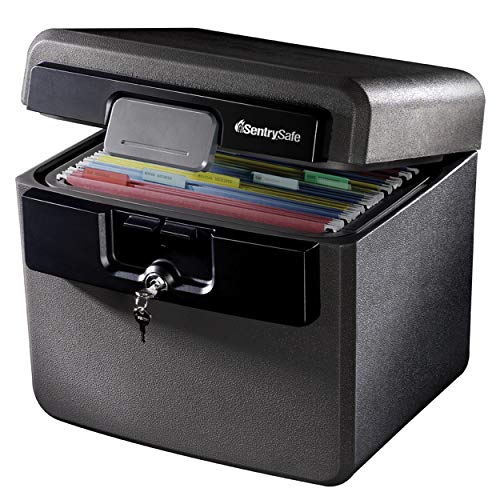
SentrySafe Black Fireproof and Waterproof Safe, File Folder and Document Box with Key Lock, Ex. 14.3 x 15.5 x 13.5 inches, HD4100
FIREPROOF: Safe is UL Classified to endure 1/2 hour at 1550°F and keep interior temperatures safe for irreplaceable…
As an affiliate, we earn on qualifying purchases.
As an affiliate, we earn on qualifying purchases.
Frequently Asked Questions
How Do I Identify the Most Critical Files to Back up First?
You should prioritize backing up legal documentation first, like court papers or custody agreements, since they’re crucial for your case. Next, save emotional support files, such as therapy notes or messages from loved ones, which can provide comfort and evidence if needed. Focus on these important files first to guarantee you have essential legal and emotional resources secured before tackling less urgent data.
What Digital Platforms Should I Prioritize for Backup?
Imagine opening your laptop to find a message from a friend, reminding you of shared memories. Prioritize backing up your social media accounts and cloud storage services first, as they contain invaluable photos, messages, and documents. Use reliable cloud storage platforms to guarantee your data stays safe and accessible. Social media archives and cloud backups often hold your most cherished moments—secure them first to preserve your digital history amidst changing circumstances.
How Can I Ensure My Backups Are Secure From Retaliation?
To keep your backups secure from retaliation, you should use encryption security for all your data. Encrypt files before uploading them to cloud storage, ensuring only you hold the decryption key. Choose reputable cloud providers with strong security protocols. Regularly update passwords and enable two-factor authentication. By encrypting your data and selecting secure cloud services, you reduce the risk of your backups being accessed or tampered with by malicious parties.
What Steps Should I Take if My Device Is Compromised?
If your device is compromised, act quickly by disconnecting it from the internet to prevent further access. Then, use data encryption to secure your important files before transferring them. Upload backups to trusted cloud storage services with strong security features to keep your data safe from retaliation. Consider changing passwords and enabling two-factor authentication. These steps help protect your information and minimize the risk of ongoing threats.
How Often Should I Update My Backup Copies During the Transition?
You should update your backup copies regularly during the changeover, ideally using backup scheduling to automate this process. Incorporate offline storage to safeguard your data from online threats or cyberattacks. By updating frequently—perhaps daily or weekly—you guarantee your backups stay current and reliable, reducing potential data loss. Consistent backups give you peace of mind, knowing your information is protected as you navigate the high-conflict situation and shift smoothly.

Apricorn 2TB Aegis Padlock USB 3.0 256-Bit AES XTS Hardware Encrypted Portable External Hard Drive (A25-3PL256-2000)
Hardware encrypted drive
As an affiliate, we earn on qualifying purchases.
As an affiliate, we earn on qualifying purchases.
Conclusion
Leaving a high-conflict situation can be overwhelming, but backing up crucial documents first guarantees you protect your future. Prioritize legal papers, financial records, and personal identification to keep your essentials safe. Did you know that nearly 60% of people who don’t secure their important documents before leaving face prolonged legal or financial challenges? Taking this small step can make a big difference in safeguarding your well-being and peace of mind during a difficult changeover.
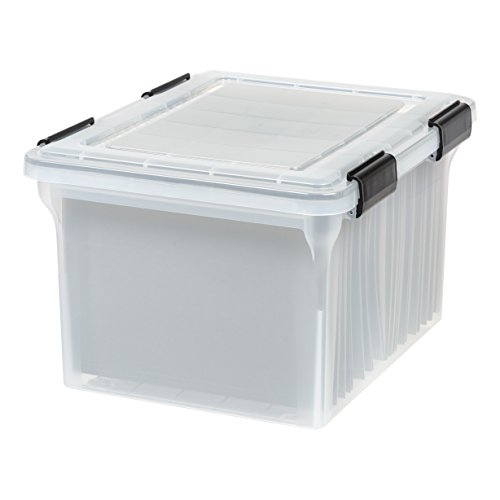
IRIS USA File Box WeatherPro Organizer Plastic for Letter/Legal, Water Resistant Document, Durable Lid, Seal w/Secure Latching Buckles, Stackable, Nestable, Clear 32 Qt. 1 Pack
WEATHERPRO: This Letter & Legal Size Plastic Storage Water Resistant Document Box has high quality heavy duty seals…
As an affiliate, we earn on qualifying purchases.
As an affiliate, we earn on qualifying purchases.
![Norton 360 Deluxe, Antivirus software for 5 Devices with Auto-Renewal – Includes Advanced AI Scam Protection, VPN, Dark Web Monitoring & PC Cloud Backup [Download]](https://m.media-amazon.com/images/I/51Ovcl9mAAL._SL500_.jpg)
Norton 360 Deluxe, Antivirus software for 5 Devices with Auto-Renewal – Includes Advanced AI Scam Protection, VPN, Dark Web Monitoring & PC Cloud Backup [Download]
ONGOING PROTECTION Download instantly & install protection for 5 PCs, Macs, iOS or Android devices in minutes!
As an affiliate, we earn on qualifying purchases.
As an affiliate, we earn on qualifying purchases.